Skip to content
Magento to Shopify Migration: The Complete Guide for 2026
-
2613 words · 13 min read

Are you finding that managing your Magento store has become a constant battle against complexity, costly updates, and the endless search for reliable developers? If the high maintenance fees and technical headaches are diverting your focus from what truly matters-growing your sales-then you are not alone. For many UK retailers, the platform that once promised power has become a significant barrier to growth.
This is precisely why a successful magento to shopify migration is one of the most strategic decisions you can make for your business in 2025. It’s a move towards a simpler, more secure, and cost-effective future. But a project of this scale can feel daunting. As Shopify Experts, we’re here to demystify the process and provide a clear, actionable roadmap. In this complete guide, we will walk you through every step, from initial planning and data transfer to post-launch success, ensuring your transition is not just smooth, but a catalyst for future growth.
Why Migrate from Magento to Shopify? A Strategic Comparison
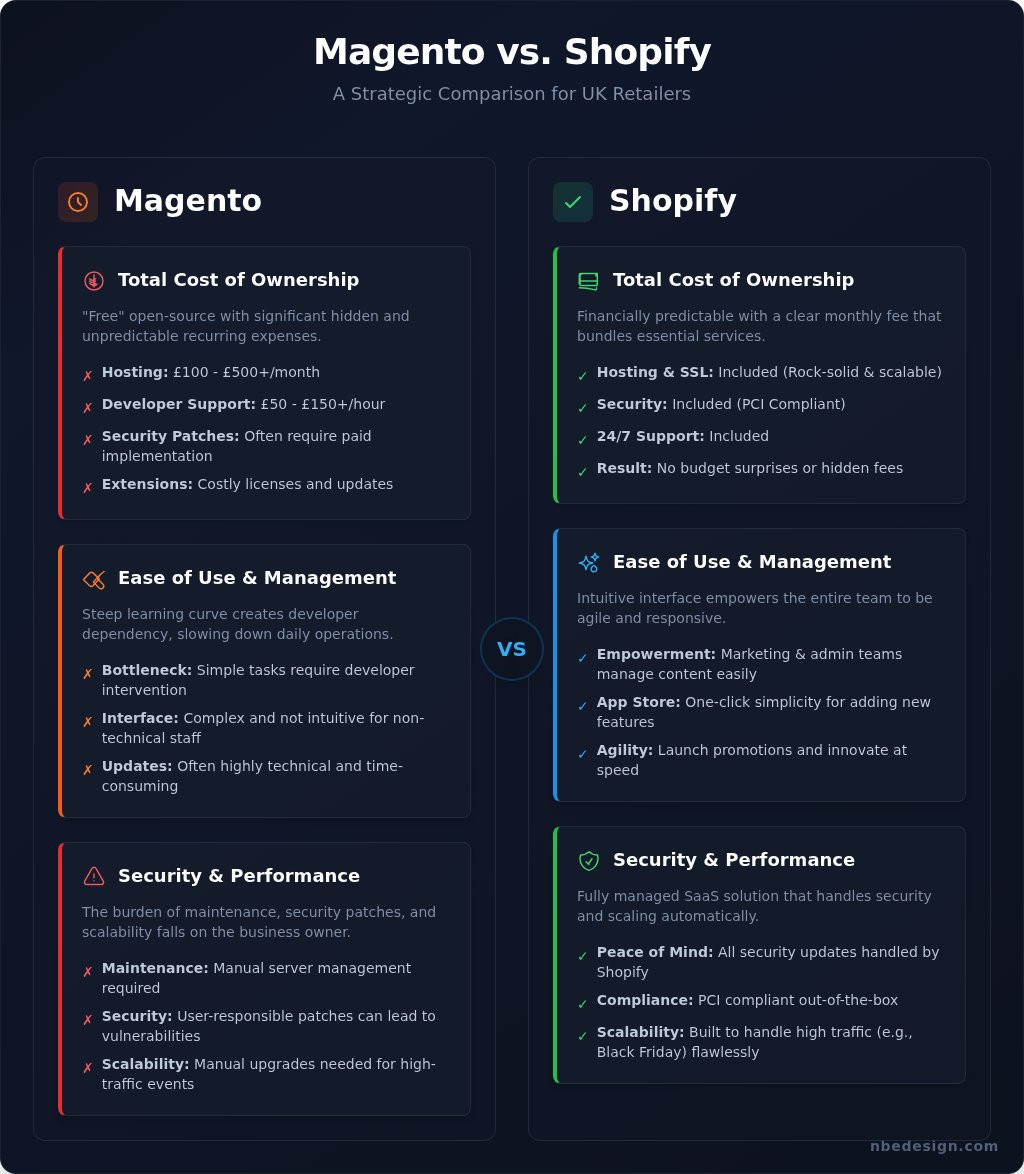
Considering a move from Magento? You're not just changing platforms; you're making a strategic decision to shift from a powerful but developer-dependent system to a user-friendly growth engine. For many UK businesses, the technical overhead of managing a Magento store begins to outweigh its flexibility. A successful magento to shopify migration is about reclaiming time and resources to focus on what truly matters: your customers, products, and growth. This transition empowers your entire team to be more agile in the fast-paced world of modern e-commerce.
To help you understand the practical steps involved, this video offers a clear overview of the migration process:
Total Cost of Ownership (TCO): Beyond the Monthly Fee
While Magento Open Source is technically "free," its true cost is often hidden. When you calculate the total cost of ownership, you must account for recurring expenses that quickly add up. In contrast, Shopify provides financial predictability, bundling essential services into one clear monthly fee.
- Magento's Hidden Costs: Expect to pay for dedicated hosting (£100-£500+/month), essential developer support (£50-£150+/hour), paid security patches, and costly extension licences.
- Shopify's Predictable Plan: Your monthly fee includes rock-solid hosting, SSL certificates, security, and access to 24/7 support, eliminating budget surprises.
Ease of Use and Daily Management
One of the most compelling reasons for a magento to shopify migration is the dramatic improvement in day-to-day usability. Magento's steep learning curve often creates a bottleneck, requiring developer intervention for simple tasks. Shopify’s intuitive interface empowers your marketing and admin teams to manage products, launch promotions, and update content themselves. This agility, combined with the one-click simplicity of the Shopify App Store, allows you to adapt and innovate at speed.
Security, Performance, and Scalability
With Shopify, the burden of server maintenance and security is lifted from your shoulders. As a fully managed, cloud-hosted SaaS solution, Shopify handles all security updates and ensures your store is PCI compliant out of the box. This means no more late-night panics over security patches. Furthermore, Shopify is built to scale. You can face high-traffic events like Black Friday with confidence, knowing your site will perform flawlessly without any need for manual server upgrades.
The Pre-Migration Blueprint: Planning for a Seamless Switch
As seasoned Shopify Experts, we’ve learned that a successful migration is 90% meticulous planning and only 10% execution. Rushing this critical first step is the single biggest mistake retailers make. This pre-migration phase is your opportunity to streamline your business, clean up your data, and create a rock-solid foundation for future growth on Shopify. Think of it not as a hurdle, but as a strategic reset for your entire eCommerce operation.
By mapping out every detail before a single piece of data is moved, you ensure the transition is smooth, predictable, and protects your hard-earned business assets.
Conducting a Full Data Audit
Your Magento store likely holds years of data. Is all of it necessary? A migration is the perfect time for a digital "spring clean." Before you move anything, you must audit your products, customers, and order history. Decide what is critical to your daily operations and what can be archived. This is also the time to identify any custom data fields in Magento and plan how they will be structured using Shopify's powerful metafields, ensuring no crucial information is lost in transit.
Feature and Functionality Mapping
Magento's flexibility often comes from a complex web of extensions and custom code. To ensure a seamless user experience post-migration, you need to map these features to their Shopify equivalents. We recommend you:
- List every Magento extension and custom feature currently in use, from payment gateways to loyalty programmes.
- Identify equivalent apps in the Shopify App Store that deliver the same or improved functionality.
- Plan for any custom development. If a unique feature is essential to your business, it will need to be scoped and rebuilt by a Shopify developer.
Protecting Your SEO Equity
Perhaps the most critical part of planning your magento to shopify migration is protecting your search engine rankings. Years of SEO work can be undone overnight without a proper strategy. The first step is to crawl your entire Magento site to create a complete map of every existing URL. This map is the foundation for your 301 redirect strategy, which tells search engines where to find your old pages on the new Shopify domain. Finally, you must benchmark your key performance indicators. This process of tracking rankings and organic traffic is a core component of any robust cross-border ecommerce digital strategy, allowing you to measure success and prove the ROI of your move to Shopify.
The Core Migration Process: What Data Moves and How
Once you've completed your pre-migration audit, the next stage is the technical transfer of your store's data. This is often the most daunting part of a magento to shopify migration, but understanding the components involved provides clarity and confidence. The goal is to move your core business assets accurately, ensuring a seamless transition for both your team and your customers.
Key Data for Migration
A successful migration focuses on transferring the essential data that powers your business. While not everything can be moved with a simple copy-and-paste, the core assets are fully transferable. Here’s what you can expect to migrate:
- Products: This includes all vital information such as SKUs, titles, descriptions, images, pricing, inventory levels, and product categories (which become 'collections' in Shopify).
- Customers: Your customer database, including names, email addresses, and their associated shipping and billing addresses, can be moved over.
- Order History: Preserving historical order data is crucial for customer service and reporting. This includes order numbers, purchased products, customer details, totals, and order status.
- Content Pages: Key informational pages like your 'About Us', 'Contact', and policy pages can be transferred to maintain your brand's voice and essential information.
Migration Methods: Apps vs. Manual vs. Agency
How you move your data depends on your store's complexity, your budget, and your technical expertise. For smaller stores with simple product catalogues, a DIY app like Matrixify can be a cost-effective solution, though it requires careful configuration. A manual CSV export/import is the most high-risk approach, often leading to formatting errors and incomplete data. For most established businesses, an agency-led migration is the safest, most efficient option, providing a rock-solid foundation for your new Shopify store.
Navigating Common Migration Hurdles
Even with the best tools, a magento to shopify migration presents unique challenges. For security reasons, customer passwords cannot be migrated; customers will need to be invited to recreate their accounts on the new site. Furthermore, Magento’s complex product configurations must be carefully mapped to Shopify’s variant system to function correctly. Ensuring that historical orders are accurately linked to the right customer and product records is another critical step that requires precision. Navigating these complexities is where an expert's experience becomes invaluable. Let our Shopify Experts handle the complexity for you.
Post-Migration Launchpad: Your Go-Live Checklist
You’ve successfully navigated the complexities of moving your data, but the work isn’t over just yet. The final phase of your magento to shopify migration is all about ensuring a flawless transition that protects your revenue, preserves your SEO rankings, and provides a seamless experience for your customers. A methodical approach here prevents post-launch headaches and sets the stage for immediate growth.
Think of this as your final pre-flight check. By systematically testing, launching, and monitoring your new Shopify store, you can switch platforms with confidence.
Pre-Launch Quality Assurance (QA)
Before your new site goes live, a comprehensive QA process is non-negotiable. This is where you catch any potential issues before your customers do. As Shopify Experts, we run through a meticulous checklist to guarantee a rock-solid launch. Your own testing should include:
- End-to-End Customer Journey: Place several test orders. Browse products, add items to the cart, apply a discount code, and complete the checkout process using various payment methods (e.g., Stripe, PayPal, Klarna). Ensure order confirmation emails are sent and formatted correctly.
- Data Verification: Spot-check your products. Are all prices in GBP (£) correct? Do images load properly? Are product descriptions, variants, and inventory levels accurate?
- 301 Redirects: Use a tool like Screaming Frog or a simple redirect checker to confirm that your most important URLs from Magento are redirecting correctly to their new Shopify counterparts. This is critical for retaining your search engine authority.
- App & Integration Functionality: Test all third-party apps and integrations. Does your email marketing platform sync new subscribers? Are shipping rates from Royal Mail or DPD calculating correctly?
The Go-Live Sequence
To minimise downtime and ensure no data is lost, follow a clear, sequential launch process. This is typically done during a period of low traffic, such as overnight or early in the morning. The sequence is straightforward:
- Enable Magento Maintenance Mode: Prevent new orders from being placed on your old site.
- Perform a Final Data Sync: Run one last delta migration to transfer any customers or orders that came in during the final stages of development.
- Update Your DNS Records: Point your domain's A record and CNAME record to Shopify's servers. This is the technical step that makes your Shopify store live on your URL. Note that DNS changes can take a few hours to propagate fully.
- Remove Shopify's Password Page: Once you've confirmed the DNS has updated and your site is loading correctly, you can remove the "coming soon" password page from your Shopify admin. Your new store is now open for business!
Post-Launch Monitoring and Growth
Your new Shopify store is live-congratulations! The initial 48-72 hours are crucial for monitoring performance and re-engaging your audience. Keep a close eye on Google Analytics for any unusual traffic drops and monitor Google Search Console for crawl errors. Run a customer reactivation campaign, inviting your loyal customers to activate their accounts on the new site. Finally, ensure your team is fully trained on the Shopify admin to streamline their daily workflows for order fulfilment and customer service. This proactive approach guarantees your magento to shopify migration becomes a launchpad for future success.
Planning your migration and need expert guidance? As official Shopify Partners based in the UK, we can ensure a seamless and efficient transition. Get in touch with our team today.
Your Next Chapter: Making the Move to Shopify with Confidence
Moving from Magento to Shopify is a significant business decision, but as this guide has shown, it's a strategic investment in growth, efficiency, and future-proofing your brand. A successful transition is built on a foundation of meticulous planning, a deep understanding of the data being moved, and a robust post-launch strategy. A well-executed magento to shopify migration doesn't just change your platform; it unlocks new potential for customer engagement and streamlined operations.
While the path is clear, navigating it alone can be complex. As certified Shopify Experts & Partners, our UK-based team specialises in complex e-commerce migrations. We have a proven track record of helping UK retailers make the switch seamlessly, ensuring data integrity and protecting valuable SEO rankings. Let us handle the technical details so you can focus on growth. Planning a migration? Talk to a UK-based Shopify Expert today.
Frequently Asked Questions About Magento to Shopify Migration
How much does a Magento to Shopify migration cost?
The investment for migrating from Magento to Shopify depends entirely on your store's complexity. A basic migration for a small catalogue could start from £2,000 to £5,000. For larger businesses with extensive product data, customer histories, and custom functionalities, the cost can range from £10,000 to £25,000 or more. As official Shopify Experts, we provide a detailed, transparent quote based on a thorough audit of your existing Magento setup to ensure a future-proof solution for your growth.
How long does it take to migrate from Magento to Shopify?
A typical magento to shopify migration timeline ranges from 4 to 12 weeks. The exact duration depends on the volume of data (products, customers, orders) and the complexity of the design and custom features that need to be rebuilt. Our process is methodical, involving stages for planning, data migration, theme development, and rigorous testing. We work efficiently to ensure a streamlined transition, getting you onto a more scalable platform without unnecessary delays.
Will I lose my SEO rankings after migrating to Shopify?
Protecting your hard-earned SEO rankings is a critical part of the migration process. While there is a risk of temporary fluctuations, a meticulously planned migration will preserve and often improve your search visibility. We ensure this by implementing a comprehensive 301 redirect strategy, mapping all your old Magento URLs to their new Shopify counterparts. This tells search engines exactly where your pages have moved, ensuring a seamless transfer of authority and maintaining your rankings.
Can I migrate my customer passwords from Magento to Shopify?
For security reasons, customer passwords cannot be migrated directly. Passwords are encrypted differently on each platform, and this measure is vital to protect your customers' sensitive data. The standard and most secure solution is to migrate all customer accounts and then send a bulk invitation prompting them to activate their new account by creating a new password. This process is straightforward for users and ensures the highest level of security for your clientele.
Is it possible to keep my Magento theme on Shopify?
Magento and Shopify are built on different technologies, so your existing theme cannot be directly transferred. However, this presents a fantastic opportunity to refresh your brand and build a new, conversion-focused design on Shopify's powerful platform. We can develop a custom theme that mirrors the look of your old site while significantly improving user experience, mobile responsiveness, and site speed, ultimately helping you to scale and grow your sales online.
What happens to my Magento extensions and custom features?
Magento extensions are not compatible with Shopify. During our discovery phase, we conduct a full audit of your current extensions and custom features to understand their purpose. We then find the best-in-class equivalents in the extensive Shopify App Store or, if needed, develop custom functionality to replicate and improve upon your required features. This ensures your store operates efficiently with a streamlined, rock-solid tech stack built for the future.
Will there be any downtime for my store during the migration?
Our magento to shopify migration process is designed to achieve near-zero downtime. We build and test your new Shopify store on a private development environment, completely separate from your live Magento site, which remains fully operational. The only downtime is a brief window of just a few minutes when we point your domain to the new Shopify store. This switch is scheduled at a pre-agreed, low-traffic time to ensure a seamless transition for your customers.

- Posted in:
- eCommerce Guide
- eCommerce Migration
- Magento
- Magento to Shopify
- magento to shopify migration
- Replatforming
- Shopify
- Shopify Experts