Skip to content
Common Shopify Migration Mistakes to Avoid for a Seamless Replatform in 2026
-
3222 words · 16 min read

Moving your store to Shopify should be an exciting evolution for your brand, yet many retailers treat it as a simple copy-and-paste task that risks years of hard-earned organic growth. Recognising the common Shopify migration mistakes to avoid is the difference between a successful launch and a frantic recovery mission. It's completely natural to feel anxious about the prospect of losing search engine rankings or corrupting customer data during such a significant transition. You've built your business with care, and the last thing you want is a technical oversight to impact your bottom line.
We're here to guide you through the process, ensuring you protect your visibility and maintain a steady flow of sales while you upgrade your digital storefront. This guide explores the critical pitfalls in data handling, URL structures, and the mandatory transition from Shopify Scripts to Shopify Functions. You'll gain a clear roadmap for a managed, low-stress replatform that sets your business up for long-term stability and growth, ensuring your store is perfectly prepared for the 2026 retail landscape.
Key Takeaways
- Understand why viewing a replatform as a strategic business evolution, rather than just a technical task, is essential for long-term success.
- Learn how to safeguard your search engine rankings by identifying the common shopify migration mistakes to avoid, such as neglected 301 redirects.
- Discover the importance of auditing and cleaning your data before the transfer to prevent product silos and broken customer histories.
- Identify why a rigorous mobile-first testing phase and a structured communication plan are vital for maintaining buyer trust post-launch.
- Recognise the value of partnering with a certified Shopify Expert to manage complex UK retail requirements like VAT, shipping, and local integrations.
Why Shopify Migrations Fail: The High Cost of Poor Planning
Replatforming is often viewed through a narrow technical lens, as if it were merely a task of moving files from one server to another. In reality, a Shopify migration is a holistic business transition that affects every department, from marketing and customer service to warehouse management. Treating it as a simple IT project is one of the most common shopify migration mistakes to avoid if you want to maintain your market position in 2026. Poorly planned moves frequently lead to an immediate SEO collapse, broken customer journeys, and the creation of data silos that can take months to rectify.
The Hidden Complexity of Replatforming
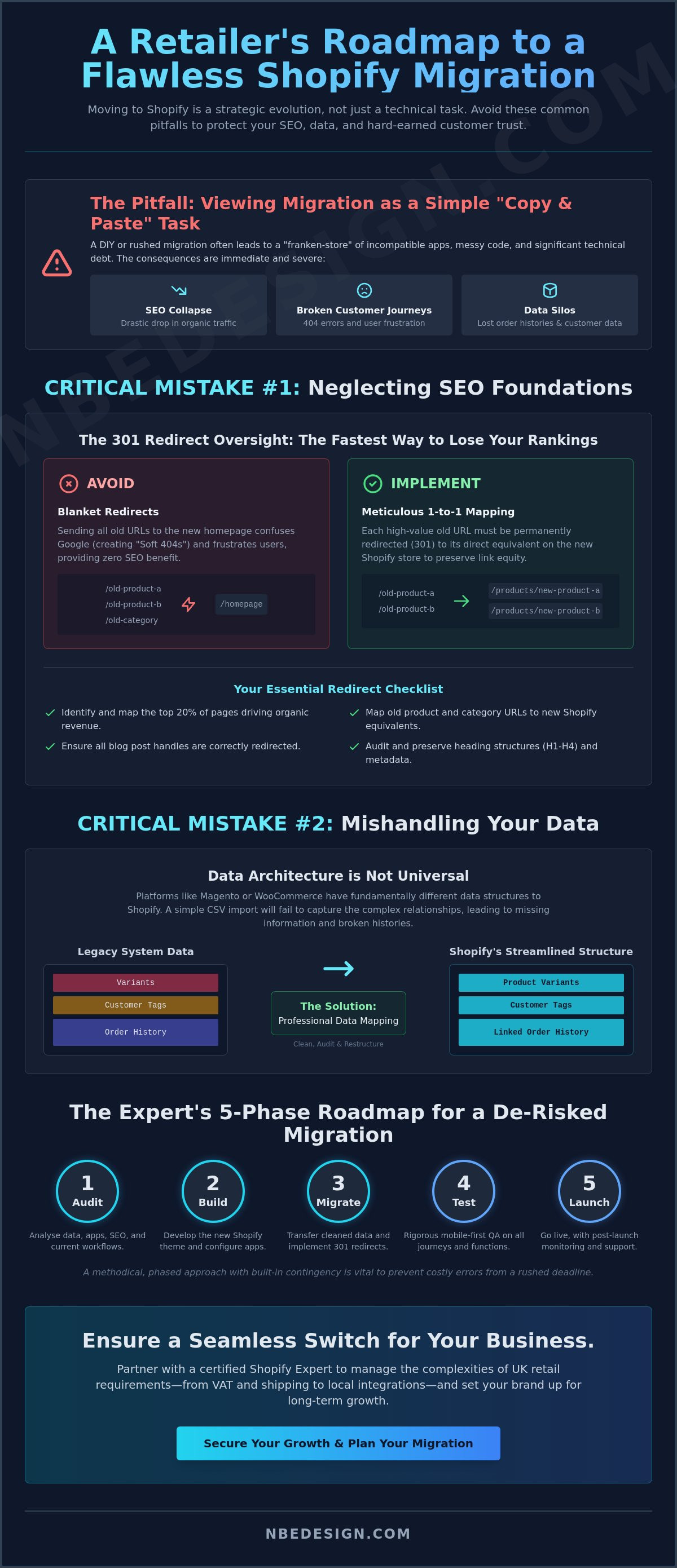
Moving from platforms like Magento or WooCommerce involves far more than a basic export and import of CSV files. These legacy systems have fundamentally different data architectures that don't always align with Shopify's streamlined structure. A professional data migration process involves mapping complex relationships between product variants, customer tags, and historical order data to ensure nothing is lost in translation. Failing to account for these architectural gaps can lead to broken links and missing product information. A successful migration preserves your existing search engine authority while significantly enhancing the end-user experience.
Setting Realistic Timelines and Budgets
One of the costliest errors a retailer can make is rushing a launch to meet an arbitrary deadline. This pressure often leads to skipped testing phases and overlooked redirects. A professional migration follows a methodical sequence: Audit, Build, Migrate, Test, and Launch. Each phase serves a specific purpose in de-risking the transition. Shopify experts in the UK typically build contingency periods into their schedules to account for the unexpected hurdles that naturally arise during complex system integrations. By allowing for a thorough QA process, you ensure that your new store performs flawlessly from the moment it goes live.
Critical SEO Mistakes: Protecting Your Search Rankings
Are you prepared for the possibility of your organic traffic dropping significantly overnight? SEO is the most fragile component of a replatforming project. If you don't handle it correctly, you're essentially starting your search presence from zero. Identifying common shopify migration mistakes to avoid is vital before you flip the switch on your new store. Years of hard-won authority can vanish in hours if your transition strategy doesn't prioritise search engine visibility.
The 301 Redirect Oversight
The single biggest mistake in any migration is neglecting 301 redirects. When you move to Shopify, your URL structure will change by default. Old links from search results, bookmarks, or social media will lead to 404 "Page Not Found" errors. This causes "Google confusion," where crawl bots can no longer find your high-value pages, leading to a rapid loss of rankings. To prevent this, you need a meticulous mapping document. Start with a checklist for your high-traffic URLs:
- Identify the top 20% of pages that drive the majority of your organic revenue.
- Map old product and collection URLs to their new Shopify equivalents.
- Ensure blog post handles are correctly redirected to maintain their information authority.
- Verify that your old "About" and "Contact" pages are linked to the new versions.
Never use "blanket" redirects that send all old traffic to your new homepage. Google often treats these as "Soft 404s." This provides zero SEO benefit and frustrates customers who were looking for a specific product. Each high-value page deserves a direct, relevant destination.
Ignoring Content Hierarchy and Metadata
Shopify organises content differently than many legacy platforms. It uses "Collections" rather than "Categories," which alters the breadcrumb and URL path. You must audit your H1 through H4 heading structures before the final switch to ensure consistency. If your old site used specific keywords in its headings, those should be preserved to maintain your topical relevance. Metadata preservation is equally important. Page titles and meta descriptions must be carried over to the new Shopify pages to keep your click-through rates stable in search results.
Don't forget about image search. Preserving the Alt text for your product images ensures you don't lose traffic from buyers browsing Google Images. Additionally, site speed and Core Web Vitals should be optimised during the build phase. A slow-loading theme can negate all your other SEO efforts by providing a poor user experience. If you're feeling overwhelmed by the technical requirements of an SEO-safe switch, it's a good idea to speak with a specialist who can manage the mapping for you. We can help ensure your transition is a step forward, not a slide backwards.
Data and Integration Pitfalls: More Than Just Copy-Paste
Historical order data is frequently the most complex element to transfer, yet it's vital for maintaining customer loyalty. Buyers expect to see their previous purchases and account details when they log in to the new platform. Moving this data requires careful handling of encrypted passwords and transaction IDs to ensure a seamless transition. Beyond the core data, you must also be wary of "app fatigue." It's tempting to install every trending tool in the Shopify App Store, but this often leads to slowed site speeds and code conflicts. Choose your integrations with precision, focusing on quality over quantity.
Migrating "Dirty" Product and Customer Data
Before you begin the transfer, prune your lists. Inactive customers who haven't engaged in years or products that have been out of stock for six months only add unnecessary weight to your migration. Standardising your product tags and variants is essential for Shopify's search filters to work correctly. If your old system used inconsistent naming conventions, your customers won't be able to find what they're looking for on the new site. During the merge, pay close attention to duplicate customer profiles. Consolidating these ensures your marketing automation and loyalty programmes target the right people with the right data.
Shopify POS and Inventory Synchronisation
For retailers with a physical presence, a disconnected inventory is a significant operational risk. If your online store doesn't talk to your brick-and-mortar tills, you'll inevitably sell stock that isn't there. This is a common oversight that leads to cancelled orders and frustrated customers. Exploring professional Shopify POS solutions allows you to unify your sales channels from day one. During the final data "cutover," ensure your inventory counts are frozen and audited. This precision ensures that when you go live, your stock levels are 100% accurate across every location, providing a truly omnichannel experience for your UK customers.
The Post-Launch Blind Spot: Customer Experience and Testing
Many retailers breathe a sigh of relief the moment their DNS settings point to Shopify and the new site goes live. This is a mistake. The first 48 hours post-launch are the most critical for your brand's reputation. While the technical move might be finished, the psychological transition for your customers is just beginning. Overlooking the human element of a replatform is one of the most common shopify migration mistakes to avoid if you want to protect your conversion rates from an immediate dip.
In the rush to launch, it's easy to forget that your customers are creatures of habit. If they find a different layout, missing account history, or a checkout process that feels unfamiliar, they may abandon their carts entirely. You must monitor the site for "Ghost 404s" in the first two days. These are broken links that only appear once real users start navigating the site in ways your staging environment didn't predict. Constant surveillance of your real-time analytics allows you to catch these errors before they impact your bottom line.
Customer Communication and Account Activation
Security protocols mean that Shopify cannot "import" passwords from your old platform. This means every existing customer must re-activate their account. If you don't communicate this clearly, your support team will be overwhelmed with "can't log in" tickets. Instead of a cold, automated system notification, send a branded "Our New Home" email. Explain the benefits of the new site, such as faster checkout or better mobile browsing, and provide a clear, one-click button for account activation. Transparency builds trust and turns a potential technical hurdle into an engaging marketing moment.
Mobile Optimisation and QA Testing
With roughly 80% of e-commerce traffic now originating from mobile devices, your store must be flawless on small screens. A site that looks beautiful on a 27-inch iMac but breaks on an iPhone is a failed migration. You must conduct a rigorous Quality Assurance (QA) phase that prioritises the mobile experience. If you're looking for inspiration on how a seamless transition looks, you can view the NB eCommerce & Design portfolio for examples of high-performance mobile design. Key elements to test include:
- Search functionality: Does the mobile search bar suggest relevant products instantly?
- Filter speed: Can users narrow down collections without the page lagging?
- Add to Cart responsiveness: Is the confirmation clear, or does the user wonder if the button worked?
- Checkout flow: Have you tested Apple Pay, Google Pay, and Klarna across multiple mobile browsers?
Don't leave your launch to chance. If you want to ensure your site is fully optimised for the 2026 retail environment, it's best to book a pre-launch audit with a specialist. We can help you identify those hidden friction points before they cost you a single sale.
Partnering with a Certified Shopify Expert for a Seamless Switch
Replatforming your business is a significant milestone that requires more than just technical proficiency; it demands a strategic partner who understands the nuances of the retail landscape. We've explored the technical hurdles of SEO preservation, data integrity, and mobile testing, but the most effective way to navigate these complexities is to work with professionals who live and breathe the Shopify ecosystem. By choosing a managed transition, you eliminate the common shopify migration mistakes to avoid and free yourself to focus on what you do best: growing your brand and serving your customers.
The anxiety associated with a digital move is often rooted in the fear of the unknown. A certified partner acts as a steady hand, providing a clear roadmap that replaces uncertainty with a methodical, proven process. At NB eCommerce & Design, we take pride in our role as a trusted guide for retailers in the North East and across the globe. Our approach isn't about simply moving data; it's about craftsmanship and ensuring your new store is a high-performance asset from the moment it launches.
Why Certification and Experience Matter
A "Shopify Expert" certification is far more than a digital badge. It represents a long history of proven results and a deep affiliation with the platform that has evolved alongside the technology itself. While automated software tools promise a quick fix, they often lack the nuance required for a truly seamless transition. Automated tools don't understand your unique business logic, your specific UK VAT requirements, or the complexities of your local shipping integrations.
A managed migration involves a human-led audit of every link, tag, and customer profile. This "Local Expert, Global Reach" positioning means we combine our deep roots in the Darlington and Newcastle regions with the technical capability to support international expansion. We understand the specific habits of UK shoppers, from their preference for Royal Mail and DPD integrations to their expectations around Klarna and clear tax breakdowns at checkout. This localised knowledge ensures your store feels "at home" the moment a customer arrives.
Your Next Steps to a Successful Shopify Store
The path to a successful replatform starts with a comprehensive pre-migration audit. This phase allows us to identify potential friction points in your current setup before they become expensive problems on your new site. To learn more about how we handle these high-stakes transitions, you can explore our dedicated Shopify Expert UK services, where we detail our methodical approach to bespoke store development and migration.
Don't let the fear of technical debt or lost rankings hold your business back from the growth it deserves. Whether you're moving from a legacy system or upgrading your current setup, we're here to ensure the transition is low-stress and highly rewarding. Get in touch with our Darlington and Newcastle experts today to discuss your project and discover how a managed migration can protect your legacy while building your future.
Secure Your Digital Future with a Managed Shopify Migration
Replatforming is a strategic business evolution that requires a balance of technical precision and retail foresight. By prioritising a meticulous 301 redirect strategy and ensuring your inventory remains synchronised through Shopify POS, you protect the foundation of your business. Understanding the common shopify migration mistakes to avoid, from neglecting metadata to ignoring the mobile checkout experience, allows you to transition with absolute confidence. A successful move isn't just about moving data; it's about enhancing the user journey for every customer who visits your store.
As a Certified Shopify Partner and Expert based in the North East UK, we specialise in guiding high-growth retailers through these complex transitions. Our managed migration services combine local expertise with a global reach, ensuring your store is perfectly positioned for the 2026 retail landscape. We handle the technical complexities so you can stay focused on your brand's growth. Book a consultation with our Shopify Migration Experts today to build a low-stress roadmap for your store. Your brand's next chapter starts with a seamless switch; let's make it your most successful one yet.
Frequently Asked Questions
Will migrating to Shopify hurt my Google rankings?
A well-managed migration shouldn't cause long-term damage to your Google rankings. While a brief period of fluctuation is normal as search engines re-index your new URL structure, following a strict 301 redirect strategy preserves your authority. Failing to map your high-traffic pages is one of the common shopify migration mistakes to avoid that leads to traffic loss. We focus on protecting your SEO health to ensure your visibility remains intact throughout the transition.
How long does a typical Shopify migration take to complete?
A typical Shopify migration usually takes between 4 and 12 weeks to complete. This timeline depends on the volume of product data, the complexity of your current integrations, and the level of custom design required. A rushed project often leads to overlooked technical details that can cause issues post-launch. We recommend allowing sufficient time for a thorough audit, build, and a rigorous testing phase to ensure your store launches without any operational friction.
Can I migrate my customer passwords from WooCommerce or Magento to Shopify?
No, you cannot migrate customer passwords due to Shopify's strict security and encryption protocols. When you move from WooCommerce or Magento, your customer records and order histories are transferred, but passwords are not. You'll need to invite your customers to re-activate their accounts on the new platform once the site is live. We suggest using this as a marketing opportunity to welcome them to your new store and highlight the improved shopping features.
What happens to my old website once I move to Shopify?
Your old website remains fully operational until the moment you point your domain's DNS settings to Shopify. Once the new site goes live, your old platform becomes inaccessible to the public. It's vital to keep a backup of your old site's database for several months post-launch. This ensures you have a reference point if you need to check historical records or verify old product descriptions that didn't move during the initial transition.
Do I need to hire a Shopify Expert for the migration, or can I do it myself?
While you can use automated tools for a basic DIY migration, hiring a certified Shopify Expert is recommended for complex or high-growth stores. Professionals manage the intricate mapping of SEO redirects and the cleaning of "dirty" data that automated software often misses. Investing in specialist help reduces the risk of downtime and ensures your store is optimised for the 2026 retail landscape from day one, protecting your long-term revenue.
How do I ensure my Shopify POS stays synced during the migration?
Ensuring your Shopify POS remains synced requires a unified inventory approach before you go live. You must audit your stock levels across all physical and digital locations to create a single source of truth within the Shopify admin. During the final data cutover, we recommend freezing inventory movements to prevent discrepancies. This precise synchronisation ensures that your brick-and-mortar sales and online orders are always reflected in real-time, preventing overselling across channels.
What is the most common technical mistake during a Shopify switch?
The most common technical mistake is neglecting the change in URL structure between platforms. Shopify uses a specific format for collections and products that differs significantly from Magento or WooCommerce. If you don't implement 1:1 301 redirects for every active page, you'll face a surge of 404 errors. This is a critical error among common shopify migration mistakes to avoid, as it directly impacts your user experience and can cause an immediate drop in search visibility.
How much does a professional Shopify migration cost in the UK?
The cost of a professional Shopify migration in the UK varies based on the size of your product catalogue and the complexity of your existing system integrations. Factors such as custom theme development and historical order migration also influence the final investment. We provide tailored quotes after a thorough audit of your current store and business requirements. This ensures you receive a managed service that meets your specific goals without the risk of hidden technical debt.

- Posted in:
- common shopify migration mistakes to avoid
- Data Migration
- eCommerce SEO
- Replatforming
- Shopify Expert
- Shopify Functions
- Shopify Migration
- UK eCommerce