Skip to content
Mastering Shopify POS Inventory Management: A Complete Guide
-
2880 words · 14 min read

Does this sound familiar? A customer celebrates their online purchase, only for you to realise the last one just walked out the door of your brick-and-mortar shop. This frustrating scenario, along with the tedious hours spent manually reconciling spreadsheets and the uncertainty of not having a clear view across multiple locations, can seriously hinder growth. For modern retailers in the UK, mastering Shopify POS inventory management is the critical step to transforming these operational headaches into a streamlined, efficient system.
In this complete guide, we'll show you exactly how to unify your online and in-store stock once and for all. You will learn how to leverage Shopify's powerful tools to eliminate overselling, automate stock updates across all your sales channels, and confidently handle everything from purchase orders to stock transfers and returns. It’s time to gain a single, accurate, real-time view of your inventory and get the rock-solid data you need to scale your business with confidence.
Why Unified Inventory Management is a Game-Changer for Retailers
For any modern UK retailer with both a physical and an online presence, the greatest challenge is often bridging the gap between the two. How do you ensure the stock levels on your website accurately reflect what's on your shop floor? This disconnect is where sales are lost and customers are let down. A unified system isn't just a convenience; it's the foundation for growth, and effective shopify pos inventory management is the tool that makes it possible.
By creating a single source of truth for your entire stock, you can eliminate the guesswork and manual effort that plagues so many businesses. This allows you to stop overselling, prevent 'out of stock' disappointments, and unlock powerful new sales opportunities like 'buy online, pick up in-store' that modern customers expect.
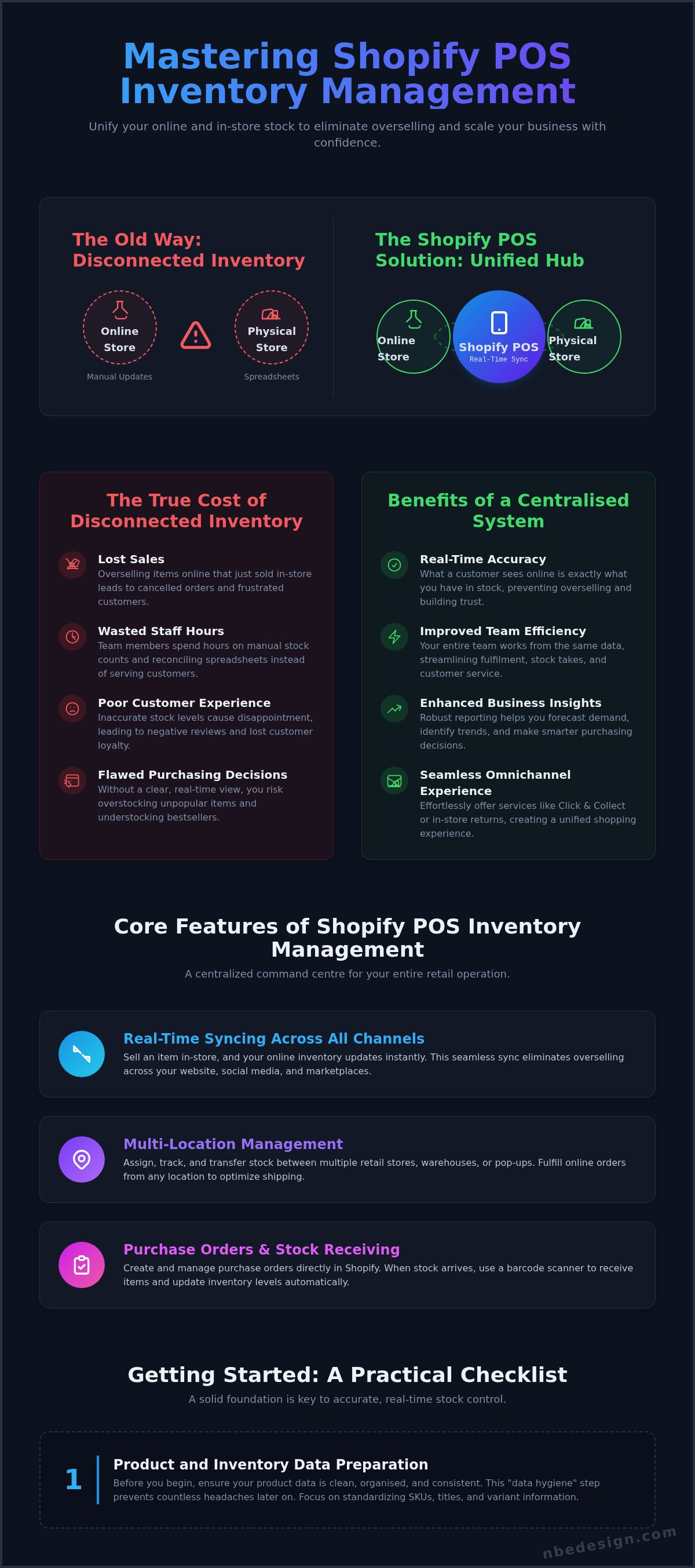
The True Cost of Disconnected Inventory
Running separate inventory systems for your online and brick-and-mortar stores creates a constant battle that costs more than just time. These hidden expenses can significantly impact your bottom line and reputation. The true costs include:
- Lost Sales: Displaying an item as "in stock" online when the last one just sold in-store leads directly to a cancelled order, a frustrated customer, and lost revenue.
- Wasted Staff Hours: Your team spends valuable time on manual stock counts, double-checking numbers, and reconciling spreadsheets instead of serving customers. These hours add up to significant wage costs.
- Poor Customer Experience: Inaccurate stock levels are a leading cause of negative reviews and lost loyalty. A customer who has a bad experience is unlikely to return.
- Flawed Purchasing Decisions: Without a clear, real-time view of what’s selling and where, you can't make smart decisions about reordering, leading to overstocking unpopular items and understocking bestsellers.
Benefits of a Centralised System like Shopify POS
Adopting a centralised system immediately transforms these challenges into strengths. At its core, a unified platform is a form of powerful inventory management software that acts as the central brain for your entire retail operation. With Shopify POS, every sale, return, or transfer-whether online or in-person-updates one master inventory list in real-time.
- Real-Time Accuracy: What a customer sees online is exactly what you have. This confidence prevents overselling and builds trust.
- Improved Team Efficiency: From the storefront to the stockroom, your entire team works from the same data, streamlining fulfilment, stock takes, and customer service.
- Enhanced Business Insights: With all sales data in one place, you gain access to robust reporting that helps you forecast demand, identify trends, and make smarter purchasing decisions.
- A Seamless Omnichannel Experience: Effortlessly offer services like Click & Collect or in-store returns for online orders, creating the professional, unified shopping experience that keeps customers coming back.
Core Features of Shopify POS Inventory Management
At the heart of Shopify’s power is a suite of robust, integrated tools designed to give you complete control over your stock. Moving beyond simple sales tracking, the platform offers a centralised command centre that simplifies complex retail operations. Effective shopify pos inventory management isn't just about knowing what you have; it's about making that information work for you across every part of your business, from your brick-and-mortar shop in the UK to your global eCommerce presence.
Real-Time Syncing Across All Sales Channels
The days of manual stock reconciliation are over. When you sell a product in-store using Shopify POS, your online inventory is updated instantly. This seamless, real-time sync works across all your sales channels-your website, social media shops, and any other marketplace integrations. This eliminates the risk of overselling an item that just sold out in your physical store. The system intelligently tracks every variant, so whether you sell a size Large blue t-shirt online or a size Small in-store, the specific stock count for that variant is adjusted everywhere, ensuring accuracy and building positive customer experiences.
Multi-Location Management
Do you operate multiple retail stores, a warehouse, or even temporary pop-up shops? Shopify makes managing stock across different locations straightforward. You can:
- Assign and track inventory levels for each specific location.
- Easily transfer stock between your stores to respond to local demand or replenish low-stock items.
- Fulfill online orders from any location that has available inventory, enabling efficient ship-from-store capabilities to reduce delivery times and costs.
This granular control provides a clear, unified view of your entire inventory, no matter how distributed your business is.
Purchase Orders and Stock Receiving
Shopify streamlines your entire supply chain, from ordering to receiving. You can create and manage purchase orders for your suppliers directly within the Shopify admin, tracking expected delivery dates and costs for better cash flow planning. When new stock arrives, the process is incredibly efficient. Using the Shopify POS app and a barcode scanner, you can quickly receive and check in the delivery. As you scan each item, your inventory levels are automatically updated across all locations and sales channels, ensuring your stock is on the shelf and ready to sell immediately.
Setting Up Your Inventory in Shopify POS: A Practical Checklist
Transitioning to a new system can feel daunting, but a methodical approach ensures a smooth and successful launch. The key to mastering shopify pos inventory management from the start lies in preparation. Following this practical checklist will help you build a rock-solid foundation for accurate, real-time stock control across all your sales channels.
Step 1: Product and Inventory Data Preparation
Before you begin, ensure your product data is clean, organised, and consistent. This "data hygiene" step prevents countless headaches later on. Focus on these core tasks:
- Assign SKUs and Barcodes: Every product and each of its variants needs a unique Stock Keeping Unit (SKU). If you use barcodes, ensure they are correctly assigned in your product data. This is non-negotiable for efficient scanning and tracking.
- Use the Bulk Editor: For existing stores, Shopify's bulk editor is an incredibly powerful tool. Use it to quickly update inventory quantities, prices, and other data across hundreds of products at once, saving you hours of manual work.
- Enable 'Track quantity': Systematically review your products and ensure the 'Track quantity' checkbox is ticked for every physical item you sell. This single action activates Shopify’s inventory tracking for that product.
Step 2: Configuring Locations in Shopify
Shopify POS excels at managing stock across multiple sites. In your Shopify admin, navigate to 'Settings' > 'Locations' to define precisely where your inventory is held. Add each physical retail store, warehouse, or even a temporary pop-up shop as a distinct location. It's crucial to assign your initial stock counts to each location with complete accuracy. This first count establishes your baseline and is fundamental to long-term success, a principle that aligns with established GAO best practices for inventory accuracy. Finally, set your location priorities to determine which location's inventory is used to fulfil online orders first.
Step 3: Essential Hardware for Efficiency
The right tools transform a good inventory system into a seamless, efficient operation. A reliable barcode scanner is essential for quick checkouts, receiving stock, and performing stock takes, drastically reducing manual errors. A dedicated label printer allows you to create professional, scannable barcode labels for products that arrive without them. Investing in a compatible hardware bundle ensures all your components work together flawlessly from day one. To see what works for businesses like yours, explore the best POS hardware setups for UK shops to get started.
Advanced Inventory Strategies & Day-to-Day Best Practices
Once your Shopify POS is set up, the real work of optimising your retail operations begins. Moving beyond the basics is crucial for growth, allowing you to maintain pinpoint accuracy, make smarter purchasing decisions, and handle daily retail challenges with confidence. Mastering these strategies will transform your shopify pos inventory management from a simple necessity into a powerful business asset.
Maintaining Accuracy with Stock Takes and Cycle Counts
Inaccurate stock levels lead to lost sales and frustrated customers. To prevent this, implement regular physical counts. A full stock take is a complete count of every item, usually done annually. In contrast, cycle counting is a more manageable, ongoing process where you count small sections of your inventory daily or weekly. Using the Shopify POS app on an iPad or iPhone with a compatible barcode scanner can dramatically speed up this process. When you find discrepancies, investigate and resolve them immediately to keep your data clean and reliable.
Demand Forecasting and Low-Stock Reports
Don't let your best-sellers run out. Shopify's native analytics and reports provide the sales data you need to predict future demand. By analysing your "Sales by product" reports, you can identify seasonal trends and consistent top-performers. Use this insight to inform your purchasing strategy. We strongly recommend setting up low-stock alerts within Shopify for your key products. This simple, automated notification ensures you have enough time to reorder before you disappoint a customer.
Managing Returns, Exchanges, and Damaged Stock
Retail isn't just about sales; it's also about efficiently handling what comes back. The Shopify POS system streamlines these common scenarios:
- Returns: When a customer returns an item, your staff can process the refund directly in the POS. They will be prompted to inspect the item and choose whether to return it to your active, sellable inventory or set it aside.
- Exchanges: The POS interface handles exchanges seamlessly. It processes the return of the original product and adds the new one to the cart in a single transaction, automatically calculating any price difference for the customer.
- Adjustments: For stock that is damaged, lost, or used for promotional purposes, you can make direct adjustments in your Shopify admin. This ensures your recorded inventory levels always match the physical stock you have on hand.
By building these best practices into your daily routine, you ensure your inventory data remains a rock-solid foundation for your business. If you need help optimising your workflows, the Shopify Experts at NB eCommerce & Design can help you craft the perfect setup.
Why Partner with a Shopify Expert for Your POS Setup?
While Shopify POS is renowned for its user-friendly interface, a do-it-yourself approach isn't always the most efficient path for an ambitious retail business. Understanding when to seek professional help can save you significant time, money, and future headaches. For retailers with complex operations, partnering with an expert is a strategic investment in getting your setup right from day one.
An expert ensures your shopify pos inventory management is configured correctly from the start, providing a rock-solid foundation for growth. It’s about moving beyond a basic setup to build a streamlined, future-proof retail ecosystem tailored to your specific needs.
Navigating Complex Setups
A seasoned Shopify Expert becomes indispensable when your business requirements go beyond the standard. They provide the strategic oversight needed for scenarios such as:
- Large-Scale Data Migration: Seamlessly moving tens of thousands of products, customer records, and order histories from a legacy system without data loss or corruption.
- Custom Integrations: Connecting Shopify POS with your existing accounting software, ERP systems, or third-party logistics (3PL) partners for a truly unified operation.
- Multi-Location Strategy: Developing a robust framework for managing inventory, staff, and reporting across multiple storefronts, warehouses, or franchise locations.
The Value of an Expert Partner
Working with a specialist offers more than just technical skill; it provides commercial insight and peace of mind. A certified Shopify Expert in the UK not only understands the platform inside and out but also appreciates the nuances of the local retail landscape.
An expert partner helps you avoid common pitfalls that can lead to inaccurate inventory data, overselling, and ultimately, lost sales. Furthermore, they provide tailored training for you and your staff, ensuring your team can leverage the full power of the system to maximise efficiency and deliver an exceptional customer experience. This hands-on guidance transforms a potentially daunting transition into a confident step forward for your business.
Ready to ensure a seamless and powerful POS setup? Get in touch with our team today.
Unlock Your Retail Potential with Unified Inventory
We've explored how a unified system is the cornerstone of modern retail success. Mastering shopify pos inventory management is no longer a complex challenge but a tangible advantage, allowing you to eliminate stock discrepancies, gain real-time insights, and create a seamless customer experience across all your sales channels. From setting up initial stock levels to implementing advanced best practices, the power to streamline your operations is at your fingertips.
While the tools are powerful, a flawless setup is key to unlocking their full potential and future-proofing your business. As certified Shopify Partners and Experts, we have a proven track record of helping UK retailers unify their online and brick-and-mortar stores. We understand the unique challenges you face and can ensure your transition is seamless, efficient, and tailored to your growth.
Ready to move forward with confidence? Speak with a UK-based Shopify POS Expert to streamline your inventory. Your journey to efficient, unified commerce starts now.
Frequently Asked Questions
What's the difference between Shopify POS Lite and Pro for inventory management?
Shopify POS Lite, included with all Shopify plans, offers foundational inventory tools perfect for new or single-location retailers. It automatically syncs stock levels between your online and physical stores, handles product variants, and assigns inventory to locations.
For businesses looking to scale, Shopify POS Pro (at an additional £69/month per location) provides advanced features. This includes detailed inventory reports, stock adjustments, purchase order management, and the ability to transfer stock between multiple locations, offering much more granular control.
Can Shopify POS handle inventory for bundled products or kits?
While Shopify's core system doesn't natively track the individual components of a bundled product, this is a common retail requirement that is easily solved. By integrating a dedicated bundling app from the Shopify App Store, you can create product kits for your customers.
When a bundle is sold via Shopify POS, the app will automatically deduct the correct quantity from each component product's inventory. This ensures your stock levels for individual items remain accurate and seamlessly synced across all channels.
How does Shopify POS manage returns and exchanges in terms of stock levels?
Shopify POS streamlines the returns process to maintain perfect inventory accuracy. When you process a return, you have the option to restock the item at that specific location. If the product is in a sellable condition, selecting this option immediately increases the stock count.
For exchanges, the system effectively treats it as two transactions: the original item is returned to stock (if applicable), and the new item is sold, decreasing its own inventory level. This ensures every stock movement is tracked correctly.
Can I use my existing barcode scanner and hardware with Shopify POS?
In many cases, you can continue using your existing hardware, such as barcode scanners, receipt printers, and cash drawers. Shopify POS is designed to be flexible and supports a wide range of third-party hardware. However, for a guaranteed seamless experience, it is crucial to check compatibility first.
We always recommend consulting Shopify's official hardware compatibility list or contacting a Shopify Expert. This ensures your devices will integrate perfectly and helps you avoid any operational issues during a busy sales day.
Is it possible to track raw materials or components with Shopify's inventory?
Shopify's native inventory system is designed to track finished, sellable products. For businesses that manufacture their own goods and need to track raw materials or components, a more specialised solution is required. This level of granular tracking is a common need for growing brands.
To achieve this, you can integrate a powerful manufacturing or inventory management app from the Shopify App Store. These apps extend the platform's capabilities, allowing you to streamline your shopify pos inventory management from raw components to finished goods.
How do I perform a stock take or physical inventory count using Shopify POS?
Performing a physical inventory count is a critical task for any retailer. With Shopify POS Pro, you can use the integrated Stocky app to conduct efficient stock takes using a barcode scanner. This significantly speeds up the process and reduces human error, making it a far less daunting task.
For those on other plans, you can use third-party scanner apps or export a product CSV file to guide your manual count, then update quantities in bulk. A regular stock take is a cornerstone of effective shopify pos inventory management.

- Posted in:
- eCommerce
- Inventory Management
- Multi-location Inventory
- Retail Management
- Shopify
- Shopify POS
- shopify pos inventory management
- Shopify Tips
- Stock Control