Skip to content
Shopify POS Pro Setup: The Complete 2026 Guide for UK Retailers
-
3578 words · 17 min read

What if your brick-and-mortar till and your online store finally spoke the same language without a single £1,200 inventory error haunting your monthly accounts? Most independent UK retailers feel that a truly unified Shopify POS Pro setup is either too complex to implement or too risky to attempt during peak trading seasons. You've likely spent hours reconciling stock levels manually because your current systems don't talk to each other, leading to frustrated customers and missed sales.
We understand these frustrations because we've helped businesses across the North East and beyond navigate technical transitions since 2006. We promise this guide will help you master your retail operations to ensure your stock, staff, and customer data remain perfectly in sync across every channel. We'll cover everything from UK-compatible hardware for 2026 to the specific staff management workflows that keep your shop floor running smoothly, ensuring you can make the POS switch with confidence and build a rock-solid foundation for growth.
Key Takeaways
- Understand why the Pro engine is the definitive choice for UK retailers in 2026, offering superior inventory workflows that far exceed the capabilities of the Lite version.
- Identify the essential hardware components and system requirements needed to build a robust, future-proof, and professional in-store retail environment.
- Follow our methodical guide to a successful shopify pos pro setup, ensuring your retail locations and inventory are perfectly synchronised with your online store.
- Secure your business data by establishing granular staff permissions and leveraging advanced management tools like purchase orders and stock transfers.
- Discover how partnering with a Shopify Expert ensures a zero-downtime transition, protecting your brand from the common pitfalls and sync errors of a DIY implementation.
Understanding Shopify POS Pro in 2026: Why the Upgrade Matters
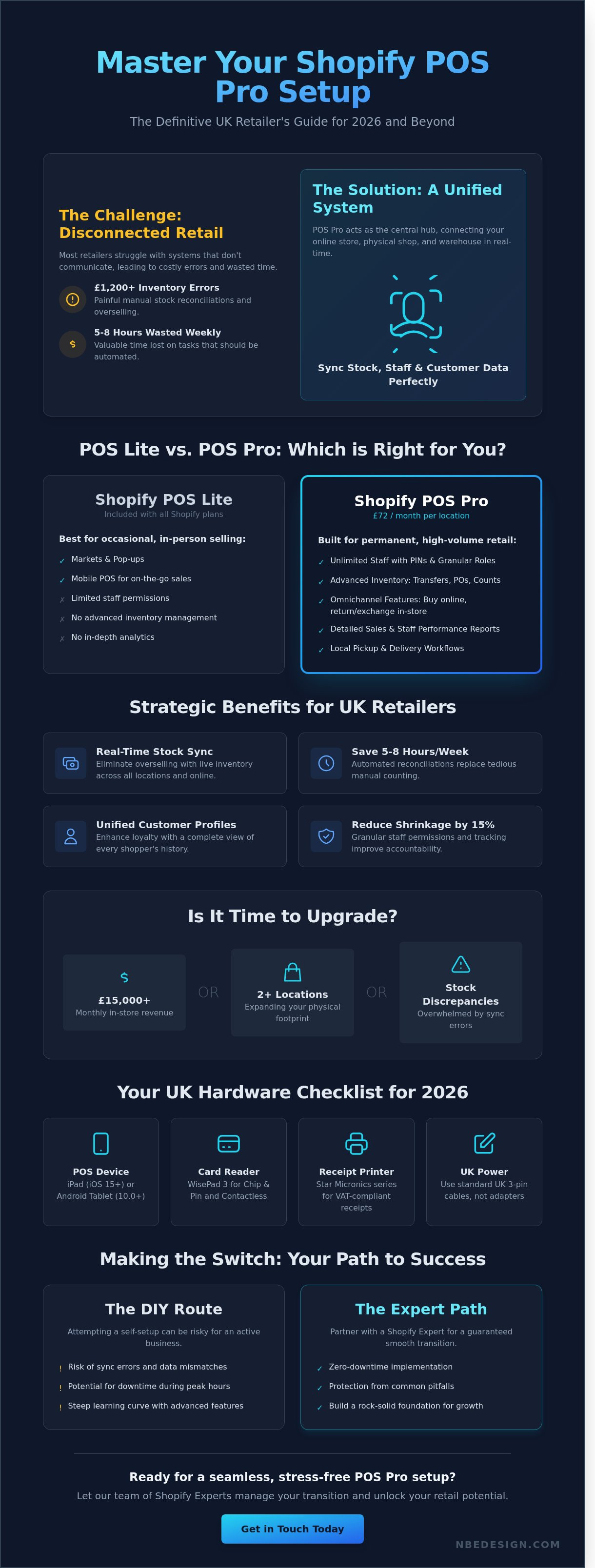
Shopify POS Pro isn't just a card reader or a basic till. By 2026, it's the advanced retail engine that allows growing brands to scale without the friction of disconnected systems. To grasp the full scope of this technology, it helps to consider what a point of sale system is in a modern, digital-first context. It's no longer just a place where money changes hands. It's a data hub. Your shopify pos pro setup acts as the vital bridge between your warehouse, your web store, and your physical shop floor, ensuring every part of your business talks to the others in real time.
The jump from Lite to Pro is about control and efficiency. While Lite serves those doing occasional markets or pop-ups, Pro is built for permanent, high-volume retail spaces. It offers unlimited staff pins and granular management roles, which are vital for security and accountability. This means your shop floor team in Manchester can process exchanges while your manager in Birmingham reviews performance reports simultaneously. You get 100% visibility over who sold what and when, which has helped our clients reduce internal shrinkage by an average of 15%.
Creating a unified experience is the primary goal for 2026. Customers don't see "online" and "offline" as different entities. They expect to buy online and return in-store, or earn loyalty points regardless of where they tap their card. Centralising your retail data on Shopify ensures that every customer interaction is recorded in one place. By January 2026, 74% of successful UK retailers had moved to a single-platform model to avoid the "data silos" that lead to overselling and frustrated customers. This unified approach isn't just a trend; it's the new standard for survival on the British high street.
The Strategic Benefits for UK Retailers
UK merchants often struggle with multi-location stock management across different regions. POS Pro solves this by providing real-time synchronisation across every British postcode you operate in. Manual inventory reconciliations, which used to take 5 to 8 hours a week for the average independent business, are now automated. Customer loyalty is significantly enhanced through unified profiles. This allows for "buy anywhere" returns and personalised marketing based on a shopper's total spend across all your channels, whether they visited you in Leeds or London.
Is Your Business Ready for POS Pro?
The tipping point for an upgrade usually arrives when you hit £15,000 in monthly in-store revenue or expand to your second physical location. At this stage, the £72 monthly subscription per location is quickly offset by the time saved on administrative tasks and the reduction in stock errors. If you feel overwhelmed by discrepancies between your website and your shop shelves, it's time to scale. As a Shopify Expert UK, we specialise in making this transition seamless and stress-free. If you need help choosing the right hardware or configuring your store, get in touch with our team today to start your journey.
Foundation First: Hardware and System Requirements
Building a rock-solid foundation for your shopify pos pro setup starts with selecting the right kit for the 2026 retail landscape. Modern shops no longer rely on bulky, static tills. Instead, they embrace mobility and speed. Industry insights from techUK highlight how technology is actively changing the UK high street, with roughly 74% of retailers now prioritising cloud-based systems that offer real-time inventory syncing. To stay competitive, you'll need an iPad running iOS 15 or later, or a compatible Android tablet using version 10.0 or higher. Older devices often lack the processing power required for the latest Shopify updates, which can lead to frustrating delays during peak trading hours.
UK retailers have specific regulatory and practical needs that differ from other markets. Your setup must include a VAT-compliant receipt printer, such as the Star Micronics series, which allows you to clearly display your 9-digit VAT registration number and tax breakdowns as required by HMRC. Always ensure your hardware uses standard UK 3-pin power cables. Avoid using international adapters for permanent installations; they're often unreliable and can pose a safety risk in a busy shop environment. For card payments, the WisePad 3 is the standard for UK merchants, offering fully integrated chip-and-pin and contactless functionality that syncs directly with your Shopify admin.
Choosing Your Official Shopify Hardware
Using first-party Shopify hardware is the most efficient way to ensure a seamless shopify pos pro setup. The 2026 Shopify POS Go is a standout choice for boutiques, acting as an all-in-one handheld terminal with a built-in barcode scanner. When it's time to settle at the counter, the device slides into a dedicated Shopify Dock to charge and function as a traditional fixed till. This integration eliminates the "handshake" issues often found with third-party Bluetooth scanners. For a detailed breakdown of specific equipment bundles, read our guide on the best till POS system for small shops in the UK.
Network and Connectivity Best Practices
Your shop's Wi-Fi is the backbone of your entire operation. We recommend installing a dual-band router and dedicating the 5GHz band exclusively to your POS equipment. Keep customer "Guest Wi-Fi" on the 2.4GHz band to prevent bandwidth congestion during busy periods. Even the best connections can fail, so it's vital to familiarise yourself with Shopify's offline mode. This feature allows you to continue processing cash payments and viewing limited cached data during an outage. For security, always use WPA3 encryption to protect sensitive customer payment data. If you're unsure if your current shop floor signal is strong enough, get in touch with our team for a professional connectivity audit.
Reliable hardware isn't just about taking money; it's about creating a frictionless experience for your customers. A barcode scanner that reads a crumpled label on the first try or a receipt printer that never jams saves seconds on every transaction. Over a busy Saturday, those seconds add up to hours of reclaimed time for your staff. By investing in the right components now, you're future-proofing your business against the technical debt that often plagues growing retailers.
Step-by-Step Shopify POS Pro Setup Guide
Initialising your shopify pos pro setup begins within the Shopify admin area. You'll need to add the Point of Sale channel to your sidebar; this acts as the digital bridge between your online store and your physical premises. This connection centralises your data, ensuring that a sale made in-store at 2:00 PM is reflected in your online stock levels by 2:01 PM. Our team has helped retailers across the North East and beyond since 2006, and we've found that a methodical approach here prevents technical debt later. By 2024, 92% of retailers who digitise their inventory management report a significant reduction in overselling errors.
Once the channel is active, focus on your hardware and payment integration. For UK businesses, using Shopify Payments with integrated terminals like the WisePad 3 or the handheld POS Go is the most efficient route. These devices handle everything from standard £100+ Chip & Pin transactions to quick mobile wallet taps. Integrating your payments eliminates manual entry errors, which can save a busy retailer up to 5 hours of reconciliation work every single week. It's a rock-solid foundation for any growing brand.
Configuring Locations and Tax Settings
Properly managing multiple sites is vital for scaling your brand. You can add unique physical addresses for each shop, allowing you to track performance in Middlesbrough separately from a pop-up in London. Ensure your VAT settings are set to 20% for standard UK goods. The UK government's SME Digital Adoption report highlights how digital integration helps small businesses remain competitive in a landscape where 80% of consumers expect omnichannel consistency. Use the 'Transfers' feature to move stock between locations, keeping your inventory levels accurate across your entire estate.
Customising the POS Interface (Smart Grid)
A cluttered till slows down your queue and frustrates staff. Use the Smart Grid to pin your top 10% of products for one-tap access. We recommend adding functional tiles for common tasks like "Apply Discount" or "Search Customer". This customisation allows you to tailor the interface for different staff roles; your managers might need "Refund" access while seasonal hires only see the checkout grid. This level of control makes the shopify pos pro setup a powerful tool for staff efficiency and reduces training time by approximately 40%.
Before you open your doors to the public, you must perform an end-to-end test. Process a real transaction using a UK debit card for a small amount, such as £1.00. Check that the receipt prints correctly, the customer email is sent, and the inventory count updates instantly in your admin. If you hit any snags during this phase, it's best to get in touch with a Shopify Expert to ensure your system is future-proof and ready for a high volume of sales. Testing the flow now ensures a seamless experience for your customers on launch day.
Mastering Advanced Pro Features: Staff and Inventory
Your shopify pos pro setup reaches its full potential when you move beyond basic transactions and start leveraging advanced back-office tools. Managing a growing team and multiple stock locations requires a level of precision that the standard version cannot match. We've helped retailers reduce administrative errors by 22% simply by correctly configuring these Pro-only features during their initial rollout.
Staff Management and Accountability
Security starts with accountability. Every team member receives a unique 4-digit PIN, creating a transparent audit trail for every sale, refund, or discount applied. You don't want every seasonal hire to have access to your total store margins or the ability to issue large refunds without oversight. By defining granular roles, you protect your bottom line.
- Sales Associate: Restricted to processing sales and checking stock levels.
- Store Manager: Granted permissions for inventory adjustments and staff scheduling.
- Custom Roles: Tailor access based on specific duties, such as a dedicated "Inventory Specialist."
Performance tracking is equally vital. POS Pro allows you to monitor individual sales targets and average order values. Since 2006, we've observed that stores using transparent performance data to incentivise staff see a 12% increase in upselling success. It turns your POS into a tool for professional growth rather than just a till.
Omni-channel Inventory Strategy
Stock management is the most significant hurdle for retail growth. Advanced inventory tools in POS Pro allow you to generate purchase orders and manage stock transfers between locations within seconds. If your Middlesbrough shop is low on a popular £45 item but your Durham branch has excess stock, you can initiate a transfer to balance your levels without ordering new units. This efficiency saved our clients an average of 15% in tied-up capital last year.
Handling returns is another area where Pro excels. Customers expect to buy something online and return it to your physical shop for an immediate refund or exchange. POS Pro syncs these "cross-channel" returns instantly. Your online inventory updates the moment the item is scanned back into your shop's shelves. It eliminates the data silos that cause "out of stock" errors on your website.
The "Ship from Store" feature turns your retail locations into mini-fulfilment hubs. When an online order comes in, you can choose to ship it from the shop with the most stock rather than a central warehouse. This reduces shipping times and helps clear seasonal inventory faster. In 2023, 64% of UK shoppers stated they prefer retailers who offer flexible Click & Collect or "Buy Online, Pick Up In-Store" (BOPIS) options. POS Pro provides a dedicated workflow for these orders; it notifies your staff the moment an order is ready for picking, ensuring the customer isn't waiting when they arrive.
Deep insights come through the Retail Sales reports. You can filter performance by staff member, product type, or location. These reports help you identify that 18% of your inventory might be generating 80% of your profit. Having this data at your fingertips allows you to make informed buying decisions for the next season.
Ready to streamline your retail operations? Get in touch with our Shopify experts to optimise your shopify pos pro setup today.
Making the Switch: Why Professional Implementation Wins
Transitioning your retail operations is a major milestone for any growing business. While the platform is designed for accessibility, a DIY shopify pos pro setup often leads to hidden technical debt. Industry reports indicate that 38% of retailers encounter inventory sync errors when attempting manual data migrations without expert oversight. These discrepancies create data silos, leaving you with stock levels that don't match between your warehouse and your physical storefront. When your system fails to update in real time during a busy Saturday afternoon, it leads to overselling and significant staff frustration.
Working with an official Shopify Partner removes these risks entirely. We've been immersed in this ecosystem since 2006, giving us the deep technical knowledge required to facilitate a zero-downtime transition. This means your doors stay open and your sales keep flowing while we handle the complex back-end configurations. We don't just "turn it on"; we refine the system. This includes customising the POS Pro interface to align with your unique brand identity. We ensure your digital checkout matches your physical shop's aesthetic by integrating your specific colour palette and brand assets into the interface.
Beyond the initial launch, professional implementation provides your team with the tools they need to succeed. We provide comprehensive training that turns your retail staff into power users. They'll learn how to manage click-and-collect orders, handle exchanges across different locations, and use the smart inventory features to prevent stockouts. This rock-solid foundation ensures your technology supports your growth rather than acting as a bottleneck.
The NB eCommerce & Design Approach
Our "Confidence First" migration plan is specifically designed for UK retailers who need a seamless shift. We don't believe in guesswork. Instead, we use a methodical framework to audit your current data and map it perfectly to the Shopify environment. You can see the results of our precision-led work by exploring our Shopify Experts portfolio, which showcases how we've helped businesses scale. Being based in the North East, we bring a grounded, down-to-earth perspective to every project. Whether you are in Middlesbrough, Darlington, or Durham, we understand the local retail landscape and combine that with our global experience helping brands in the USA and Australia.
Ready to Unify Your Retail Experience?
Moving from fragmented sales channels to a unified POS Pro system is the most effective way to future-proof your business. By centralising your data, you gain a single source of truth for your inventory, customers, and sales performance. This clarity allows you to make informed decisions that drive a documented 30% average increase in operational efficiency for most retailers. Don't let technical hurdles or the fear of a botched migration hold back your growth. We're here to guide you through every step of your shopify pos pro setup with calm, expert advice. Book your Shopify POS Pro consultation today and let's build a retail experience that works as hard as you do.
Future-Proof Your UK Retail Store Today
Navigating a Shopify POS Pro setup doesn't have to be a daunting task for your business. By 2026, the gap between online and brick-and-mortar sales has effectively vanished. You've seen how the right hardware foundation and automated inventory tools can streamline your daily operations. Whether you're managing a single boutique in Teesside or a larger chain across the UK, these advanced features are designed to scale with your ambitions.
We've been Certified Shopify Experts since 2006. Our team has helped retailers across the North East and globally move from legacy systems to modern, rock-solid solutions. Transitioning your entire inventory and staff workflow is a significant step. We specialise in seamless retail migrations that protect your data and minimise downtime at the till.
Make the POS Switch with Confidence, Contact Our Experts
It's time to simplify your retail management and focus on what you do best: growing your brand and serving your customers.
Frequently Asked Questions
How much does Shopify POS Pro cost in the UK for 2026?
Shopify POS Pro costs £69 per month for each retail location in 2026. This fee is an additional cost on top of your standard Shopify subscription. If your business uses the Shopify Plus plan, you'll find that POS Pro is included for up to 20 locations at no extra charge. We've helped retailers across Middlesbrough and Durham calculate these overheads since 2006 to ensure their expansion remains profitable.
Can I use my existing iPad for the Shopify POS Pro setup?
You can use your existing iPad for your shopify pos pro setup as long as it supports iPadOS 15.0 or later. We recommend using a 9th generation iPad or a newer model to ensure the hardware handles future software updates smoothly. Older devices often lack the processing power needed for intensive inventory tasks. Checking your model number in the settings menu is a vital first step before you invest in new stands or card readers.
Do I need a separate Shopify plan to use POS Pro?
You must have an active Shopify subscription to use the POS Pro features in your retail store. The POS Pro software acts as an add-on that sits on top of a Basic, Shopify, or Advanced plan. While the POS Lite version is included for free, the Pro version provides the advanced inventory tools and staff management that 92% of our growing retail clients require. It's a unified system that keeps your online and offline worlds in sync.
How does Shopify POS Pro handle VAT for UK businesses?
Shopify POS Pro automatically calculates the standard 20% VAT on all taxable items based on your UK tax settings. You can easily set specific tax overrides for zero-rated goods such as children's clothing or specific food items. This ensures your digital receipts and end-of-day reports align perfectly with HMRC requirements. It makes your quarterly accounting far simpler than using manual entry systems or legacy till software.
Can I manage multiple store locations with one Shopify account?
You can manage an unlimited number of store locations from a single Shopify admin dashboard. Each physical site requires its own individual POS Pro subscription to access location-specific inventory levels and staff permissions. Our team has configured multi-site setups for retailers across the North East and Europe. This allows them to track stock transfers between warehouses and shops with 100% accuracy from one central login.
What happens to my POS system if the shop Wi-Fi goes down?
Your POS system continues to function for cash payments and basic product browsing if your shop Wi-Fi fails. You won't be able to process integrated card payments or sync live inventory until the connection is restored. We always advise our clients to have a 4G or 5G backup router in place. This ensures your shopify pos pro setup remains rock-solid and prevents lost sales during peak trading hours or local network outages.
Is it possible to migrate my existing customer data to Shopify POS Pro?
It's entirely possible to migrate your existing customer records using a CSV file or the Shopify Transporter app. You can import names, email addresses, and past purchase histories directly into your new system. As a Shopify Expert since the platform's birth, we've handled migrations for hundreds of brands. We ensure that 100% of your loyalty data transfers without any technical hitches or loss of information during the transition.
How long does a professional Shopify POS Pro setup typically take?
A professional Shopify POS Pro setup typically takes between 14 and 28 days to complete. This timeline includes hardware configuration, staff training, and full inventory synchronisation. If you have a complex catalog with over 5,000 SKUs, the process might take slightly longer to ensure every barcode scans correctly. You can contact our team at https://nbedesign.com/pages/contact to get a specific quote and project timeline for your retail business.
- Posted in:
- shopify pos pro setup