Skip to content
Shopify Store Redesign Services: A Practical Guide to Planning a Better Store
-
2991 words · 14 min read

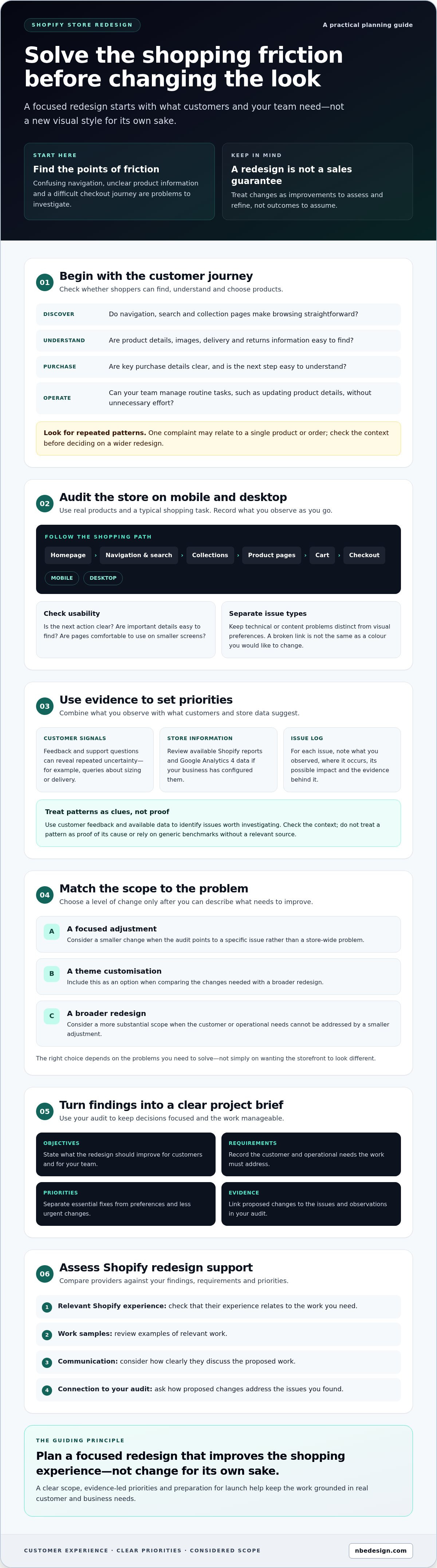
What if the biggest problem with your Shopify store isn’t how it looks, but how hard it is for customers to use? A fresh visual style can be appealing, but it won’t resolve confusing navigation, unclear product information or a checkout journey that creates friction. Before exploring Shopify store redesign services, identify what’s holding your store back and which changes matter most.
If your store feels dated or difficult to use, it’s understandable to want a complete refresh. It’s also sensible to be cautious: without a clear scope, a redesign can disrupt day-to-day work and make priorities harder to manage. This guide will help you identify reasons for a redesign, assess customer and business needs, and plan the work in manageable stages. You’ll also learn what to check before launch and how to decide whether to manage the project in-house or seek specialist Shopify support. The aim is a focused redesign that improves the shopping experience, not change for its own sake.
- Start with the customer experience: identify where shoppers encounter confusing navigation, unclear information or unnecessary friction before changing the visual design.
- Audit your Shopify store on mobile and desktop to pinpoint issues and set priorities based on customer and operational needs.
- Choose the right scope by comparing a focused refresh, theme customisation and a broader redesign against the problems you need to solve.
- Build a clear project brief with your objectives, requirements and priorities, then use it to guide decisions and prepare for launch.
- When assessing Shopify store redesign services, review relevant Shopify experience, work samples and communication, and ask how proposed changes address your audit findings.
Why consider Shopify store redesign services? Start with the customer experience
A store can look dated, feel difficult to navigate or no longer reflect how your business works. Those concerns are worth investigating, but they don’t automatically mean you need to replace everything. Shopify store redesign services are most useful when they address specific customer or operational needs, rather than simply making the storefront look different.
Start with the shopping journey. Can customers find the right products, understand the information provided and see clearly what to do next? Can your team manage routine tasks, such as updating product details, without unnecessary effort? A redesign can address these issues, but it can’t guarantee higher sales or conversion rates. Conversion rate optimization (CRO) offers useful context: treat improvements as changes to assess and refine, not outcomes to assume.
Which signs suggest your Shopify store may need a redesign?
Separate visual ageing from functional friction. An older-looking colour palette or layout may be a brand concern. Confusing menus, hard-to-scan product pages or unclear delivery and returns information can make shopping harder. Look for repeated patterns in customer feedback, support questions and store analytics. For example, recurring queries about sizing or delivery may indicate that this information needs to be easier to find.
Use evidence, not one-off impressions. A single complaint may relate to an individual product or order, rather than the whole store. Check the context and look for the same issue elsewhere before deciding on a wider redesign.
What should a redesign improve for shoppers?
Review the journey from product discovery to purchase on both mobile and desktop. Do navigation categories make sense? Does the product information answer likely questions? Are pages comfortable to use on smaller screens, and are key purchase details clear before checkout? Identify the points where a customer might hesitate, become confused or need to search for information.
Connect each proposed change to a specific need. If shoppers struggle to compare products, consider how product pages could present relevant details more clearly. If staff find routine updates difficult, include that operational requirement in the brief. A customer-focused redesign brings together considered changes that help shoppers find, understand and choose products while meeting the retailer’s practical needs.
This is a stronger starting point than choosing a new visual style first. Once you can describe the problems you’re solving, you can decide whether the right response is a small adjustment or a more substantial redesign.
How to audit your Shopify store before planning a redesign
A structured audit helps you distinguish essential fixes from personal preferences before you set a budget or speak to providers. Work through the store as a shopper, then record each issue with its location, impact and supporting evidence. This creates a practical brief to share when comparing Shopify store redesign services.
What should you review in the current store?
Check the main journey on both mobile and desktop, using real products and a typical shopping task. Start at the homepage and move through navigation, search, collection pages, product pages, cart and checkout. At each step, ask whether the next action is clear and important details are easy to find. Repeat the journey on a phone, where menus, text and images may behave differently.
Review key templates for readability, image presentation and consistency. Check whether product details are easy to scan, images help explain the item, and collection pages make browsing straightforward. Keep technical or content problems separate from visual preferences: a broken link or missing information is different from a colour or layout you’d simply like to change.
How can store data help set redesign priorities?
Use evidence you already have. Review available Shopify reports and Google Analytics 4 data if your business has configured them. Look for patterns worth investigating, such as pages shoppers visit before leaving or recurring questions about a particular stage of the journey. Treat these as clues, not proof of a cause, and avoid applying generic benchmarks without a relevant source.
Compare those patterns with customer feedback and support questions. If shoppers repeatedly ask about delivery information, for example, note which pages contain those details and whether they’re easy to spot. An issue log can include:
- Issue: What did you observe, and where?
- Impact: How might it affect shoppers or store operations?
- Evidence: What report, customer comment or test supports the concern?
- Priority: Does it need addressing now, or should it be investigated further?
Let observed customer friction, supported by evidence, guide redesign priorities rather than assumptions about what a store should look like.
When you turn audit findings into a project brief, it can help to consider the broader principles in Website Redesign: The Ultimate Guide, particularly goal-setting and content planning. If you’d like specialist input on interpreting your Shopify findings, you can discuss your store requirements.
Shopify store facelift or full redesign: how to choose the right scope
A dated appearance alone doesn’t mean your store needs rebuilding. Use your audit findings to decide how much change is justified. A focused refresh may address presentation, while wider problems with customer journeys, store requirements or the existing setup could call for more extensive work. The right scope depends on what needs fixing and whether your current theme and implementation can support the changes.
| Option | Issues addressed | Likely scope | Dependencies | Level of change |
|---|---|---|---|---|
| Focused refresh | Specific visual or content issues | Targeted updates to selected pages or elements | Existing theme and implementation can support the changes | Low |
| Theme customisation | Several design or usability needs the current theme doesn’t meet as configured | More involved changes across relevant templates and store elements | Theme structure, existing code and connected features need review | Moderate |
| Broader redesign | Connected issues across journeys, templates or business requirements | Reconsidering the wider storefront experience and how its parts work together | Content, integrations and operational requirements may affect the scope | High |
This comparison is a starting point, not a fixed specification. Existing code, theme structure and store setup can affect what’s practical, so confirm feasibility before settling on a solution. A provider of Shopify store redesign services should be able to explain how the proposed scope addresses the problems you’ve identified.
When might a focused Shopify theme refresh be enough?
A targeted refresh may suit a store with a sound structure and a short list of clear issues, such as inconsistent presentation or content that needs improving on selected pages. It keeps the level of change focused, but the current theme and its implementation may limit what can be adjusted. Ask a qualified Shopify professional to assess whether the requested changes are feasible before treating a refresh as the answer.
When might a broader redesign be worth exploring?
Consider a wider redesign if several connected issues affect how customers move through the store, or if business requirements have changed enough that isolated updates won’t address them coherently. Discuss integrations, content needs and operational dependencies early, as these can shape the scope and implementation. Retailers assessing broader design support can also read this Shopify web design agency guide.
Match the level of change to the evidence. A clear scope helps you compare proposals based on the problems they solve, rather than choosing the most extensive option by default.
How to plan a Shopify redesign project without losing sight of the essentials
A clear plan turns audit findings into decisions your team and any design partner can work from. Move from objectives to scope, preparation and launch checks in sequence. This keeps design choices grounded in customer needs and makes it less likely that essential content or store operations will be overlooked.
- Set objectives: Describe what customers should be able to do more easily and which operational needs the project must support.
- Agree priorities and scope: Use your audit to separate essential fixes from optional improvements, then confirm what is and isn’t included.
- Prepare materials and decisions: Gather content and assets, assign responsibilities, and agree how design reviews and approvals will work.
- Check before launch: Test key pages and journeys, integrations and analytics, then resolve issues before the redesigned store goes live.
If the project also involves moving away from your current platform, treat it as a migration as well as a redesign. Migration planning may involve additional requirements, so discuss these explicitly rather than assuming they’re part of the design scope.
What should a useful Shopify redesign brief include?
Give providers enough context to understand the business behind the storefront. Describe your products, customers, how the store currently works and the issues you’ve observed. Explain the customer experience you want to support, then list essential functionality, existing systems and non-negotiable operational requirements. For example, note how product or stock information needs to be managed.
Ask each provider to clarify the proposed scope, responsibilities, assumptions and deliverables. Confirm who supplies content, imagery and feedback, and which decisions your team will need to make. This makes it easier to compare proposals for Shopify store redesign services based on what they include, not just how they present the finished design.
How can you prepare for design review and launch?
Collect current brand assets, product information, copy and suitable imagery before design work gets underway. Identify who will review designs, provide missing content and approve changes. If several people need to contribute, name one person to coordinate feedback so decisions don’t conflict or stall.
Before launch, agree a practical checklist covering mobile and desktop, key store journeys, integrations and analytics. Test representative products and pages, including the route from browsing to checkout. Confirm that important information is present and connected systems behave as expected. If the redesign includes a platform move, plan and check the additional migration tasks separately.
Have a Shopify redesign brief ready to discuss? Talk to the Shopify design team about your requirements.
How to evaluate Shopify store redesign services and take the next step
A useful proposal connects your audit findings to a clear plan. Compare providers on their Shopify experience, understanding of your requirements, communication and the work included. The lowest-cost option may leave important tasks out, while the largest proposal may include changes your store doesn’t need. Focus on fit, clarity and evidence.
What should you ask a Shopify redesign provider?
Ask how they’ll review your current store, understand your customers and turn your requirements into a proposed scope. Clarify who is responsible for design, development, content, testing and launch coordination. Find out how you’ll review work, give feedback and approve changes. Ask what post-launch support means in practice, including what’s covered and for how long, so expectations are clear before work begins.
How can you check whether the proposed redesign is ready?
Compare the proposal with your documented priorities. Check that essential store functionality, relevant content and operational dependencies are accounted for. Review the provider’s Shopify design and development portfolio for work relevant to your requirements, then ask how each proposed change addresses an issue from your audit. A polished example is useful, but understanding the reasoning behind the work matters too.
Before agreeing to proceed, make sure the proposal clearly explains:
- Scope: Which pages, templates and store elements are included, and what’s excluded?
- Responsibilities: Who supplies content and imagery, tests the store and approves decisions?
- Assumptions: What needs to be confirmed about your existing theme, code, integrations or store setup?
- Review and launch: How will feedback be handled, and what checks are planned before the redesigned store goes live?
Clear answers help you compare Shopify store redesign services on their approach and fit, rather than proposal size alone. If a recommendation doesn’t appear to address your audit findings, ask the provider to explain the connection or revise the scope. A good discussion should leave you with a clearer understanding of the work and the decisions required from your team.
If you’re planning a redesign and would like to talk through your store requirements, discuss your Shopify redesign with NB eCommerce & Design. You don’t need to have every detail settled before starting a conversation.
Make your next Shopify redesign decision with confidence
A better store starts with a clear reason for change. Use customer feedback and store evidence to identify what needs attention, then choose a scope that fits those priorities rather than opting for a full rebuild by default. A focused brief, clear responsibilities and agreed checks can help keep the project practical from planning through launch.
The right Shopify store redesign services should address the needs you’ve identified and give you a clear understanding of what’s included. NB eCommerce & Design is a certified Shopify Partner and Expert based in North East England, helping retailers with Shopify store design and development, migrations, POS integration, support and consulting.
Discuss your Shopify store redesign with our team and share what you’re looking to improve. You don’t need to have every detail mapped out before starting a conversation. A clear first step can help you move towards a store that works better for your customers and your business.
Frequently Asked Questions
When should I redesign my Shopify store?
Consider a redesign when evidence suggests your store is making shopping or store management harder. Signs might include confusing navigation, product information customers struggle to find, recurring support questions or a layout that no longer reflects your business. Review customer feedback and available store data before deciding. One complaint or a dated look alone doesn’t necessarily mean you need a full redesign; investigate the cause and choose a scope that fits.
What is the difference between a Shopify store refresh and a full redesign?
A refresh makes targeted changes to an existing store, such as updating selected content or visual elements. A full redesign considers the broader storefront experience and may address connected issues across customer journeys, templates and business requirements. Theme customisation can sit between these options. The right choice depends on your audit findings and the existing theme, code and setup, rather than appearance alone.
How do I plan a Shopify store redesign?
Start by defining what customers should be able to do more easily and which store or operational issues need attention. Record your requirements and priorities in a brief, then agree the project scope, responsibilities and deliverables. Prepare product content, imagery and brand assets, and decide who will review and approve work. Before launch, plan checks for key pages, shopping journeys, devices, integrations and analytics.
Can I redesign my Shopify store without changing its theme?
Yes, some redesigns can be made within the existing theme, depending on its structure and implementation. A focused update to content, layout or visual presentation may be feasible without replacing the theme. More extensive changes could be limited by how the current store is built. Ask a qualified Shopify professional to assess the theme and explain which changes are practical before deciding on the project scope.
How do I choose Shopify store redesign services?
Choose a provider whose Shopify experience and proposed process fit your requirements. Review relevant work samples and ask how their recommendations address issues identified in your store audit. Clarify what’s included, what’s excluded, who handles design, development, content and testing, and how feedback and approvals work. Compare proposals by scope, responsibilities and assumptions, rather than assuming the lowest-cost or largest proposal is automatically best.
Will a Shopify redesign improve my conversion rate?
A redesign may address obstacles that make it harder for customers to find products, understand key information or complete a purchase, but it can’t guarantee a higher conversion rate. Set clear objectives and use available store data to understand current customer behaviour. After launch, review relevant data and feedback to assess whether the changes are helping. Treat the redesign as a considered improvement, not a guaranteed sales outcome.
What should I prepare before speaking to a Shopify redesign provider?
Bring a brief description of your store, its customers and the issues you’ve observed. Note which pages or shopping steps are affected and include relevant customer feedback or available analytics. It’s also useful to list essential functionality, existing systems, operational requirements and the changes you see as priorities. Gather brand assets and product content if available, and identify who will make decisions and approve project work.

- Posted in:
- customer experience
- ecommerce redesign
- Shopify
- Shopify redesign
- shopify store redesign services
- store audit
- store redesign services
- theme customisation