Skip to content
Shopify Integration Services: Practical Guide for Retailers
-
3402 words · 17 min read

Shopify integration services are most useful when they solve a specific retail problem, such as keeping online and in-store stock information aligned or making customer profiles available where staff need them. The right connection is not necessarily the one with the most features. It is the one that supports a clear workflow and gives your team information they can use.
When stock, orders, customer records and business tools sit in separate systems, everyday tasks can become harder to manage. Before connecting them, decide what needs to work better, which information should move between systems and what staff will do if records do not match. Shopify POS, for example, supports unified inventory and customer profile management across online and in-store channels.
This guide explains what integrations can do, how to plan a project and how to test data flows before relying on them. It also covers Meta Pixel setup, a website measurement connection with a different purpose from operational retail integrations. NB eCommerce & Design helps retailers with Shopify store design and development, Shopify migration services, Shopify POS integration, and ongoing support and consulting.
Key Takeaways
- Start Shopify integration services with a retail workflow that needs attention, not simply a list of tools to connect.
- Map the data, systems and responsibilities involved, then define how you will tell whether the integration is working as intended.
- Plan a Meta Pixel connection by identifying the right Meta business asset, using Shopify’s supported setup route and testing the resulting events.
- Check data accuracy, duplicate records, exceptions and access permissions before relying on an integration in day-to-day operations.
- Match the support to the project, from straightforward configuration to a broader Shopify build, migration or POS project.
What Shopify integration services connect, and why retailers use them
Shopify integration services connect a Shopify store with other tools or systems used to manage retail operations or measure website activity. A connection may transfer selected information between systems, but it does not automatically mean every task is automated or every process changes. The scope depends on the retailer’s needs, the data involved and how the systems work together.
A retailer might need product and stock information to stay aligned across sales channels, or customer details to be available to staff in more than one place. Another business may want to connect in-store and online sales through Shopify POS. These are different needs, so define the workflow before choosing an integration. Shopify’s extensibility is part of the wider Shopify platform overview, but a practical project still needs to account for the store’s setup and day-to-day processes.
The reason to connect systems is usually practical: reduce repeated data entry, make information available in the right place or support a process across online and in-store retail. Shopify POS supports unified inventory and customer profile management across those channels. NB eCommerce & Design implements Shopify POS solutions to help retailers bring their online and physical shop operations together.
Which parts of a retail business can Shopify integrations connect?
Potential connections cover different kinds of retail information. Rather than starting with a list of tools, identify what staff need to see or do, where the relevant information currently lives and which system should be treated as the source of truth.
- Inventory: Product and stock information used to manage availability across channels.
- Customer records: Profile details that staff may need to access in more than one system.
- Accounting: Sales information used for financial record-keeping.
- Point of sale: In-store transactions and related retail operations.
Moving data is only one part of an integration. A connection might send an updated stock quantity to another system, for example, but it does not decide who can adjust stock, how staff handle a discrepancy or what happens when a product is returned. Those decisions shape the process that uses the data. Define them early so that a successful transfer is not mistaken for a workflow that works well in practice.
How does Meta Pixel differ from an operational integration?
Meta Pixel is a tracking connection that sends information about website events to Meta tools. Depending on its configuration, those events may include actions such as viewing a page or completing a purchase. Its purpose is to provide website activity data for measurement within Meta’s tools, not to manage stock, customer profiles or sales operations.
This distinction matters when planning. Operational integrations support retail information and tasks; Meta Pixel concerns website event measurement. Both involve data moving between systems, but they serve different business needs and should be assessed separately. For Pixel setup, use the current Shopify-supported route and check interface names and instructions against Shopify and Meta documentation.
Plan Shopify integrations around your store’s data and workflows
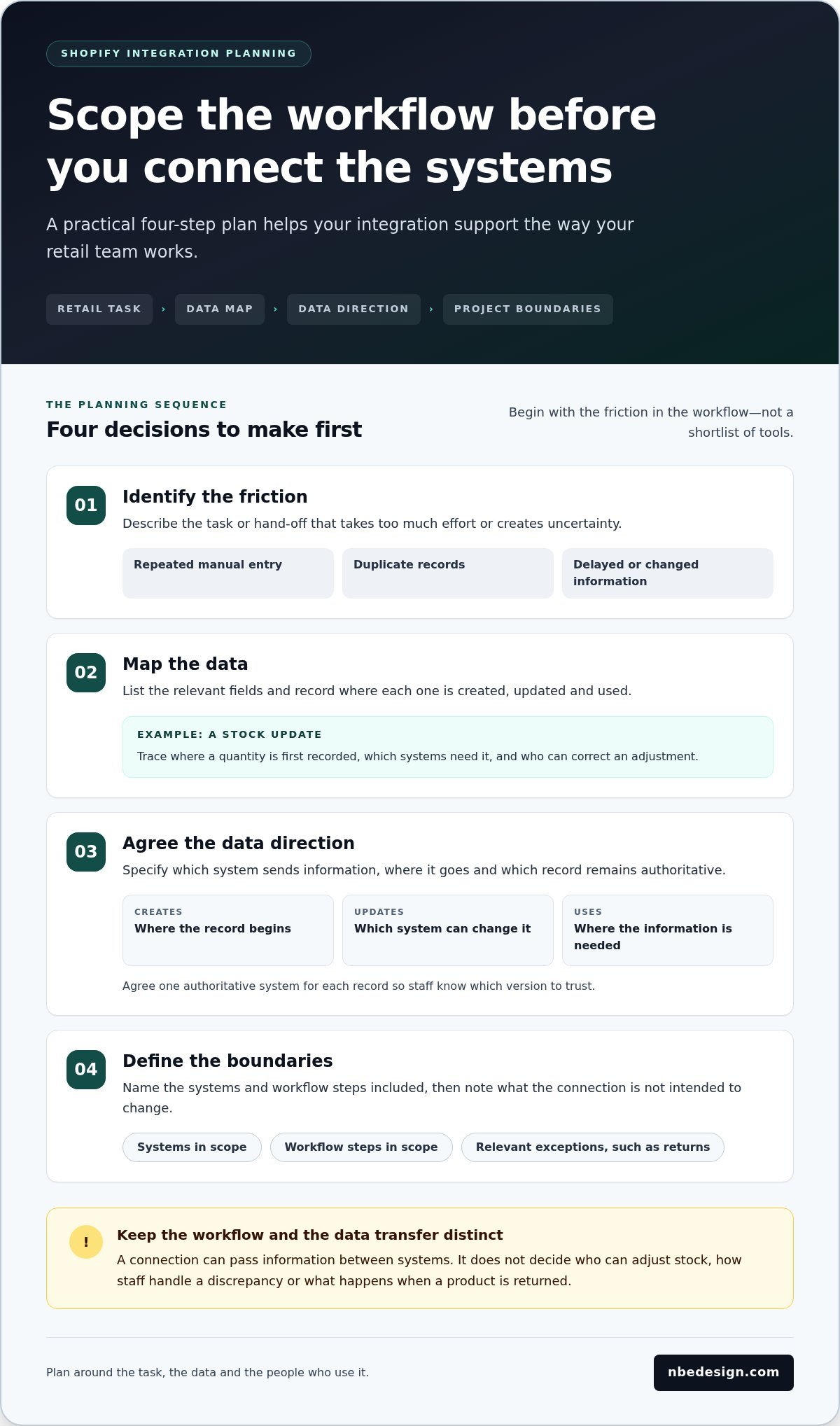
A useful integration plan starts with the task causing friction, not with a shortlist of apps. Map what staff do now, what information they need and which system should be trusted when records differ. This gives you a clear basis for choosing tools or technical support, and keeps the project grounded in your retail operation.
Map the workflow before choosing the tool, so the connection supports the way your retail team actually works.
Map the retail process before choosing an integration
Look for repeated manual entry, duplicate records and hand-offs where information can be delayed or changed. For a stock update, trace how a quantity is first recorded, which systems need to receive it and who can correct an adjustment. This separates the data transfer from the staff process around it. Keep online-to-store operations separate from website event measurement because they have different purposes.
Then identify who owns each data type. One system should be authoritative for a given record, even if other systems use a copy. Write down which system creates it, which can update it and which only uses it. Without that agreement, a connection can pass information in both directions and leave staff unsure which version to trust.
Set a clear scope for a Shopify integration project
Before implementation, document the systems and information included, along with what the connection is not intended to change. Shopify integration services can cover different workflows, so a precise scope helps everyone understand the boundaries and how the work will be assessed.
- Identify the friction: Describe the task or hand-off that takes too much effort or creates uncertainty.
- Map the data: List the relevant fields and note where each is created, updated and used.
- Agree the direction: Specify which system sends information, where it goes and which record remains authoritative.
- Define the boundaries: Name the systems and workflow steps in scope, plus relevant exceptions such as returns, cancelled orders or manual stock adjustments.
- Set acceptance checks: Agree what you will inspect to confirm the connection behaves as intended.
For the stock example, checks might confirm that a defined quantity change appears in the intended system, that a return follows the agreed process and that a manual adjustment is not overwritten unexpectedly. These are observable checks, not promises of a particular commercial result. Record who will review each check and what should happen if it fails.
A focused scope also makes exclusions visible. If the project covers stock updates, it might not include changing returns handling or staff permissions. Mark those boundaries clearly and revisit them if the workflow changes. That gives the team a shared reference during configuration and testing, rather than relying on assumptions.
If you are planning a connected Shopify project and want to talk through your workflows, discuss your Shopify requirements.
How to connect Meta Pixel with Shopify thoughtfully
Meta Pixel can send website event information to Meta tools, helping retailers measure activity such as product views or purchases. Connecting it is not just a matter of adding a tracking tool. First identify the correct Meta business asset, then use Shopify’s currently supported connection route and test that the expected events are received. Treat the setup as a measurement connection, separate from operational integrations that handle stock or sales processes.
As of October 2026, Shopify’s Facebook & Instagram sales channel app provides a supported route for connecting Meta tracking. Depending on the selected data-sharing level, the connection may use the browser-based Pixel alone or add the server-to-server Meta Conversions API. These options affect how data is shared, so review the current Shopify and Meta documentation before choosing settings. Interface names and instructions can change.
Prepare the Meta and Shopify accounts before setup
Before beginning, make sure you can access the Shopify store and the relevant Meta business account and assets. Identify the intended Pixel and confirm that the person completing setup has the permissions needed to select and connect it. Choosing an asset associated with a different business or website can make test results difficult to interpret.
Be clear about the purpose of measurement before enabling events. For example, decide whether you need to check product-page views, add-to-cart activity or completed purchases. Also review your cookie and consent settings, and consider applicable UK data protection responsibilities before activating tracking. This is practical preparation, not legal advice. Check the latest official guidance for the setup and requirements relevant to your business.
Test the Pixel connection and review event data
After connecting the asset through Shopify’s supported route, test the customer journey and inspect the relevant Meta testing or diagnostics tools. Use a controlled visit to the storefront and perform the actions you expect to measure. Testing checks whether expected website activity is received; it does not prove that every action will be attributed to an advert or appear in reporting exactly as expected.
- Check expected events: Confirm that the actions you planned to measure appear in the relevant testing view.
- Look for gaps: Note events that do not appear after you complete the matching action.
- Review duplicates: Check whether the same action appears more than once, particularly if more than one tracking method is active.
- Inspect event names: Confirm that the events shown make sense for the activity you performed.
If a result looks unexpected, review the selected Meta asset, connection settings and consent behaviour before relying on the data. Keep a record of the test, what you observed and any changes made. This gives your team a clear baseline for future checks without assuming that a working connection guarantees complete measurement or improved advertising performance.
Test Shopify integrations before relying on their data
A connection can appear active while passing incomplete, duplicated or unexpected information. Before staff rely on it, test both the data moving between systems and the retail task that depends on it. A useful check covers ordinary activity, exceptions and permissions, then records what happened so issues can be reproduced and retested.
Check data flow with realistic retail scenarios
Choose test cases that reflect the intended use of the integration. For an order connection, compare a representative order in Shopify with its destination record. Check that key details match, then test relevant variations such as a cancellation or return. For customer data, review which fields are shared and whether staff can access them as intended. Use the same source and destination records for each check, and note discrepancies rather than assuming a particular accuracy threshold.
- Data accuracy: Do the relevant fields match between the source and destination?
- Duplicate records: Does one action create more than one record or event?
- Exceptions: Are cancellations, returns or adjustments handled in line with the agreed process?
- Access permissions: Can the right staff view or update the information, without giving access where it is not needed?
Keep technical checks distinct from business checks. A technical check confirms that information arrives in the expected place; a business check confirms that a member of staff can complete the intended task with it. For retailers joining online and in-store operations, Shopify POS supports unified inventory and customer profile management across both channels. The Shopify POS information explains how that connected retail setup can support day-to-day operations.
Monitor the workflow after launch
Testing should not stop when the connection first works. Assign someone to review errors, record how the workflow should run and keep the process notes current. Revisit the checks when systems, store procedures or business requirements change. A platform migration or major store change is also a sensible point to reassess connected workflows, since the assumptions behind an integration may no longer hold.
If a check fails, document the action taken, the expected result, what actually happened and any error message. Include enough detail for another person to repeat the test, while avoiding unnecessary customer information in shared notes. Where practical, change one relevant setting or process at a time, repeat the same scenario and record whether the result changed. This creates a troubleshooting trail and helps separate a technical issue from a process or permissions problem.
Shopify integration services should account for what happens after launch, not just the initial connection. Keep a simple record of the integration’s purpose, owner, key checks and known exceptions. If your Shopify setup needs a more joined-up approach, talk with our Shopify team about your retail workflows.
Choose Shopify integration support that fits your retail operation
The right level of support depends on the size and complexity of the change, how much technical ownership your team can take on and what happens if the connection needs attention later. A straightforward setup may suit a retailer comfortable configuring tools and checking the result. If several systems or important workflows are involved, specialist Shopify support can help define the scope, coordinate the work and plan testing. A broader Shopify project may be a better fit when integrations sit alongside a store redesign, development work or a platform transition.
Match Shopify support to the work you need done
Use the project’s main requirement to guide your decision. For a simple configuration, agree who will manage settings, access and ongoing checks. For a more involved connection, make responsibilities clear: who owns the workflow, who handles changes and who investigates an issue? Match Shopify integration services to that scope rather than treating them as a single standard task.
- DIY configuration: Consider this when the connection is limited, your team understands the workflow and someone can take responsibility for testing and follow-up.
- Specialist support: This can help clarify requirements and manage more complex Shopify work where data, systems or teams need to align.
- A broader Shopify project: Consider this when the integration is part of a wider store build, development project or migration.
If you are moving to Shopify from another platform, Shopify migration services can cover data transfer, design, launch and a migration guide. That makes them relevant when the transition involves existing store data and established processes, not just a new connection. For planning around Shopify expertise, explore the Shopify expert services. If your priority is connecting physical shop and online operations, Shopify POS supports unified inventory and customer profile management across both channels, and the Shopify POS page covers that area.
When planning Meta Pixel, follow current Shopify and Meta instructions for the connection and assess tracking in light of your consent settings. For wider retail needs, NB eCommerce & Design provides Shopify store design and development, migration, POS integration, and support and consulting for Shopify retailers.
Discuss your Shopify project with a specialist
NB eCommerce & Design has worked with the Shopify platform since its launch in 2006 and became a Shopify Select Partner in January 2026. That experience informs practical conversations about how a store is structured and how its retail workflows fit together. Start with the task you want to improve, the systems involved and any concerns about disrupting day-to-day operations. You do not need every technical detail settled before outlining the project’s goals.
Discuss your Shopify project and the workflow you want to support.
Build your next Shopify connection with confidence
Your next integration can be a starting point for a more adaptable Shopify setup. As your retail operation evolves, the connections you choose should continue to fit the way your business works. A clear project goal gives you a practical basis for deciding what to tackle now and what can wait.
Effective Shopify integration services support considered decisions, not change for its own sake. Keep your future plans in view as you assess the role each connection should play in your store.
NB eCommerce & Design helps retailers with Shopify store design and development, migration services, Shopify POS integration, and ongoing support and consulting.
Discuss your Shopify project and take a confident next step.
Frequently Asked Questions
What are Shopify integration services?
Shopify integration services are the planning and technical work involved in making a Shopify store work alongside other retail tools. The term can describe a supported connection or a more involved project with several systems and teams. Before choosing an approach, clarify who will use the connection, who owns decisions about it and how changes will be handled. These details help distinguish a useful project from a connection that adds complexity without a clear purpose.
How do I connect Meta Pixel to Shopify?
Use the latest official Shopify and Meta guidance for the connection, then assess event information in the context of your measurement plan. Keep a record of the events you intend to use and the settings selected, so someone responsible for the store can understand the setup later. Avoid treating event activity as a complete account of customer behaviour or as proof that a particular advert caused a sale. Tracking data needs careful interpretation.
What can Shopify integrate with?
Potential connections can involve retail software, finance tools, customer databases, in-store systems or measurement platforms. The practical question is how a specific connection will fit your existing setup: does it use a supported connector, an app or a more tailored technical approach? Each route can involve different setup and maintenance responsibilities. Consider who will manage updates and investigate issues, especially if the connection is important to a routine your team performs every day.
Do I need a developer for Shopify integrations?
A developer may not be necessary for a straightforward configuration using an available supported connection. More tailored requirements, unusual data rules or several linked systems can call for technical expertise. Think about the consequences of an error as well as the setup itself: if staff cannot complete a core task, who can investigate and resolve the problem? That ownership question can help you decide whether your team can manage the work or needs specialist input.
How can I tell whether a Shopify integration is working?
Beyond checking an initial test, look for patterns in how the connection behaves during normal store activity. Keep a simple issue record with the date, affected process, observed behaviour and any steps needed to reproduce it. This makes it easier to compare later incidents and share useful details with whoever maintains the connection. Review the record periodically, particularly after a related system or store process has changed.
Can Shopify POS connect online and in-store retail operations?
Yes, Shopify POS is designed to bring online and in-store retail operations together. It supports unified inventory and customer profile management across both channels. To make that useful for staff, agree practical responsibilities such as who handles a discrepancy between a shop-floor count and the store record, and how a new team member learns the routine. Clear procedures help turn connected systems into a consistent way of working. NB eCommerce & Design provides Shopify POS solutions for retailers.
What should I prepare before starting a Shopify integration project?
Alongside the project requirements, identify the people who need to approve decisions and those who will use the changed process. Consider how you will brief staff, where they can find updated instructions and what the team should do if the connection is temporarily unavailable. Planning these operational details early can make a change easier to introduce, particularly when a new process affects more than one role or retail channel.
How much do Shopify integration services cost?
The cost of Shopify integration services depends on the work required, so a useful discussion needs more than the name of a tool. Explain what you want the store to support, which parts of the operation are affected and whether the project is part of a wider Shopify change. NB eCommerce & Design provides pricing details on request. A clear outline helps frame a conversation about the project’s scope and next steps.

- Posted in:
- ecommerce management
- inventory sync
- Meta Pixel
- retail technology
- retail workflows
- shopify integration services
- Shopify integrations
- Shopify POS