Skip to content
How to Make Your Shopify Store Feel Trustworthy From Browsing to Checkout
-
3117 words · 15 min read
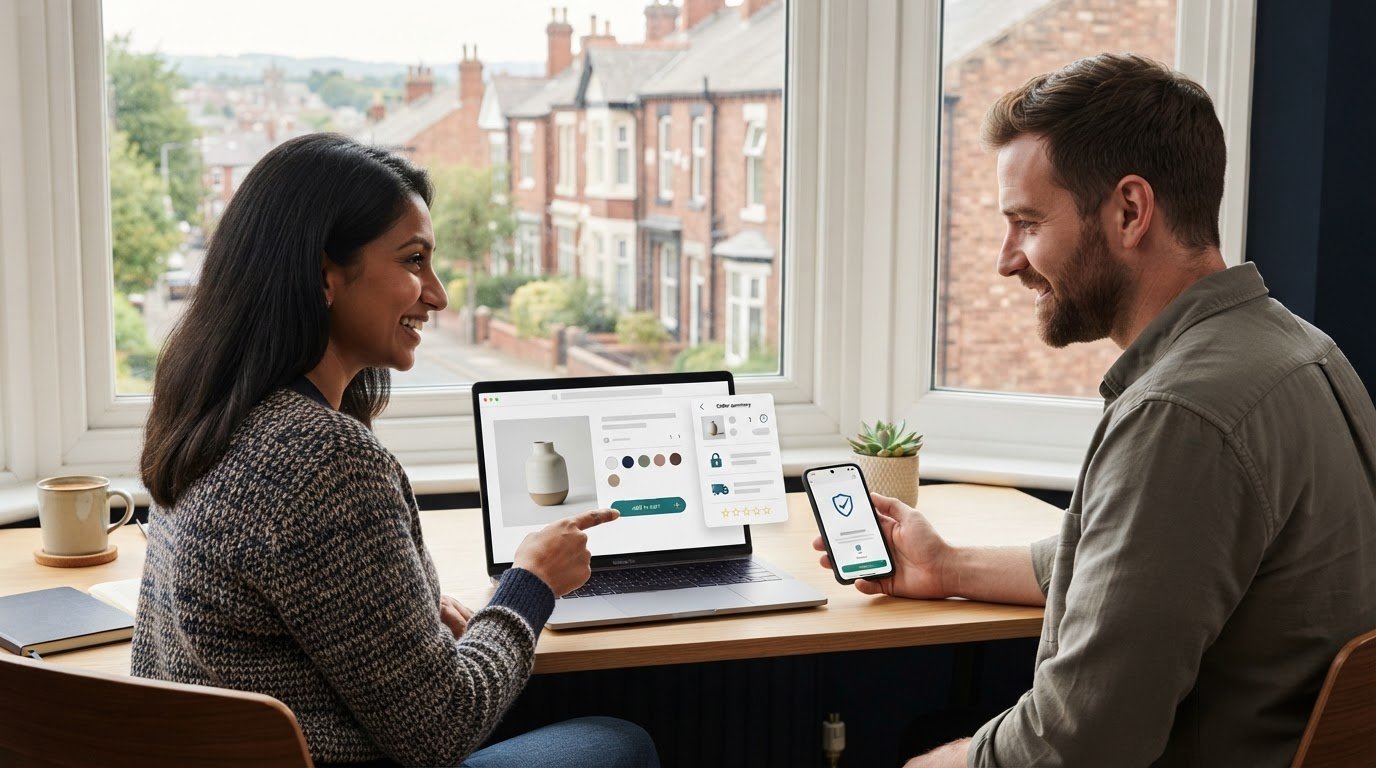
A polished homepage cannot earn trust if checkout feels confusing or product photos do not match what arrives. To answer how to make my Shopify store look trustworthy, make every step clear, consistent and credible, from the first product page through payment. Use cohesive design, accurate product images, easy-to-find policies, genuine customer feedback and clear store details.
Shoppers need confidence in what they are buying, how their information will be used and what happens after they place an order. Small gaps, such as unclear delivery information or mismatched product images, can create doubt even when your products are excellent.
This guide shows how to build trust throughout browsing and checkout, improve product photography, explain privacy and returns clearly, use customer feedback responsibly and fix store details that can undermine confidence. Follow these practical steps to make your Shopify store easier to understand and more reassuring to shop.
Key Takeaways
- Keep design, navigation and checkout patterns consistent so shoppers can move through your store with confidence.
- Use clear, consistent product photos and descriptions that help customers understand what they’re choosing.
- Make privacy, cookie, shipping and returns information easy to find and understand.
- Use genuine customer feedback and helpful support information to answer common concerns.
- Review store details such as delivery expectations, stock status and order totals to spot avoidable sources of doubt.
1. Consistency across the browsing and checkout journey
Trust depends on a smooth journey from the homepage to checkout. Keep spacing, typography, button styles and page layouts consistent across your homepage, collection pages and product pages. For example, use the same button colour for “Add to basket” throughout, and make the basket icon behave consistently. A 2025 Statista survey cited in Shopify’s trust badges guide reports that security concerns cause roughly 19% of shoppers to abandon a purchase before completing it. Clear, familiar checkout cues can help reduce uncertainty.
Audit the complete browsing path: open your homepage, select a collection, view a product, add it to the basket and proceed to checkout. Check that each step looks connected and that buttons lead to the expected page. Shopify stores include an SSL certificate to help secure transactions. Shopify is Level 1 PCI DSS compliant, and stores on the platform are PCI compliant by default. These protections support payment security, while clear information and careful store setup still matter.
Run a five-minute mobile check in a private browsing window. On your phone, follow the path from homepage to checkout and look for clipped text, hard-to-tap buttons or layout shifts. Then find shipping, returns, customer support and business information without using search. If customers have to navigate several menus to find delivery details, improve the navigation or add a clear footer link. Repeat the check on desktop to spot differences between screen sizes.
For UK shoppers, show familiar payment choices clearly, such as major credit cards, PayPal and other digital payment methods available at checkout. Preferences vary, so do not imply that one option is trusted by everyone. Display only logos for payment methods customers can actually use. Keep accelerated checkout buttons visible and consistent with your design, while making standard checkout easy to find. Shoppers should understand their choices before placing an order.
Trust badges work best when they communicate something real. Use accurate payment marks or secure-checkout signals, and avoid generic badges that imply a guarantee your store does not offer. To make your Shopify store look trustworthy, start with signals that reflect genuine features. If you use a trust badge app, review its publisher, permissions, support information and current reviews. Costs vary by plan and features, so check the current listing before installing. An app is optional when your existing checkout cues are clear.
To secure your Shopify store with SSL and protect customer data, use the certificate included with the store and control account access. Shopify provides SSL to help secure transactions, while its Level 1 PCI DSS compliance supports payment security. Don’t collect information you don’t need, and limit staff access to relevant permissions. Another practical answer to “how to make my Shopify store look trustworthy” is to ensure every security claim accurately describes the protections in place.
2. Why do inconsistent product photos hurt trust?
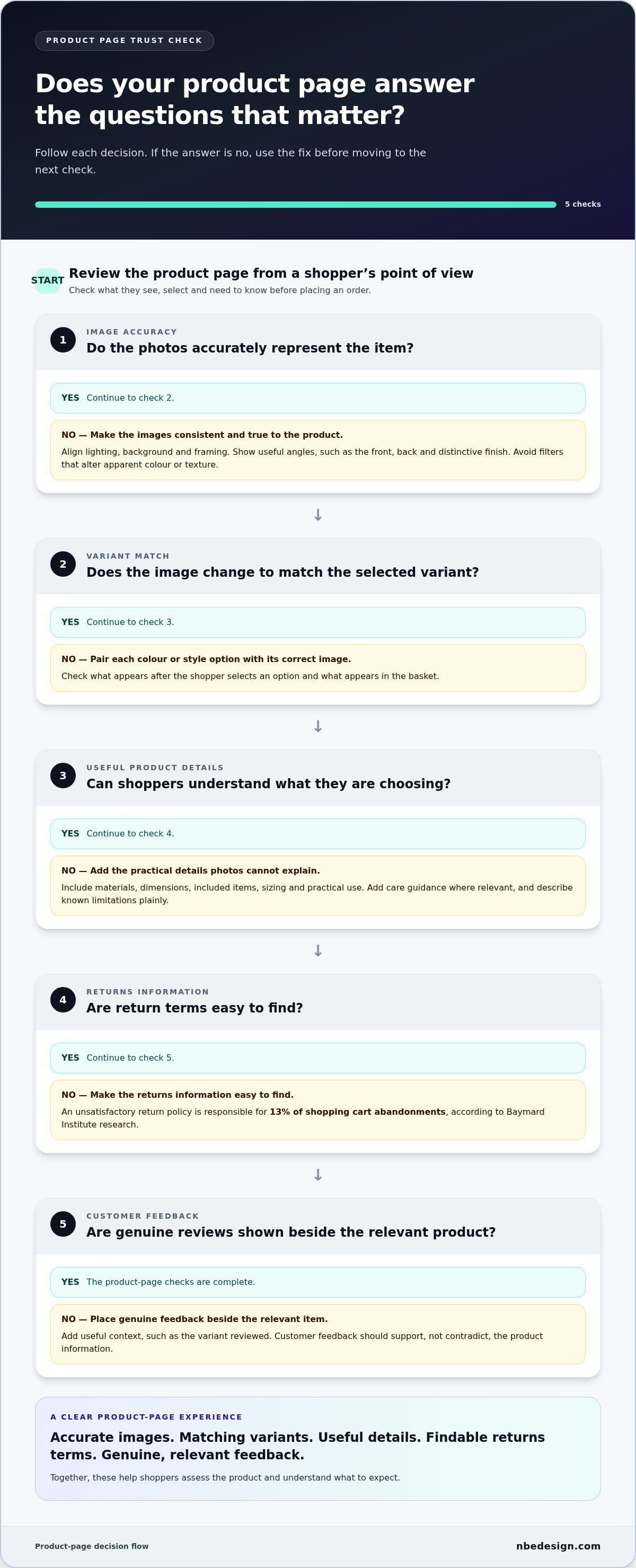
Product photos set expectations before shoppers read every detail. If one listing has a plain background and another has distracting surroundings, the range can feel inconsistent. Keep lighting, background and framing aligned across product pages. For example, photograph each ceramic mug against a similar backdrop, then add close-ups of its handle and glaze. Shoppers can compare items without every image looking identical.
Show useful angles, including the front, back and any distinctive finish. Multiple product images and zoom functionality can help customers examine details. A coat might need a full-length view, a close-up of its fastenings and a photograph showing the lining. Avoid filters that alter the apparent colour or texture. If you are wondering how to make your Shopify store look trustworthy, start by ensuring every photo accurately represents the item customers will receive.
Match images to product variants. If a shopper selects a green bag, show that colour instead of leaving the black default image in place. Pair each colour or style option with the correct image, then check what appears after selection and in the basket. This catches uncertainty about whether the selected option is actually the one being ordered.
Descriptions should answer questions photos cannot. Explain materials, dimensions, included items, sizing and practical use. For a table lamp, state its material and measurements, and whether a bulb is included. Add care guidance where relevant and describe known limitations plainly. Specific details give customers a sound basis for comparison, unlike broad claims such as “premium quality”.
Professional product photography can help create a consistent catalogue, especially when a store sells many types of product. Before a shoot, prepare a shot list for each category, including useful angles and details. Review the finished images on phone and desktop screens for colour, cropping and clarity. Pair each image with accurate sizing and material information so shoppers can assess the product from multiple angles.
Reviews and returns information also shape product expectations. Baymard Institute research reports that an unsatisfactory return policy is responsible for 13% of shopping cart abandonments. Make return terms easy to find, and place genuine reviews beside the relevant item. Include useful context, such as the variant reviewed. A practical answer to how to make my Shopify store look trustworthy is to ensure customer proof supports, rather than contradicts, your product information. For help refining page layouts, discuss your Shopify store design.
3. Cookie and privacy policies in Shopify
Shoppers share personal details during checkout, so explain what your store collects and why. Cognizant research found that 91% of respondents were concerned about privacy, while 75% were concerned about misuse of personal data. A concise privacy policy can describe information collected through orders, customer accounts and enquiries. Explain how those details support order fulfilment and customer service, using plain language rather than vague assurances.
In Shopify, open Settings > Policies to add your privacy policy, terms of service, return and refund policy, shipping policy and contact information. Check each entry for accuracy before publishing. For example, make sure the contact details in your policy match those shoppers can find elsewhere in the store. Shopify links saved policy information in the checkout footer, but make key policies easy to find before checkout too.
Cookie information should be clear before shoppers make a choice. In Shopify, Settings > Customer privacy > Cookie banner controls the consent banner, including where it appears and its position on the page. Check its display on phone and desktop, then make sure the wording explains the choice clearly. A banner that covers the “Add to basket” button or blocks product details can frustrate shoppers instead of clarifying their cookie choices.
Tailor your privacy policy to how your store operates. Explain what information customers provide, how you use order details and how they can contact your business with privacy questions. Do not promise that data is never shared unless that accurately reflects your practices. If the store uses customer accounts or email updates, explain these in the relevant policy so shoppers know what to expect.
Return and refund terms should answer practical questions before a purchase. Baymard Institute research reports that an unsatisfactory return policy is responsible for 13% of shopping cart abandonments. State which products can be returned, how customers start a return, and how refunds are handled. If your policy offers 30-day returns, say so plainly and explain when that period begins. Put any exclusions beside the terms shoppers need to understand.
Shipping information completes the picture. Explain delivery options, estimated dispatch and arrival timelines, any delivery charges, and how customers can follow up about an order. Keep these details consistent across product pages, the shipping policy and checkout. Before publishing changes, test each policy link from the footer and checkout, then read the wording as a first-time shopper. Clear, consistent policies help customers make informed decisions.
4. Customer testimonials and user-generated content
Customer feedback gives shoppers evidence beyond your own product descriptions. Show reviews beside the relevant product so people can compare comments with its features. A star rating provides a quick overview, while written feedback adds useful detail. For example, a review mentioning fit can help clothing shoppers judge sizing. Make reviews easy to scan, and identify the product or variant each rating describes.
To add reviews to Shopify, choose a reviews app from the Shopify App Store, install it, then add its review section to your product template. Configure how ratings and written reviews appear, and test the page on desktop and mobile. Shopify retired its own reviews app in 2024, so stores now use other available options. Invite verified customers to leave honest feedback after an order, without asking them to provide only positive comments.
Authenticity matters more than a perfect-looking rating. Build trust on Shopify without fake reviews or misleading claims by publishing feedback from real customers, preserving the meaning of their comments and clearly disclosing any incentives. If a review raises a concern, respond calmly with relevant information. A helpful reply can show how you handle issues, while fabricated testimonials can damage credibility.
Customer photos and videos can add context that studio images cannot. Invite customers to share how they use an item, then get permission before featuring their content on a product page or in a dedicated section. Preserve the original context and identify the product shown. For instance, a customer photo of a backpack in everyday use can help visitors understand its scale. Remove content that does not match the product or makes unsupported claims.
Reviews work best alongside visible support. Add an FAQ section with specific answers, such as how to choose a size, care for a material or track an order. Link each answer to the relevant product or policy page. Make your support route easy to find and explain when customers can expect a reply. Avoid promising a response time unless your team can consistently meet it.
Place customer proof where it helps shoppers decide, rather than hiding every review on one page. A product review section can answer questions close to the “Add to basket” button; a customer story can illustrate a more involved purchase. Check that comments remain readable on mobile and that ratings update when products change. Clear, genuine feedback, paired with useful answers, gives visitors practical evidence for their decision. If your review display needs a clearer place in the store, discuss your Shopify store design.
5. Common store details that undermine trust
A store can look polished yet lose shoppers’ confidence through small operational mismatches. Compare the delivery estimate on a product page with the shipping information at checkout. If the page promises prompt dispatch but checkout shows a much later arrival, shoppers may hesitate. Set realistic shipping timelines and keep them consistent wherever an order is discussed.
Stock information needs the same attention. Check each product option, such as a particular size or colour, and make availability clear before customers add it to their basket. Shoppers should not discover at checkout that their selected variant is unavailable. If stock changes quickly, review the product display and checkout flow together so the information remains useful.
Unexpected totals can create doubt at the final step. Explain how delivery charges and other costs affect the order total before checkout, rather than leaving shoppers to guess. For example, show when delivery is calculated and where the customer can see the final amount. Use a test order to compare the total shown on the product page, basket and checkout.
Broken links and outdated details can also make a store feel neglected. Test footer, menu and contact links, especially after changing a theme or reorganising pages. Remove expired sale banners, old delivery notices and references to products you no longer sell. Open the store in a private browsing window and follow key links as a first-time visitor.
Which business details must a UK online shop display by law? The exact disclosures depend on the business and its circumstances, so a design checklist is not a complete legal guide. Make your business identity and contact route easy to find alongside clear store policies, and ensure the information reflects how your business trades.
Look for smaller inconsistencies too. A “free delivery” banner should match the delivery terms and checkout calculation. Product pages should describe stock accurately, and order confirmation emails should reflect what customers purchased. Check these details after promotions, catalogue updates or fulfilment changes, since each can affect customer expectations.
Use a short trust audit: browse the store on mobile, select a product variant, add it to the basket and review the checkout total. Then confirm shipping timelines, stock status and contact details remain clear at every step. If a redesign could make these elements part of a more consistent journey, explore Shopify store design with NB eCommerce & Design.
NB eCommerce & Design: Shopify Store Design & Development
NB eCommerce & Design helps retailers create a clearer, more consistent customer journey on Shopify. Its Shopify Store Design & Development service brings page layouts, navigation and checkout experience together, helping shoppers move from product discovery to purchase with fewer points of confusion.
If your store has outgrown its original design, or customers struggle to find key information, a structured redesign can address those friction points. NB eCommerce & Design also provides Shopify migration services for businesses moving to Shopify and Shopify POS solutions for retailers connecting online and in-store operations.
For support shaping a more cohesive Shopify store, contact NB eCommerce & Design.
Make trust part of your store’s routine
Trust is not a one-off design task. Treat it as part of maintaining your Shopify store as products, promotions and customer needs change. Assign someone to review the shopping journey whenever the store is updated. They can check that the experience reflects what your business promises and gives customers the information they need to make informed decisions.
If you are considering how to make your Shopify store look trustworthy, focus on the details customers rely on when deciding whether to buy and return. Use customer questions and feedback to find friction, then make practical improvements rather than adding more visual signals. A clear, dependable experience can support stronger relationships with shoppers over time.
For help planning a more cohesive Shopify experience, contact NB eCommerce & Design. A conversation can help you consider the right next step for your store, whether you’re refining its design, moving to Shopify or bringing online and in-store operations together. Take the next step when you’re ready.
Frequently Asked Questions
What makes a Shopify store look trustworthy?
A trustworthy Shopify store feels coherent and gives shoppers enough information to decide with confidence. Beyond visual design, keep your business name, tone of voice and product details consistent across pages and customer emails. For example, an order confirmation should use the same store identity customers saw while browsing. Clear support routes and accurate stock information also make the experience feel dependable.
Why do inconsistent product photos hurt trust?
Inconsistent photos can make shoppers wonder whether listings show the same product quality or come from different sources. Compare images for colour balance, scale and cropping, especially when products appear together in a collection. A red jumper photographed in bright daylight may look different beside one shot under warm indoor lighting. Consistent presentation helps customers compare options without mistaking differences in photography for differences in the products.
What trust signals should a Shopify store display?
Use signals that address a shopper’s real concern, not decorative badges with no clear meaning. A visible business contact route, genuine product feedback, clear payment choices and a useful order confirmation each serve a practical purpose. Check that every logo or claim reflects something your store actually offers. For instance, do not show a payment mark if that method is unavailable at checkout.
What should a Shopify store's shipping, returns and refund policies include?
Make each policy answer the questions customers ask before ordering: how delivery works, when an order is expected, how to request a return and how refunds are handled. Explain product exclusions or return conditions in plain language. Customers should be able to tell, for example, whether they need to contact support before sending an item back. Keep policy wording aligned with the steps your team follows.
How can I make Shopify product photos, descriptions and pricing look credible?
Show each item in photos that reflect its colour and condition, then make the description specific enough to support comparison. State relevant measurements, materials and what the customer receives. Keep the displayed price aligned with the selected variant, and show delivery charges or other additional costs before the order is placed. Avoid dramatic claims that product details cannot support, such as calling an item “indestructible”.
How can I improve Shopify checkout trust and reduce cart abandonment?
Test checkout as a customer, using a real product and each key variant. Confirm that the basket shows the correct item, quantity and total, then check that payment choices remain clear through the final step. Remove distractions that interrupt purchase completion, such as broken links or confusing button labels. A clear route back to the basket also helps shoppers correct an order without restarting their purchase.
Which Shopify trust badge apps are reputable, and how much do they cost?
Before installing a trust badge app, review its publisher, permissions, support information and current reviews. Costs vary by plan and features, so check its current listing.

- Posted in:
- checkout optimisation
- customer confidence
- ecommerce trust
- how to make my shopify store look trustworthy
- online retail
- product pages
- Shopify
- store design