Skip to content
Squarespace to Shopify Migration: 2026 Practical Guide
-
3044 words · 15 min read

What if the biggest risk in moving your store isn’t the data you transfer, but the parts that don’t come across? If you plan to migrate from squarespace to shopify, it’s natural to worry about products, customer records, orders, page content and the search visibility you’ve built. Treat the move as a storefront rebuild alongside a carefully managed data and SEO transition, not a simple copy and paste.
This practical guide explains what you may be able to transfer, what could need rebuilding and how to prepare for a controlled launch. You’ll learn what to audit before migration, how to map important URLs to Shopify destinations, and what to test before switching platforms. We’ll also cover how Squarespace data limitations can affect the process, including product reviews, and how to weigh a DIY move against specialist support.
With a clear plan, you can reduce uncertainty, keep customers informed and avoid common surprises. Whether you’re moving a straightforward catalogue or a more involved store, the steps ahead will help you protect your data, customer experience and search visibility.
Key Takeaways
- Before you migrate from squarespace to shopify, define the business need behind the move so your new store supports clear goals.
- Audit products, customers, orders and content, then confirm which items can transfer and which may need another method or manual rebuilding.
- Map priority Squarespace URLs to their Shopify destinations before launch to support useful customer journeys and search visibility.
- Use a structured plan to assign ownership for data checks, content decisions, design approval and launch testing.
- Choose DIY or specialist support based on your store’s data complexity, available time, technical confidence and SEO exposure.
Why migrate from Squarespace to Shopify? Start with your store’s goals
A platform change should solve a business problem, not just give you a different website. When you migrate from Squarespace to Shopify, you’re changing your commerce setup while planning a new storefront and a controlled launch. That means coordinating several workstreams: transferring data, rebuilding the design and customer journeys, planning URLs, and testing the new store.
Before deciding, compare your current setup with what you need next. Shopify is centred on commerce, but that alone doesn’t make it the right choice for every Squarespace business. Review the background and overview of Shopify, then assess the platform against your own requirements rather than choosing based on reputation or features alone.
What should a retailer assess before leaving Squarespace?
Document how your store works today and where it creates friction. Review your products and variants, how customers find and buy them, which pages and blog content support your brand, and the workflows involved in managing stock and orders. Note specific issues, such as customers struggling to find a product or staff having to update the same information in multiple places.
- Requirements: What must the new store support at launch?
- Pain points: Which tasks or customer journeys feel difficult in your current setup?
- Priorities: Which changes are essential now, and which can wait?
For example, a retailer with a growing catalogue may need to improve how customers browse products. A redesign or additional content features might also be desirable, but not essential on day one. Separate must-haves from later improvements to keep the migration focused and make it easier to assess the right platform and build approach.
When might Shopify better fit the next stage of a store?
Shopify may suit a retailer looking for a different commerce setup or an opportunity to rethink the shopping experience. The key question is whether its capabilities and the storefront you plan to build match your sales and operational needs. Before committing, check that essential workflows, content requirements and tools your business relies on can be supported as intended.
If you also sell in a physical shop, consider whether you want online and in-person retail operations to work together. Review the practical requirements for stock, sales and staff workflows, and explore Shopify POS demos and onsite visits as part of that assessment. The right setup depends on how your business operates, not simply on whether you have both a website and a shop.
If your current platform meets your needs, migration may not be the priority. If you decide to proceed, give data transfer, storefront reconstruction, URL planning and testing their own checks and owners. A clear goal gives each workstream direction and helps you judge whether the change supports what your store needs.
What moves from Squarespace to Shopify, and what may need rebuilding?
There isn’t one transfer route that covers every Squarespace store. What you can move depends on the export options available, the format of your records and Shopify’s import options at the time of migration. Use the table as an audit framework, not a guarantee. Check each category before deciding how to handle it.
| Category | Planning status | What to check |
|---|---|---|
| Products and variants | Verify | Check which product fields, variant details and images can be exported and imported, then compare sample records. |
| Customers | Verify | Confirm which customer fields are available and whether the intended import method accepts them. |
| Orders | Verify | Check what order history can be transferred, which fields are supported and whether any records need another approach. |
| Pages and blog content | Third-party method or manual recreation | Review export options, then plan how to rebuild page structure, posts and metadata if they don’t import as needed. |
| Images and key files | Transfer or verify | Check that files are available, correctly associated with content and display as expected in the new store. |
| Settings and storefront design | Manual recreation | Record relevant settings and treat visual design and page layouts as a rebuild, not editable Shopify theme components. |
Which store data should be audited and mapped?
Build an inventory before you migrate from squarespace to shopify. For products, record variants, image associations, categories or collections, and current product URLs. For customers and orders, identify the fields your business needs to retain, then verify import constraints before choosing a method.
Include pages, blog posts, metadata, navigation and important downloadable files in the content audit. A sample export and import can reveal missing fields or formatting issues early. Don’t assume that a successful file transfer means every record is complete or ready to use.
What parts of the Squarespace storefront may need recreating?
Content and design are different things. Text and images may be reusable, but the original visual design and page layouts may not transfer as editable Shopify theme components. Map current navigation, landing pages and product-page content to the structure you want customers to use in Shopify. Decide what to retain, revise or leave behind.
If international growth is part of your plan, the US Small Business Administration offers general advice on reaching overseas customers through e-commerce. Treat it as broad strategic reading, not UK-specific guidance. For help assessing data and storefront requirements, you can discuss your migration requirements with a specialist.
How do you protect SEO and customer journeys during a Squarespace migration?
A platform change can alter page addresses as well as the storefront behind them. If a customer follows an old product link or a search engine revisits an indexed page, a missing destination can interrupt the journey. Before you migrate from squarespace to shopify, record important Squarespace URLs and decide where each should lead in the new store.
A redirect guides visitors and search engines from an old address to a relevant new one. It supports continuity, but doesn’t guarantee that rankings or traffic will be retained. Check Shopify’s current instructions for setting up redirects before launch, then test that each priority route reaches the intended page.
How should a retailer plan Squarespace URL redirects?
Start with a list of URLs worth preserving. Include product and category pages, high-value content and addresses customers use regularly. Match each one to its closest relevant Shopify destination, such as an old product page to its replacement, rather than sending every retired URL to the homepage.
Flag URLs without a direct replacement. Decide whether to create suitable replacement content, redirect to a genuinely related page or leave the URL without a redirect. Record each decision and include it in launch testing. Keep the mapping in a shared document so the people building the store and reviewing SEO use the same plan.
What should be checked before and after launch?
Before launch, review priority pages and customer paths, from landing on a product to finding key information and completing a purchase. Check that page titles and descriptions are appropriate, internal links point to the right Shopify pages, and important pages can be discovered. Confirm redirects using the platform’s current guidance and test representative old URLs.
- Before launch: Check destination URLs, metadata, navigation, internal links and key customer journeys.
- After launch: Recheck redirects and priority pages, then monitor analytics and search performance tools for crawl issues, broken links and unexpected changes in visitor behaviour.
Use analytics to see whether visitors can still find important products and move through the store as expected. TechNet’s discussion of e-commerce for small businesses also highlights valuable analytics tools as part of the broader value digital commerce can offer. Treat migration checks as ongoing risk management. Investigate issues as they appear, but don’t assume any checklist can guarantee unchanged rankings or traffic.
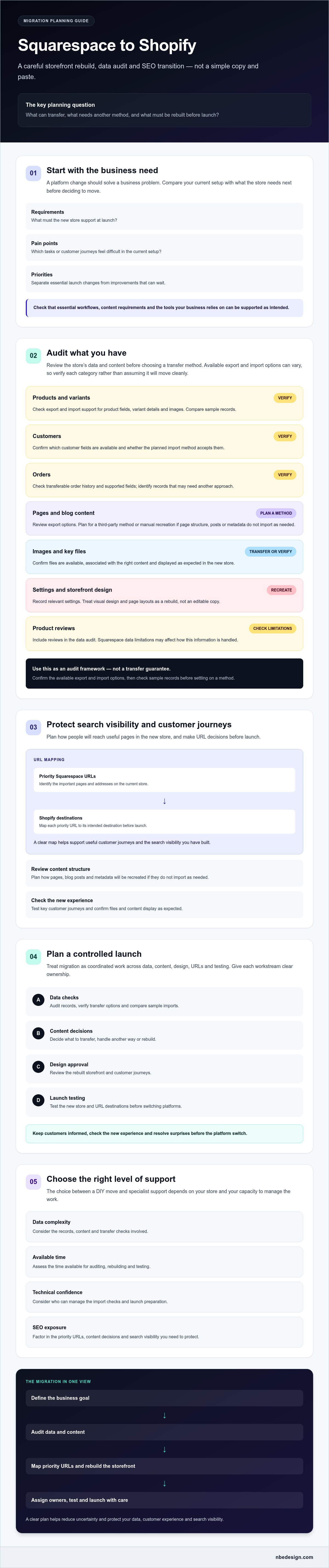
Step-by-Step Squarespace to Shopify Migration Planning
A well-managed migration gives each task an owner and a clear point of approval. Keep the existing Squarespace store available while the Shopify storefront is being prepared. Switch only after the new store has been checked and is ready for customers, leaving time to resolve issues before the changeover.
- Audit: The store owner lists the products, customer journeys, content, records and workflows that matter.
- Plan: Agree what data needs moving, which URLs need new destinations, what the Shopify storefront will include and who owns each decision.
- Build: The design approver reviews the new storefront, navigation and key page layouts against the agreed requirements.
- Transfer: The person responsible for data checks compares transferred records with the source and flags gaps for resolution.
- Test: The project lead coordinates checks across products, customer journeys, forms, checkout, redirects and analytics.
- Launch: The launch coordinator confirms readiness, manages the changeover and ensures the team knows how to handle essential store tasks.
- Monitor: After launch, review customer feedback, analytics and reported issues, then prioritise fixes.
What should happen before the data transfer?
Retain important source-store content and records using options confirmed in current Squarespace guidance. Agree the data map and URL destinations before moving records, and decide which products, pages and customer journeys are essential on day one. Name who approves content, checks data and makes final launch decisions. Clear ownership helps prevent missed tasks and conflicting changes.
How should the new Shopify store be tested before launch?
Use suitable test procedures to follow the customer journey from product discovery through product details, cart and checkout. Review customer-facing content and forms, then check that priority old URLs reach relevant destinations. Confirm analytics and domain settings against current Shopify guidance, and make sure the person taking over store operations understands the agreed launch process.
Pre-launch checklist:
- Product information, variants and images have been reviewed.
- Navigation, key pages and customer-facing forms work as intended.
- Cart and checkout have been checked using appropriate test procedures.
- Priority redirects and destination URLs have been tested.
- Analytics, domain settings and operational handover have been checked.
Switch only after the people responsible have reviewed their areas and outstanding issues have a clear decision. If you’re preparing to migrate from squarespace to shopify and want help coordinating the work from data transfer through launch, discuss your migration plan with NB eCommerce & Design.
Should you migrate from Squarespace to Shopify yourself or with an expert?
The right approach depends on the work involved and the time and skills you can give it. A smaller store with straightforward data, few pages and someone confident handling technical tasks may be a practical DIY project. A larger catalogue, complex content, important search traffic or limited in-house capacity can make specialist support worth considering.
Compare your situation across four areas: data complexity, available time, technical confidence and the potential impact of URL or customer-journey issues. DIY gives you direct control, but you’ll need to coordinate the work and resolve problems as they arise. Specialist support can bring data transfer, storefront development, testing and launch into a managed migration process.
When can a DIY Squarespace migration be practical?
A DIY move may suit a store with manageable records and an owner or team member who can set aside time for preparation and checks. Be realistic about whether you can map products and customer records, recreate pages, plan redirects and test checkout. If those tasks are unfamiliar or would compete with day-to-day trading, include the time and capacity they require in your decision.
Platform instructions and import options can change, so check current Squarespace and Shopify documentation before relying on a particular export or transfer method. Test your process with representative records where possible, and keep a record of anything that needs manual attention.
What should you ask a Shopify migration expert?
Ask how the provider will audit your existing data, identify records that need a different transfer method, handle content and plan changes to important URLs. Clarify who is responsible for storefront design, data checks, testing, launch coordination and resolving issues after launch. Make sure you understand what is included, what decisions you’ll need to make and how progress will be reviewed.
NB eCommerce & Design is a certified Shopify Partner and Expert offering Shopify migration services. Based in North East England, it works with clients worldwide, so your location doesn’t need to determine whether specialist support is suitable. You can learn more about a Shopify expert in the UK and assess whether the provider’s experience fits your store’s requirements.
Choose the route that matches your capacity, not just the apparent simplicity of moving records. If you want a specialist to help coordinate the transition from data transfer through launch, talk to a Shopify migration specialist.
Plan your next step with confidence
A successful move starts with a clear reason for changing platforms and a practical plan for what comes next. Before you migrate from squarespace to shopify, check which records can transfer, which parts of the storefront need rebuilding and how priority URLs will guide customers to the right pages. Then test the new store carefully before launch.
The right migration route depends on your store’s data, available time and technical confidence. A straightforward move may be manageable in-house, while a more involved transition can benefit from specialist coordination across data transfer, storefront development, testing and launch.
NB eCommerce & Design is a certified Shopify Partner and Expert, managing Shopify migrations from data transfer through launch. If you’d like to discuss your store’s needs and priorities, discuss your Squarespace-to-Shopify migration.
With the right preparation and support, you can approach the transition with greater clarity and build a Shopify store ready for your next stage of retail growth.
Frequently Asked Questions
Can you migrate a Squarespace website to Shopify?
Yes, you can move a Squarespace store’s commerce operation to Shopify, but the process usually involves more than transferring data. Products and other records may be moved using suitable export and import methods, while the storefront, page layouts and navigation may need rebuilding. Audit the site first, check current platform guidance for available transfer options, and plan testing and launch tasks before making the switch.
What data can you transfer from Squarespace to Shopify?
Products, variants, images, customer records, orders, pages and blog content may be transferable, but the method and available fields vary by category. Check current Squarespace export options and Shopify import options before assuming a record will move intact. Some content may need manual recreation or a third-party method. Keep a data map, then compare sample records in Shopify to spot missing details before launch.
Will my Squarespace design transfer to Shopify?
Don’t assume your Squarespace design will transfer as an editable Shopify theme. You may be able to reuse copy and images, but visual styling, page layouts, navigation and product-page structure may need to be recreated in the new storefront. Review key pages and customer journeys, decide what to retain or improve, and approve the rebuilt design before launch testing.
Will migrating from Squarespace to Shopify affect SEO?
It can affect search visibility if important URLs change or pages, metadata and internal links aren’t handled carefully. Before you migrate from squarespace to shopify, record priority URLs and map each to a relevant Shopify destination. Review page titles, descriptions and indexability, then check redirects and search performance after launch. These steps reduce migration risk, but they can’t guarantee unchanged rankings or traffic.
How do I redirect Squarespace URLs to Shopify?
First, record the Squarespace URLs you want to preserve and match each to its closest relevant Shopify page. Identify old URLs without a direct replacement and decide deliberately what should happen to them. Set up redirects using current Shopify guidance, then test priority old links to confirm they reach the intended destinations. Avoid sending unrelated URLs to the homepage, as that may not help visitors find what they need.
Can I keep my domain when I move from Squarespace to Shopify?
In many cases, you can keep using your existing domain, but moving your website doesn’t necessarily mean transferring the domain registration. Check who manages the domain and follow current instructions from your domain provider and Shopify to point it to the new store. Before changing or cancelling any service, confirm that your domain registration will remain active and that the new connection works as intended.
Should I migrate from Squarespace to Shopify myself or hire an expert?
DIY may suit a straightforward store if you have time and confidence to map data, rebuild pages, manage redirects and test checkout. An expert may help when records, content or SEO requirements are more involved, or your team has limited capacity. NB eCommerce & Design is a certified Shopify Partner and Expert, offering migration support from data transfer through launch. Compare responsibilities and scope before choosing.

- Posted in:
- data transfer
- ecommerce SEO
- migrate from squarespace to shopify
- platform migration
- Shopify
- Squarespace
- store migration
- website migration