Skip to content
Shopify POS Review: An Expert’s Honest Take for UK Retailers
-
2927 words · 14 min read

Choosing the right Point of Sale system is a critical decision for any UK retailer. Get it wrong, and you face inventory chaos, unreliable performance during peak hours, and a web of confusing costs. That's why finding a clear, honest shopify pos review is so essential. You need to know if it can truly handle your specific needs without hidden fees or a daunting setup process that frustrates your staff.
As seasoned eCommerce and design specialists, we at NB eCommerce & Design are here to provide that clarity. In this guide, we cut through the marketing noise to deliver an unbiased breakdown of Shopify POS for UK businesses. We'll explore the features that matter, the real-world hardware and software costs in pounds (£), and its rock-solid reliability. By the end, you'll have the confidence to decide if this is the all-in-one solution you need to unify your sales channels, simplify daily operations, and make better decisions for growth.
Key Takeaways
- Discover how Shopify POS seamlessly syncs your brick-and-mortar shop with your online store for a single, powerful view of your entire business.
- Understand the critical differences between POS Lite and POS Pro to determine which plan provides the features you need to scale efficiently.
- Get a complete breakdown of the true costs for UK retailers, from monthly software fees and card processing rates to essential hardware investments.
- This expert Shopify POS review provides a final, unbiased verdict to help you decide with confidence if it’s the right fit for your specific business needs.
What is Shopify POS & Who Is It Really For?
At its core, Shopify POS (Point of Sale) is an application that allows you to sell your products in person, whether at a pop-up shop, a market stall, or a permanent brick-and-mortar store. It’s the physical counterpart to your online Shopify store, designed to unify your entire retail operation. The core value proposition is simple but powerful: it seamlessly syncs your in-store and online sales, inventory, customer data, and reporting into a single, rock-solid dashboard. Understanding if this system is right for your business is the first critical step in this Shopify POS review.
This integrated approach is a world away from traditional, non-connected POS systems that force retailers to manually reconcile stock levels and customer information between their till and their website-a process that is often inefficient and prone to costly errors. What began as a leading e-commerce platform has matured into a complete retail operating system. A quick look at Shopify's history and evolution shows that the development of a native point-of-sale system was a crucial step in its mission to streamline commerce for businesses of all sizes.
The Ideal Shopify POS User Profile
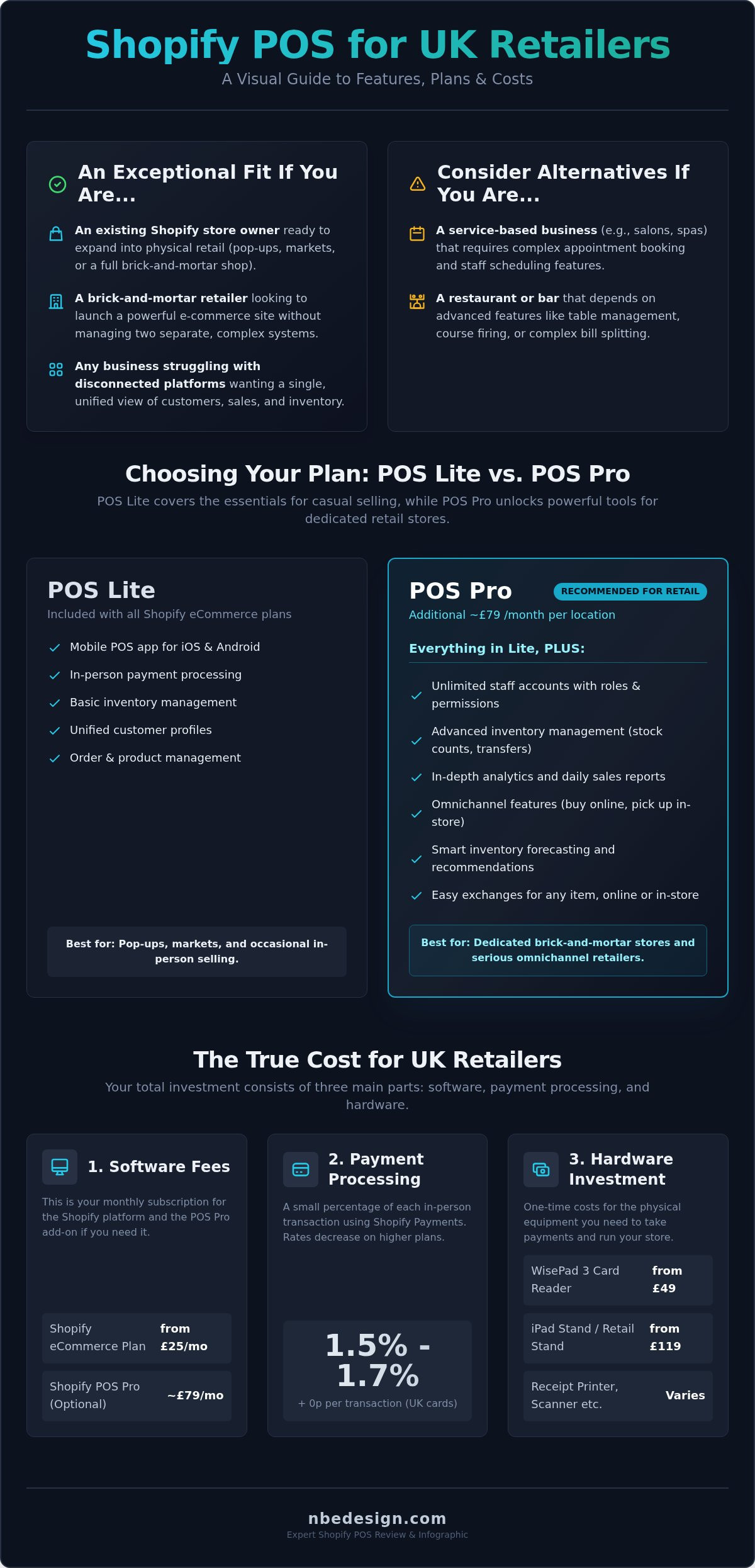
Are you wondering if Shopify POS is the right tool to help you scale? It’s purpose-built for modern retailers who operate across multiple channels. You'll find it's an exceptional fit if you are:
- An established Shopify store owner ready to expand into physical retail with a pop-up, event stand, or a full high-street shop.
- A traditional brick-and-mortar retailer looking to launch a powerful e-commerce presence without the headache of managing two separate systems.
- Any business currently struggling with disconnected platforms for online and in-store sales, wanting to simplify operations and gain a single view of their customers.
When Shopify POS Might NOT Be the Best Fit
While incredibly versatile, Shopify POS isn't a one-size-fits-all solution. For certain industries with highly specific needs, a more specialised system may be more efficient. Shopify POS might not be the best choice for:
- Service-based businesses like salons, spas, or consultancies that require complex appointment booking and staff scheduling features.
- Restaurants and bars that depend on advanced features like table management, course-firing, or intricate bill-splitting capabilities.
- Retailers with highly specialised needs, such as businesses in the UK requiring specific compliance tracking or intricate inventory modifications not native to the platform.
Core Features Review: A Deep Dive into Daily Operations
A point-of-sale system is the heart of your daily retail operations. It needs to be fast, reliable, and intuitive enough for your entire team to master. In this part of our Shopify POS review, we examine the core features that directly impact your workflow, from managing stock to processing sales and understanding your performance.
Unified Commerce: Inventory and Product Management
Shopify’s greatest strength is its seamless integration between your online store and your brick-and-mortar locations. When an item sells in-store, your website's inventory updates in real-time, and vice-versa. This eliminates the risk of overselling and simplifies stock management. From a single dashboard, you can:
- Manage your entire product catalogue, including variants and pricing across all channels.
- Create purchase orders and manage stock transfers between locations (on the Pro plan).
- Set up low-stock alerts to prevent stockouts.
However, a common critique is that the native inventory reporting can be basic. Businesses with complex needs, like tracking batches or expiry dates, may find the out-of-the-box reports limiting without turning to third-party apps.
In-Store Checkout and Customer Management
The checkout experience is slick and efficient. Staff can quickly find products, apply discounts, and accept a wide range of payments, including contactless and mobile wallets. A standout feature is the unified customer profile. Every transaction, whether online or in-store, is linked to a single customer record, providing a complete purchase history. This empowers your staff to offer personalised service and build stronger relationships. The system makes it easy to process returns, refunds, and exchanges, helping you stay compliant with UK consumer rights for retailers and maintain customer trust. While recent UI updates have aimed to streamline the workflow, some long-term users have noted a learning curve for staff accustomed to the older interface.
Reporting and Analytics
Shopify POS provides a solid foundation of reports, giving you a clear view of sales trends, staff performance, and daily cash flow. Because all your sales data is in one place, you get a truly holistic overview of your business health without needing to merge spreadsheets. The main limitation, frequently mentioned by users, is the lack of deep customisation in the standard reports. To unlock more advanced analytics, such as detailed stock sell-through rates and custom report building, an upgrade to the Shopify POS Pro plan is essential.
Shopify POS Lite vs. Pro: Which Plan Do You Need?
One of the most common questions we encounter in any shopify pos review is about the difference between the Lite and Pro plans. Choosing the right tier is crucial for streamlining your operations without overpaying for features you don't need. The decision hinges entirely on the scale and complexity of your retail business.
Fortunately, Shopify makes the entry point exceptionally easy. Every Shopify eCommerce plan, from Basic to Advanced, automatically includes Shopify POS Lite at no extra cost. This allows you to unify your online and in-person sales from day one. For businesses ready to scale, POS Pro is the dedicated upgrade that transforms your setup into a full-featured retail command centre.
Shopify POS Lite: The Essentials for Free
Best for: Market stalls, pop-up shops, artists, and new retailers taking their first steps into brick-and-mortar sales.
POS Lite provides all the core functionality you need to make sales and manage your business on a smaller scale. It's a powerful mobile POS that lets you accept payments anywhere using a smartphone or tablet. Key features include integrated payment processing, order and product management that syncs with your online store, and basic customer profiles to track purchase history.
Its limitations appear when your business complexity grows. You cannot manage staff permissions, perform stock transfers between locations, or access detailed in-store analytics.
Shopify POS Pro: Unlocking Advanced Retail Features
Best for: Established retail stores, businesses with multiple locations, and any retailer focused on growth and operational efficiency.
For an additional £69 per month per location, POS Pro unlocks the tools needed to manage a sophisticated retail operation. This is where the problem/solution format becomes clear: if you face a challenge related to scale, POS Pro is likely the answer. The advanced features are a frequent highlight in any in-depth Shopify POS review because they directly address the pain points of growing retailers.
Consider upgrading to Pro if you need to:
- Manage complex inventory: Use purchase orders, receive detailed inventory reports, and transfer stock between your stores seamlessly.
- Empower your team: Create unlimited staff accounts and assign specific roles and permissions to control access to sensitive information.
- Make data-driven decisions: Access advanced in-store analytics and daily sales reports to understand performance and identify trends.
- Offer a true omnichannel experience: Streamline operations with features like "buy online, pick up in store," and process exchanges from online orders at your physical location.
Ultimately, the choice is straightforward. Start with the powerful, free POS Lite. When your daily operations demand more control, deeper insights, and smarter inventory management, it’s time to invest in POS Pro to future-proof your growth.
Hardware, Costs & Pricing: The True Investment
To provide a truly comprehensive shopify pos review, we must look beyond the features and dive into the figures. Understanding the complete financial investment is critical for any UK retailer looking to streamline their operations. This section breaks down every potential cost-from monthly software subscriptions and payment processing to one-off hardware purchases-giving you the clarity needed to make a confident, informed decision for your business.
Software Pricing and Transaction Fees
Your primary recurring cost is your core Shopify eCommerce plan. The capable POS Lite software is included with all standard plans (Basic at £25/mo, Shopify at £65/mo, and Advanced at £344/mo). For access to advanced retail features like smart inventory management and unlimited staff accounts, you will need the Shopify POS Pro upgrade. This is a transparent add-on, costing an additional £79 per month, for each physical retail location.
When using the integrated Shopify Payments, in-person credit and debit card rates are highly competitive and simple, with no hidden fees:
- Basic Plan: 1.7% per transaction
- Shopify Plan: 1.6% per transaction
- Advanced Plan: 1.5% per transaction
Note: Using an external payment gateway will incur additional transaction fees from Shopify on top of what your chosen provider charges. For most businesses, sticking with Shopify Payments is the most efficient and cost-effective route.
Essential Shopify POS Hardware
Building your physical checkout is a flexible process. Shopify offers its own sleek and reliable hardware, including the WisePad 3 card reader (starting at £49 + VAT) and various iPad stands designed for a professional counter. However, the system also integrates seamlessly with a wide range of industry-standard third-party equipment, such as Star Micronics receipt printers and Socket Mobile barcode scanners.
A complete, professional setup can range from £400 to over £800, depending on the components you select. For a detailed breakdown of our recommended equipment, explore our guide on the best POS system hardware for UK shops. As Shopify Experts, we can help you configure a future-proof system that aligns perfectly with your budget and business goals.
The Verdict: Is Shopify POS Right for Your Business?
After a detailed analysis of its features, pricing, and hardware, this Shopify POS review concludes that for the right type of retailer, it is an unparalleled solution. The decision ultimately hinges on your existing setup, your specific industry needs, and your long-term growth ambitions. To help you decide, we've distilled our findings into a final summary and expert recommendation.
Pros: Where Shopify POS Excels
The system's greatest strengths lie in its seamless integration and user-centric design.
- Unbeatable Integration: It flawlessly syncs your in-store and online operations, from inventory and customer data to sales reports. If you have a Shopify website, no other POS comes close.
- User-Friendly Interface: The software is intuitive, minimising staff training time and reducing errors at checkout.
- Impressive Scalability: Shopify POS grows with you, capably handling everything from a weekend market stall with POS Go to a multi-location retail empire.
- Unified Business Data: Gain a holistic, 360-degree view of your entire business, enabling smarter decisions on stock, marketing, and staffing.
Cons: Potential Deal-Breakers to Consider
No system is perfect, and Shopify POS has limitations that are crucial to understand.
- Basic Reporting on Lite Plan: Essential, in-depth analytics are locked behind the POS Pro subscription, which is an added monthly cost.
- Not for Every Niche: It's built for retail. Businesses with complex needs, like full-service restaurants or appointment-based services, may find it lacks specialised features.
- Ecosystem Reliance: Committing to Shopify POS means committing to the wider Shopify ecosystem, which can feel restrictive if you prefer to mix and match software providers.
- Upfront Hardware Costs: While flexible, the initial investment for a complete till system, scanner, and printer can add up, especially for new businesses.
Our Expert Recommendation
For any retailer already using Shopify online, or for a new business planning to sell both in-person and online, our verdict is a resounding yes. The power of a single, unified platform for all your sales channels simply cannot be overstated. It streamlines operations, saves countless administrative hours, and provides the data you need to grow effectively.
The most common concerns-such as complex data migration or choosing the right hardware-are easily mitigated with expert guidance. A smooth transition requires a rock-solid plan. As dedicated UK Shopify Experts, we build that plan for you, ensuring a flawless setup from day one. See how we've helped other retailers master their omnichannel strategy in our Shopify Expert portfolio. Make the switch with confidence and unlock the full potential of unified commerce.
Shopify POS Review: The Final Verdict for UK Retailers
As we've explored, Shopify POS presents a powerful, unified commerce solution for UK retailers. Its core strength lies in seamlessly syncing your online store with your physical shop, creating a single source of truth for inventory, sales, and customer data. The critical decision between the Lite and Pro plans hinges entirely on your business's scale and operational complexity, from simple checkout needs to multi-location stock management.
Ultimately, this shopify pos review demonstrates that while the platform is incredibly capable, making the right choices from the start is essential for growth. Navigating this decision can be daunting, but you don't have to go it alone. As certified UK-based Shopify Experts, we specialise in seamless POS migrations. We help you choose the right hardware and plan to future-proof your business, ensuring a hassle-free transition.
Make the POS switch with confidence. Get a free consultation on your Shopify POS setup and let's build a rock-solid foundation for your retail future.
Frequently Asked Questions About Shopify POS
Can Shopify POS work offline if my internet goes down?
Yes, Shopify POS is designed to keep your business running even with an unreliable internet connection. You can continue processing cash transactions and ringing up sales. Once your connection is restored, the app will automatically sync all sales and inventory data with your Shopify admin. For card payments, specific terminals like the WisePad 3 support offline transactions, ensuring you never miss a sale during an outage. This provides rock-solid reliability for your brick-and-mortar store.
What are the main alternatives to Shopify POS in the UK?
In the UK market, the main alternatives include Lightspeed Retail, Epos Now, and Square POS. Lightspeed is a powerful choice for businesses with complex inventory needs, such as those with multiple variants or serialized stock. Epos Now is very popular in the hospitality sector but also has strong retail offerings. Square POS is known for its straightforward pricing and ease of use, making it a great option for smaller businesses or those just starting out with in-person sales.
How does Shopify POS handle returns, exchanges, and gift cards?
Shopify POS streamlines these core retail tasks exceptionally well. You can process returns and exchanges for both in-store and online purchases directly from the POS interface, refunding to the original payment method or issuing store credit. Gift cards, whether physical or digital, are fully integrated. A customer can purchase a gift card online and redeem it in your physical store, or vice-versa, creating a seamless, unified experience across all your sales channels.
Can I use my own iPad or existing hardware with Shopify POS?
Absolutely. The Shopify POS app is compatible with modern iPads and iPhones, allowing you to leverage devices you may already own. For other peripherals like receipt printers, cash drawers, and barcode scanners, you will need to ensure they are compatible with Shopify's system. Shopify provides a list of supported third-party hardware, but for guaranteed performance and a hassle-free setup, we recommend using the hardware sold directly through the Shopify UK Hardware Store.
Is Shopify POS suitable for a business with multiple store locations?
Yes, Shopify POS is built to scale with your business and excels at managing multiple locations. The Shopify POS Pro plan offers advanced features specifically for multi-store retailers, including the ability to transfer stock between locations, set location-specific staff permissions, and view unified sales reports for your entire operation. This allows you to streamline inventory management and gain a clear, centralised view of performance across all your brick-and-mortar stores.
How difficult is it to migrate from another POS system to Shopify POS?
Many businesses reading a Shopify POS review are concerned about migration, but Shopify makes the process as straightforward as possible. You can import key data like products, customers, and inventory levels using CSV files. While the process can be daunting depending on your current system, a well-planned migration minimises disruption. As official Shopify Experts, we can help you craft a migration strategy to ensure a seamless and efficient transition to a unified commerce platform.

- Posted in:
- eCommerce
- Point of Sale
- POS Systems
- Retail Technology
- Shopify
- Shopify POS
- shopify pos review
- UK Retail