Skip to content
Shopify POS: The Ultimate Guide to Unifying Your Retail and Online Store
-
3119 words · 15 min read

Is managing your business across both your physical shop and your online store becoming a complex juggling act? If you’re tired of mismatched inventory levels, outdated till systems, and the manual nightmare of reconciling sales data from different channels, you’re not alone. This disconnect doesn't just create administrative headaches; it impacts your customer experience and hinders your ability to grow. Fortunately, there is a powerful, all-in-one solution designed to bridge this gap. This advanced point-of-sale (POS) system is engineered to seamlessly unify your retail and online operations, creating a single source of truth for your entire business.
In this ultimate guide, we at NB eCommerce & Design, as leading experts in unified retail solutions, will walk you through everything you need to know. We’ll explore how a robust unified commerce platform can revolutionise your UK retail business by synchronising your inventory, sales, and customer data in real-time. You'll discover how to provide a seamless shopping experience, reduce administrative burdens, and unlock the powerful data you need to make smarter, growth-focused decisions. It's time to simplify your operations and future-proof your business with confidence.
Key Takeaways
- Move beyond a simple till system by understanding the core concept of 'unified commerce' and how it connects every part of your business.
- Identify the specific Shopify POS features that will have the biggest impact on streamlining your inventory, managing staff, and creating a seamless customer experience.
- Confidently choose the right plan and hardware with a clear breakdown of UK pricing, including your core Shopify plan fees and the cost of POS Pro.
- Learn a clear, step-by-step process for a smooth migration, addressing the common challenges of switching your retail point of sale system.
What is Shopify POS and Why Does it Matter for Modern Retail?
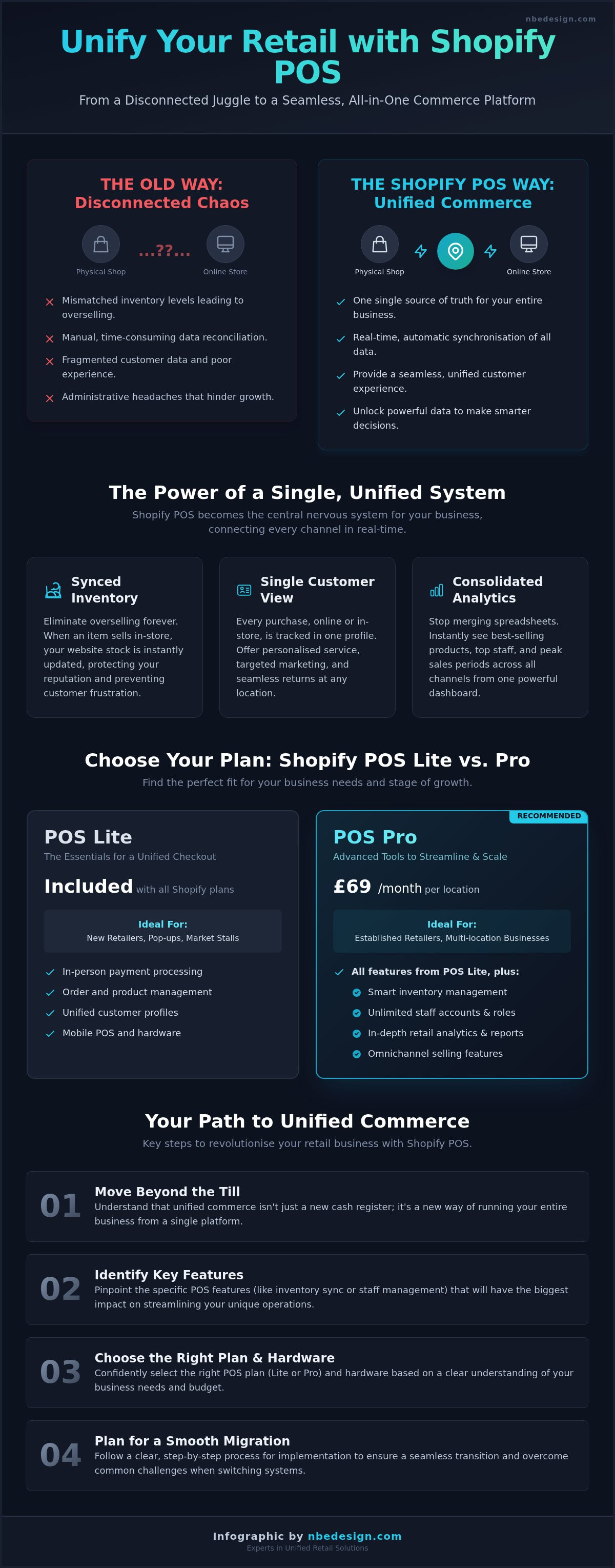
For any ambitious UK retailer with both a physical presence and an online store, the challenge is always the same: how do you make two separate channels feel like one seamless business? The answer lies in moving beyond a simple till and embracing a unified commerce platform. This is precisely where the Shopify POS system excels, acting as the central nervous system for your entire retail operation.
At its core, unified commerce means that your e-commerce site, your brick-and-mortar shop, social media channels, and any other sales avenue all share the same backend data. This eliminates the operational headaches of running disconnected systems, such as manual inventory updates and fragmented customer data. Instead of juggling spreadsheets and guessing stock levels, you get a single, accurate view of your entire business in real-time.
Beyond the Till: From a Cash Register to a Commerce Platform
A traditional cash register is a tool for a single task: processing a transaction. A modern POS, however, is a comprehensive management hub. It doesn't just take payments; it captures crucial data that empowers you to make smarter business decisions. This evolution from a basic e-commerce tool to a complete retail operating system is a significant part of Shopify's history and growth. With every in-person sale, your inventory, customer records, and financial reports are instantly updated across your entire business, giving you the clarity needed to scale efficiently.
The Power of Unified Data: Inventory, Customers, and Reporting
When your online and offline worlds are perfectly synchronised, you unlock powerful efficiencies that directly impact your bottom line and customer satisfaction. The key benefits include:
- Synced Inventory: Eliminate the risk of overselling. If a customer buys the last item in your physical shop, it's instantly marked as "out of stock" on your website, preventing disappointment and protecting your brand's reputation.
- Single Customer Profiles: A customer's purchase history, both online and in-store, is stored in one place. This allows for personalised service, targeted marketing, and hassle-free returns or exchanges at any location.
- Consolidated Analytics: Stop wasting time merging reports. Instantly see your best-selling products, top-performing staff, and peak sales periods across all channels from a single, easy-to-use dashboard.
Shopify POS Lite vs. Pro: Key Differences for Your Business
Shopify offers two tiers to match your business needs. POS Lite is included with all Shopify plans at no extra cost, making it ideal for new retailers, market stalls, or pop-ups. It covers all the essentials for taking payments and managing orders. For established businesses looking to streamline and scale, Shopify POS Pro (an additional £69/month per location) unlocks advanced features like smart inventory management, unlimited staff accounts with role-based permissions, and detailed retail analytics. You should consider upgrading to Pro when you need to manage stock across multiple locations, require more granular control over staff access, or want deeper insights into your store's performance.
Core Features of Shopify POS Every Retailer Should Know
Beyond simply processing transactions, the Shopify POS acts as the central nervous system for your entire retail business. It’s designed to unify your operations, providing a clear, real-time view of your sales, stock, and customers. The platform offers a suite of powerful tools, as highlighted in many an in-depth Shopify POS review, designed to streamline every aspect of your retail operations.
Seamless Checkout & Integrated Payments
The checkout is where the magic happens, and Shopify makes it fast and flexible. With an intuitive interface, your staff can process sales quickly, reducing queues and improving the customer experience. Because Shopify Payments is built-in, your daily takings are automatically reconciled, saving you hours of tedious admin. You can easily handle complex transactions like splitting a payment between a gift card and a credit card, or applying custom discounts on the fly. Plus, with modern options like Tap to Pay on iPhone, you can take secure contactless payments anywhere in your store.
Intelligent Inventory Management Across Locations
Say goodbye to stock discrepancies. Shopify POS syncs your inventory in real-time across your brick-and-mortar store and your online shop. Sell the last dress in your London boutique, and it’s immediately marked as 'sold out' online, preventing overselling and customer disappointment. For multi-store retailers, you can effortlessly manage stock transfers between locations, create purchase orders, and run inventory counts directly from the app. Low-stock reports ensure you reorder popular items before you run out, keeping your sales consistent.
Building Customer Relationships with Unified Profiles
Every transaction is an opportunity to build loyalty. Create customer profiles directly at the point of sale to capture valuable information. You can then view their complete purchase history-both online and in-store-in one unified profile. Imagine a customer returns to your shop; your staff can see their past purchases and offer personalised recommendations. This data is gold for marketing, allowing you to create targeted email campaigns or loyalty programmes for specific customer segments, turning one-time buyers into lifelong fans.
Effective Staff Management and Permissions
Maintain control and empower your team with robust staff management tools. You can create unlimited staff accounts, each with a unique PIN to log in and track their activity. Assign specific roles and permissions to control access to sensitive functions like processing refunds or editing product prices. This not only enhances security but also simplifies accountability. Track individual sales performance to identify your top performers, manage commissions, and foster a healthy, competitive spirit amongst your team.
Choosing the Right Shopify POS Plan and Hardware
Selecting the right setup for your business is the first step toward unifying your sales channels. The beauty of the Shopify ecosystem is its scalability; you can start with the essentials and expand as you grow. Let's break down the decision-making process into manageable parts: software plans and physical hardware.
Decoding Shopify POS Pricing: Lite, Pro, and Platform Fees
Your journey begins with a core Shopify e-commerce plan (e.g., Basic, Shopify, or Advanced). Included with every plan is Shopify POS Lite, a powerful tool for occasional in-person selling, market stalls, or new retailers. It covers all the basics like processing payments and managing orders.
For established brick-and-mortar stores requiring more advanced features, Shopify POS Pro is the solution. It adds capabilities like smart inventory management, staff permissions, and in-depth analytics for an additional £69 per month, per location. This investment streamlines complex retail operations, a point often highlighted in evaluations like this NerdWallet review of Shopify POS. Transaction fees are also a key consideration; using Shopify Payments typically offers more competitive rates than integrating a third-party payment provider.
Essential Hardware for Your Countertop
A professional and efficient checkout experience relies on rock-solid hardware. For a typical retail countertop, your core components will be:
- A Tablet: An iPad or Android tablet running the Shopify POS app serves as your command centre.
- Card Reader: Shopify’s WisePad 3 or Tap & Chip readers handle secure contactless and chip & PIN payments.
- Receipt Printer: A compatible thermal printer for customers who require a physical receipt.
You can enhance this setup with optional extras like a barcode scanner for faster checkouts and a cash drawer. While you can source compatible hardware, using Shopify's own devices ensures seamless integration and support. For a deeper dive, explore our detailed guide on the best POS system hardware for UK shops.
Mobile POS: Selling at Markets, Pop-ups, and Events
The true power of a modern shopify pos system is its flexibility. For businesses on the move, your smartphone can become your entire point of sale. Using features like Tap to Pay on iPhone or a compact mobile card reader, you can take secure payments anywhere-from a craft fair in Durham to a pop-up in London. This empowers you to capture every sales opportunity, ensuring your online and offline worlds are always perfectly in sync.
The Switch: How to Implement Shopify POS in Your Business
Migrating to a new point-of-sale system can feel like a monumental task. Concerns about data loss, operational downtime, and staff adoption are valid, but they shouldn't prevent you from upgrading to a more powerful, integrated solution. With a clear strategy, implementing shopify pos is a straightforward process that future-proofs your retail operations and unifies your sales channels. A methodical approach transforms this challenge into a seamless transition.
Step 1: Strategic Planning and Data Preparation
A successful migration begins with a solid plan. We start by analysing your specific business needs to determine the right hardware and software setup. The most critical part of this phase is preparing your data. This involves cleaning and organising your existing product, inventory, and customer information to ensure it's accurate and ready for a clean import. Establishing a clear project timeline at this stage is essential for a predictable and smooth rollout.
Step 2: Hardware Setup and Software Configuration
With your data prepared, the next phase is bringing your new system to life. This involves setting up and thoroughly testing all your hardware components, including:
- Card Readers (e.g., WisePad 3, Chipper 2X BT)
- Barcode Scanners
- Receipt Printers and Cash Tills
Once the hardware is connected, we configure the software with your business-specific settings, such as UK VAT rates, customised receipts, staff permissions, and store locations. Finally, your clean product and customer data is imported, populating your new system.
Step 3: Staff Training and Go-Live Strategy
Your team is the key to unlocking the full potential of your new POS. We champion hands-on training sessions that empower your staff to use the system with confidence from day one. To minimise risk, we often recommend running the new system alongside your old one for a short period. This allows staff to familiarise themselves in a live environment without pressure, ensuring your official 'go-live' day is smooth and efficient.
Working with a Shopify Expert for a Seamless Transition
While this process is manageable, navigating it alone can be time-consuming and fraught with potential pitfalls. Partnering with an expert removes the burden from your shoulders. A specialist can manage the entire migration project, from initial planning and data handling to staff training and post-launch support. This approach reduces stress, avoids common mistakes, and ensures your business experiences minimal disruption. Let a certified Shopify Expert in the UK handle your POS transition, so you can focus on what you do best: running your business.
Real-World Success: Shopify POS in Action
The true power of a retail platform isn't found in a list of features, but in its real-world impact. The versatility of shopify pos empowers businesses of all sizes-from high-street boutiques to bustling market stalls-to streamline operations and drive growth. Below are a few tangible examples of how UK retailers are leveraging this technology to solve common challenges and achieve remarkable results.
Case Study: The Independent Fashion Boutique
A common headache for fashion retailers is overselling a popular item due to separate stock counts for their physical shop and online store. This led to cancelled orders and customer disappointment. The solution was a unified inventory where every in-store or online purchase automatically syncs the master stock level. The outcome? A dramatic reduction in stock errors, improved customer satisfaction, and the confidence to run promotions across all channels. See how we've helped similar brands in our Shopify Experts portfolio.
Case Study: The Artisan Food Market Stall
For a pop-up food vendor, being 'cash only' is a major barrier to sales. This artisan producer struggled with lost revenue and had no way to track performance accurately. The solution was simple and powerful: using the Shopify POS app on a smartphone with a Tap to Pay reader. This instantly professionalised their setup, allowing them to accept card and contactless payments. The result was a notable increase in average order value and valuable sales data to inform future business decisions.
Case Study: The Multi-Location Gift Shop
As a gift shop expanded to a second location, the owner found managing inventory and staff a logistical nightmare. Upgrading to Shopify POS Pro provided the necessary tools to gain control. They could now easily transfer stock between stores, set location-specific staff permissions, and run unified sales reports. This streamlined their back-office operations, saving hours of manual work and providing the crucial, high-level data needed for strategic growth.
These examples showcase just a fraction of what's possible. As Shopify Experts, we can help you configure the perfect setup to unify your retail operations and grow your business with confidence.
Unify Your Retail and Future-Proof Your Business
As we've explored, Shopify POS is far more than a simple till system. It’s the powerful engine that unifies your brick-and-mortar and online stores, creating a single, streamlined view of your entire business. By seamlessly syncing inventory, customer data, and sales across all channels, you not only improve operational efficiency but also deliver the cohesive, modern shopping experience your customers expect.
Making the switch is a significant step, but you don't have to navigate it alone. As a certified Shopify Partner Agency, our UK-based team of experts has been helping retailers like you grow since 2006. We understand the challenges and opportunities of modern retail. If you're ready to harness the full potential of shopify pos and ensure a hassle-free transition, we’re here to craft the perfect setup for your business.
Plan Your POS Transition with a Shopify Expert
Frequently Asked Questions About Shopify POS
Can I use Shopify POS with my existing Shopify plan?
Absolutely. All Shopify plans include Shopify POS Lite, which is perfect for pop-ups, markets, and basic in-store sales. For more advanced retail features like unlimited staff accounts, smart inventory management, and in-depth analytics, you can add Shopify POS Pro to your existing plan for an additional fee. This allows you to scale your physical retail operations seamlessly as your business grows, ensuring you always have the right tools for the job without a complete overhaul.
What payment methods does Shopify POS accept in the UK?
In the UK, Shopify POS integrated with Shopify Payments accepts all major credit and debit cards, including Visa, Mastercard, and American Express, as well as mobile payments like Apple Pay and Google Pay. This provides a fast and secure checkout experience for your customers. You can also integrate an external card terminal from a third-party provider or accept other payment types like cash, gift cards, or split payments to accommodate every customer preference.
Can I use my own hardware (like an existing iPad or receipt printer) with Shopify POS?
Yes, you can often use your existing compatible hardware. The Shopify POS app runs on both iOS and Android devices, so your existing iPad or smartphone will likely work perfectly. For peripherals like receipt printers, barcode scanners, and cash drawers, it's crucial to check the official Shopify hardware compatibility list. Many popular models from brands like Star Micronics and Socket Mobile are supported, allowing you to potentially reduce your initial setup costs and streamline your transition.
How does Shopify POS handle returns, exchanges, and store credit?
Shopify POS makes managing returns and exchanges incredibly efficient. You can process returns for both online and in-store purchases directly from the POS, refunding to the original payment method or issuing store credit via a gift card. The system automatically updates your inventory levels across all locations. This unified approach ensures your stock counts remain accurate and provides a seamless, professional customer experience, whether they bought the item from your brick-and-mortar shop or your website.
What happens to my sales data if the internet goes down in my shop?
There's no need to worry about a lost connection halting your sales. Shopify POS has a robust offline mode that allows you to continue processing cash transactions and credit card payments with a compatible reader. Once your internet connection is restored, all the sales data will automatically and securely sync with your Shopify admin. This future-proofs your sales process, ensuring you can continue trading efficiently even during an unexpected outage, providing rock-solid reliability for your business.
Is Shopify POS suitable for a business that also offers services or appointments?
Yes, Shopify POS is highly adaptable for service-based businesses. While its core function is for retail products, you can seamlessly integrate it with powerful appointment scheduling apps from the Shopify App Store. These apps allow customers to book services online or in-store, and you can manage your calendar and process payments directly through the POS. This creates a single, unified system for managing both your product sales and your service bookings, simplifying your day-to-day operations.
How long does it typically take to switch to Shopify POS?
The transition timeline can vary depending on the complexity of your business, such as the size of your product catalogue and the amount of hardware to set up. For a smaller retailer with an existing Shopify store, the basic setup can often be completed in just a few days. For larger, multi-location businesses, a full migration and staff training might take a couple of weeks. As Shopify Experts, we help streamline this process to ensure a swift and hassle-free switch.

- Posted in:
- Ecommerce
- Inventory Management
- Point of Sale
- Retail Management
- Shopify
- shopify pos
- UK Retail
- Unified Commerce