Skip to content
Migrate from WooCommerce to Shopify: The Definitive 2026 Guide for UK Retailers
-
2890 words · 14 min read

Is your WooCommerce store struggling to keep pace with your ambitions? For many growing UK retailers, what once was a flexible platform can become a source of frustration. If you're grappling with plugin bloat that slows your site to a crawl, persistent security concerns, and the ever-increasing maintenance costs that eat into your profits, know that you are not alone. The decision to migrate from WooCommerce to Shopify is a strategic step towards reclaiming your time and future-proofing your business, but the process can seem complex.
That's why we've created this definitive 2026 guide. As Shopify Experts, we'll walk you through a proven, step-by-step plan for a seamless and successful transition. You will discover exactly how to move your store while meticulously protecting your hard-earned SEO rankings, vital customer data, and unique brand design. Get ready to build a faster, more secure, and powerfully efficient eCommerce operation that seamlessly syncs your online and physical retail, ready to scale and convert like never before.
Key Takeaways
- Understand why the shift to a hosted platform like Shopify is becoming essential for UK retailers, prioritising the speed and security needed for 2026.
- Discover the critical pre-migration steps, including how to audit and clean your product, customer, and order data for a seamless transition.
- Compare the pros and cons of different methods to migrate from WooCommerce to Shopify, helping you choose the right path for your store's size and complexity.
- Learn proven strategies to protect your organic search traffic and SEO rankings during the platform switch, including how to correctly manage URL changes.
Why Migrate from WooCommerce to Shopify in 2026?
As the digital marketplace evolves, many UK retailers are re-evaluating their platforms. By 2026, the demands for exceptional speed, rock-solid security, and a seamless customer journey are no longer optional-they are the baseline for success. If you're running on WooCommerce, you might be feeling the strain of its "maintenance trap." While powerful, its nature as a self-hosted WordPress plugin places the burden of updates, plugin conflicts, and security patches squarely on your shoulders. This is why a growing number of businesses decide to migrate from WooCommerce to Shopify. The core difference is simple: WooCommerce requires you to manage the technology, while Shopify manages the technology for you, letting you focus on what you do best-selling.
The Real Cost of Ownership: WooCommerce vs Shopify
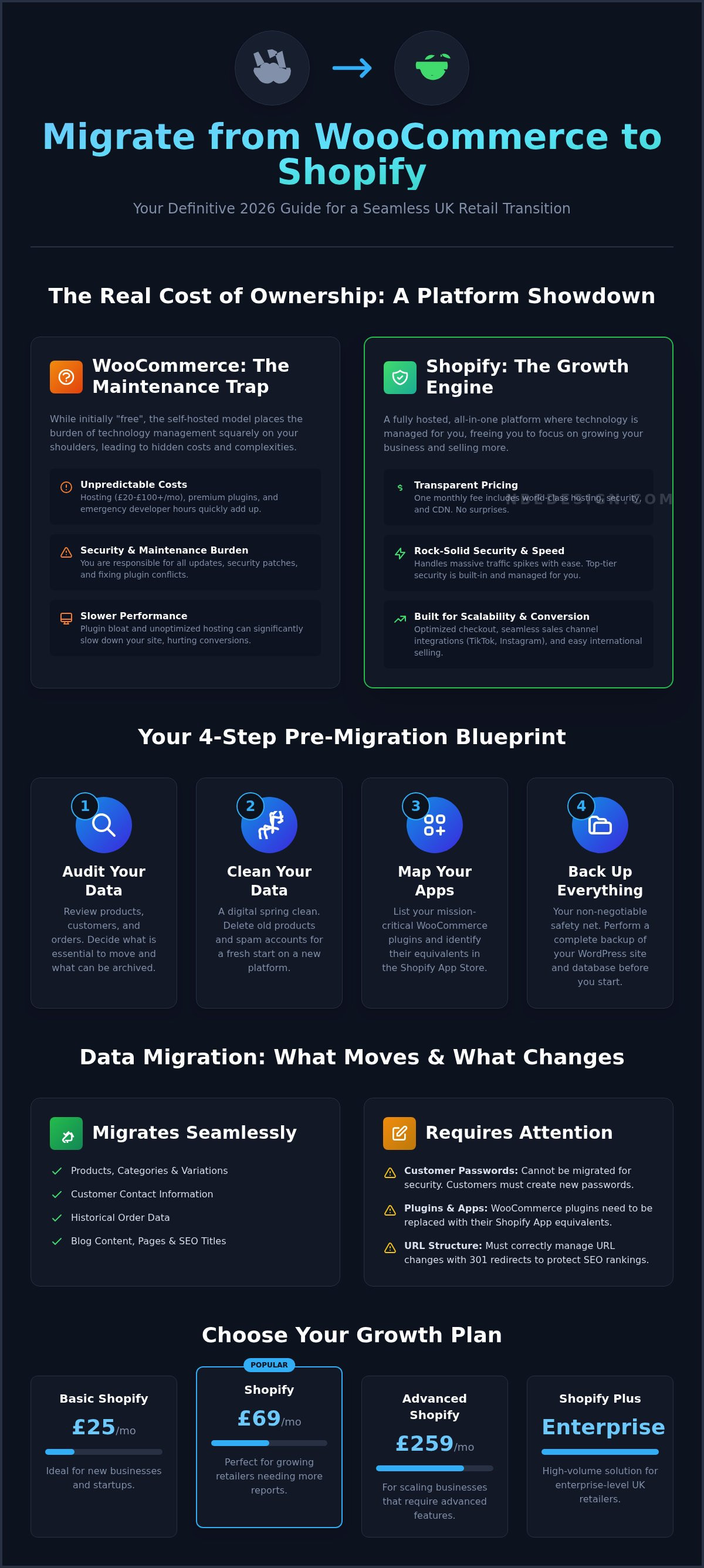
Many WooCommerce users are drawn in by its "free" label, but the true cost of ownership tells a different story. The 'free' plugin is just the start; you are responsible for a stack of ongoing and often unpredictable costs:
- Hosting: Reliable UK-based hosting can easily range from £20 to over £100 per month to handle serious traffic.
- Premium Plugins: Essential features for security, SEO, and performance often require paid annual subscriptions.
- Developer Hours: Fixing plugin conflicts, applying security patches, and managing updates requires technical expertise or costly developer time.
In contrast, Shopify’s transparent monthly fee includes world-class hosting that handles massive traffic spikes during sales events without faltering, top-tier security, and an entire ecosystem built for stability.
Scalability and Conversion: The Shopify Advantage
Growth in modern e-commerce is about more than just traffic; it's about converting that traffic and expanding your reach. Shopify excels here with its world-renowned, conversion-focussed checkout process, proven to reduce cart abandonment. As you look to scale, Shopify makes it effortless to integrate new sales channels like TikTok, Instagram, and the Shop App directly into your dashboard. For UK businesses with global ambitions, Shopify Markets provides a streamlined solution for international selling-a task that often requires a complex and costly multi-site setup on WordPress. This future-proof scalability is a key driver for making the move.
Preparing Your Store for a Seamless Migration
A successful migration is built on a foundation of careful preparation. Before you migrate from WooCommerce to Shopify, investing time in auditing and cleaning your existing data will prevent significant headaches later. This preparatory phase is your most important task, ensuring a smooth, efficient, and rock-solid transition to a platform designed for growth.
Start by taking these critical first steps:
- Audit Your Current Data: Review your products, customer lists, historical orders, and blog content. Decide what is essential to move and what can be archived.
- Clean Up Your Data: This is the perfect opportunity for a digital spring clean. Delete old, discontinued products and remove inactive or spam customer accounts to ensure you only migrate valuable, clean data.
- Map Your Apps: WooCommerce plugins don't transfer to Shopify. List your mission-critical plugins (for subscriptions, loyalty, reviews, etc.) and identify their equivalents in the Shopify App Store.
- Back Up Everything: Before beginning any migration process, perform a complete backup of your WordPress site and WooCommerce database. This is your non-negotiable safety net.
Data Mapping: What Moves and What Stays?
Understanding how your data translates is key. WooCommerce product 'attributes' and 'variations' map cleanly to Shopify's 'options' and 'variants', making product transfers straightforward. However, for security compliance, customer passwords cannot be migrated. Your customers will need to create new passwords on your Shopify store. You can also migrate historical order data, but it's wise to consider how much history is truly necessary for day-to-day operations.
Choosing Your Shopify Plan and Setting Up Your Account
With the latest e-commerce statistics showing continued growth in the UK market, selecting a plan that can scale with you is paramount. Shopify offers several tiers: Basic Shopify (£25/month) is ideal for new businesses, Shopify (£69/month) suits growing retailers with its enhanced reporting, and Advanced Shopify (£259/month) is for scaling businesses needing advanced features. For high-volume UK retailers, Shopify Plus provides an enterprise-level solution. Navigating these options can be complex, which is why partnering with a Shopify Expert UK can ensure you select the most cost-effective and future-proof plan for your business needs.
Three Methods to Migrate from WooCommerce to Shopify
Once you’ve decided to move your business to Shopify, the next critical question is how. The path you choose will depend on your budget, timeline, and the complexity of your store's data. Each method to migrate from WooCommerce to Shopify comes with its own set of trade-offs in terms of cost, time, and technical skill required.
Here’s a quick comparison to help you decide:
-
Manual Method: Best for very small stores (fewer than 50 products). It involves manually copying and pasting data.
- Cost: Free (your time).
- Time: Very high.
- Difficulty: Low, but extremely tedious and prone to human error.
-
App-Based Method: A middle-ground solution using third-party apps to automate the transfer.
- Cost: Low to moderate (from free to a few hundred pounds).
- Time: Medium.
- Difficulty: Medium, requires careful data mapping and verification.
-
Professional Method: Hiring a Shopify Expert to manage the entire process.
- Cost: Higher initial investment.
- Time: Very low (for you).
- Difficulty: None for you; the experts handle everything.
Using the Shopify Store Migration App
Shopify’s own Store Migration app is a great starting point for simple stores. The process involves using a WordPress plugin to export your WooCommerce data into an XML file. You then upload this file into the app on your Shopify store, where you'll map fields like product titles, SKUs, and customer details. Be vigilant for common errors, such as product variants not importing correctly or images failing to transfer, which often require manual cleanup.
Advanced Migration with Matrixify
For more complex data sets, an app like Matrixify is the professional's choice for a DIY migration. Its power lies in its ability to handle custom data, such as metafields created by WooCommerce plugins, which standard importers often miss. A crucial feature is the "Dry Run" capability. This allows you to simulate the entire import process, identify potential errors in a detailed report, and fix them before committing any changes to your Shopify store, ensuring a much cleaner final result.
Why a Managed Migration is Often the Safest Choice
While apps are powerful, they cannot replicate the strategic oversight of a seasoned expert. Professional Shopify Migration Services handle complexities that apps simply can't, such as custom-coded logic, complex customer group rules, or intricate third-party integrations. An expert team doesn't just move data; they verify its integrity post-import, ensuring every customer record and order history is perfectly intact. This managed approach is the surest way to achieve the scalability with lower operational costs that Shopify promises, by implementing a rock-solid cutover plan that reduces store downtime to virtually zero.
Protecting Your SEO and Design During the Switch
Let's address the biggest concern for any retailer planning a platform change: losing hard-earned search engine rankings. It’s a valid fear, but one that can be completely mitigated with a careful plan. When you migrate from WooCommerce to Shopify, the underlying URL structure of your site changes-for example, from /product/your-item to /products/your-item. Without a roadmap for search engines, this change can lead to broken links and a drop in traffic. The key is to manage this transition proactively, preserving your SEO authority while seizing the opportunity to enhance your brand's visual identity.
The Ultimate SEO Migration Checklist
To protect your organic traffic, a methodical approach is non-negotiable. As Shopify Experts, we follow a rock-solid process to ensure a seamless SEO transition. Your checklist should include:
- URL Mapping: Before you begin, export all your WooCommerce URLs and map each one to its new Shopify equivalent in a CSV file. This is your master blueprint for redirects.
- Implementing 301 Redirects: Use Shopify’s built-in URL Redirects feature or a dedicated app to implement permanent 301 redirects. This tells search engines the page has moved, passing along its ranking power, or "link juice."
-
Post-Launch Actions: Once your new Shopify store is live, submit your new
sitemap.xmlfile to Google Search Console and monitor for any crawl errors.
Upgrading Your Store Design
While it might be tempting to replicate your old design, a platform migration is the perfect moment to upgrade, not just copy. This is your chance to build a faster, more intuitive, and conversion-focussed customer experience. A modern, high-performance Shopify 2.0 theme provides unparalleled flexibility and speed, which are crucial ranking factors. For a truly professional finish that aligns with your growth goals, investing in Business Graphic Design can transform your brand's presence, ensuring your new store not only functions perfectly but also looks the part. By combining a meticulous SEO plan with a strategic design refresh, your move to Shopify becomes a powerful step forward for your business.
Post-Migration: Scaling Your UK Retail Business
You’ve successfully launched your new Shopify store-an excellent achievement. But the work doesn't stop once you migrate from WooCommerce to Shopify. The real journey of scaling your UK retail business begins now. The first crucial steps involve configuring your store for the UK market: setting up accurate shipping zones for Royal Mail or other couriers and ensuring your tax settings correctly handle VAT. This foundation is essential for a smooth customer experience from day one.
With the technical setup complete, your focus can shift to growth and efficiency. Shopify is more than just an online storefront; it's a powerful, unified commerce platform designed to grow with you.
Unifying Retail with Shopify POS
For retailers in the North East and across the UK with a physical presence, Shopify POS is a game-changer. It seamlessly syncs your online store with your brick-and-mortar shop, creating a single source of truth for your entire business. By implementing the best till POS system for small shops, you can manage stock across all locations in real-time, preventing overselling and streamlining inventory management. Furthermore, unified customer profiles allow you to track purchases both online and in-store, paving the way for targeted marketing and robust loyalty programmes.
Continuous Improvement and Growth
Growth is an ongoing process of refinement. Shopify’s built-in analytics provide invaluable data, helping you understand customer behaviour and identify potential conversion bottlenecks on your site. However, interpreting this data and implementing effective changes can be challenging. This is where ongoing support from a certified Shopify Expert becomes a rock-solid investment. Through monthly support retainers and performance audits, we help you leverage Shopify's marketing tools, optimise your store, and ensure your business is always moving forward.
Your decision to migrate from WooCommerce to Shopify was about building a better future. Now, it's time to capitalise on that decision. Make the switch with confidence and future-proof your business.
Make Your Move to Shopify with Confidence
Making the switch from WooCommerce to Shopify is more than just a platform change; it's a strategic investment in the future of your UK retail business. As we've explored, the key to success lies in meticulous preparation, choosing the right migration method, and implementing a robust post-launch plan to protect your SEO and accelerate growth.
While the process to migrate from WooCommerce to Shopify can seem complex, the rewards-from streamlined operations to enhanced scalability-are significant. You don't have to navigate this pivotal transition alone. As Certified Shopify Experts since 2006, our North East UK-based team has a proven track record of executing flawless, zero-downtime migrations for retailers just like you.
Let us handle the technical complexities so you can focus on what you do best: growing your business. Ready to migrate? Contact our Shopify Experts today for a seamless transition. Your future on Shopify is bright, and we're here to help you get there.
Frequently Asked Questions About Migrating from WooCommerce to Shopify
How long does it take to migrate from WooCommerce to Shopify?
The timeline for a migration varies depending on your store's size and complexity. A small store with a few hundred products might take a few days to a week. However, a larger, more complex store with thousands of products, extensive order history, and custom features could take several weeks. As Shopify Experts, we carefully plan each stage, from data transfer to design implementation, to ensure a smooth and efficient transition with minimal disruption to your business operations.
Will I lose my SEO rankings if I move to Shopify?
Losing SEO rankings is a common concern, but it's entirely avoidable with a strategic approach. The key is implementing a comprehensive 301 redirect plan, which maps all your old WooCommerce URLs to their new Shopify counterparts. This tells search engines like Google that your pages have permanently moved, transferring your hard-earned authority. A well-executed migration can actually become an opportunity to improve your SEO, thanks to Shopify's clean code and built-in features.
Can I migrate my WooCommerce customer passwords to Shopify?
For security reasons, customer passwords cannot be migrated. Passwords are encrypted and platforms like Shopify do not allow them to be transferred directly. While all other customer data (names, emails, addresses) is moved across, your customers will need to create a new password when they first log into your new Shopify store. This is standard industry practice and ensures the highest level of security for their personal data, building trust in your new platform.
What happens to my WooCommerce order history?
Your valuable order history can absolutely be brought over to your new Shopify store. All essential data, including customer information, products ordered, prices, and dates, can be successfully migrated. This ensures you retain a complete record for customer service, accounting, and business analysis. Having this historical data accessible within the Shopify admin from day one provides a seamless transition for you and your team, with no loss of crucial business intelligence.
Is Shopify more expensive than WooCommerce for a UK business?
While WooCommerce's core software is free, the total cost often exceeds Shopify's. With WooCommerce, you pay separately for hosting, security certificates, premium plugins, and developer support, which can quickly add up. Shopify plans start from a clear monthly fee (e.g., Basic Shopify at £25/month) which includes rock-solid hosting, security, and support. For many UK businesses, Shopify's predictable pricing model provides a lower and more manageable total cost of ownership.
Can I keep my current domain name when I switch to Shopify?
Yes, you can and absolutely should keep your existing domain name. Your domain is a core part of your brand identity, and the process of connecting it to Shopify is straightforward. Once your new store is ready to launch, you simply need to update the DNS settings with your domain registrar to point to Shopify's servers. Your customers will experience a seamless transition, visiting the same web address they've always used without any interruption.
Do I need a developer to migrate from WooCommerce to Shopify?
While tools exist for basic data transfers, engaging a Shopify Expert is highly recommended to properly migrate from WooCommerce to Shopify. An expert ensures data integrity, handles the crucial SEO redirect mapping, and customises your new theme to match your brand. Investing in professional help prevents costly errors, minimises downtime, and guarantees a smooth, future-proof transition, allowing you to focus on running your business with confidence from day one.
Can Shopify handle my UK VAT requirements automatically?
Yes, Shopify is fully equipped to handle UK VAT requirements. The platform has built-in tax settings that allow you to automatically charge the correct VAT rate on your products. You can configure your store to be VAT-registered and set tax rules for the UK and other regions. Shopify can also manage how prices are displayed-either inclusive or exclusive of VAT-ensuring your store remains compliant with UK regulations and provides a clear checkout experience for your customers.

- Posted in:
- Data Migration
- eCommerce
- migrate from woocommerce to shopify
- Platform Migration
- SEO Migration
- Shopify
- Shopify Guide
- UK Retail
- WooCommerce