Skip to content
Product Photography: The Ultimate Guide to Boosting E-commerce Sales
-
3027 words · 15 min read
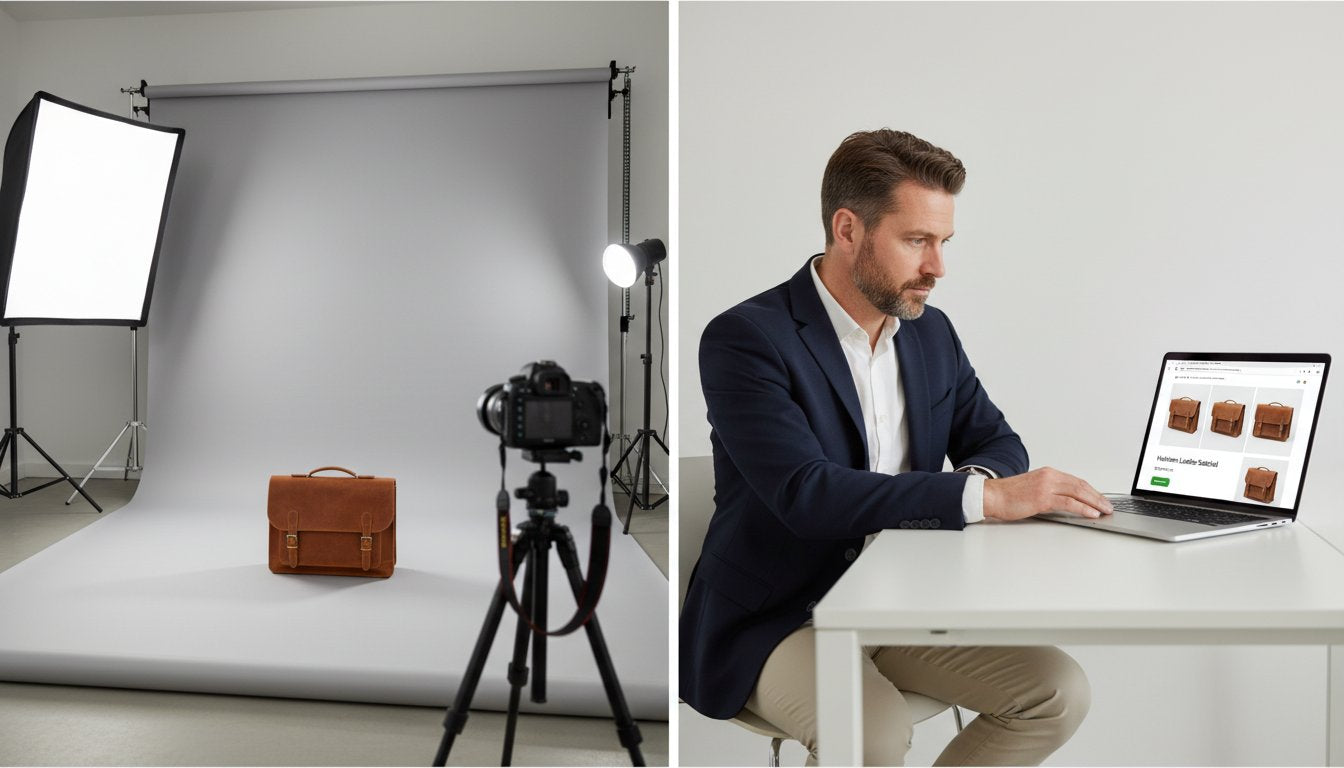
You have an incredible product, but do your online photos truly do it justice? It’s a common and frustrating challenge for many e-commerce business owners: your images feel amateur, you’re unsure what shots you actually need, and those hard-won photos aren't translating into sales. In the competitive world of UK e-commerce, the crucial difference between a customer adding to their basket and clicking away often comes down to one powerful element: professional product photography.
This guide is designed to bridge that gap and transform your images from a point of weakness into your most effective sales tool. We’ll provide a clear, conversion-focused strategy to help you master your visual merchandising. You will discover the exact types of photos that build customer trust, how to create a definitive shot list for every item, and how to make an informed decision between a cost-effective DIY setup and hiring a professional. Most importantly, we’ll show you how to display these powerful new assets on your online storefront to maximise conversions and build a brand that looks as good as it is.
Key Takeaways
- High-quality images act as your digital storefront, building crucial customer trust and reducing purchase anxiety to directly boost your conversion rate.
- Move beyond the basic white-background shot by mastering the seven essential photo types needed to tell a complete and compelling product story.
- Learn how to decide between DIY and professional product photography, ensuring you make the most cost-effective choice based on your budget, product, and brand goals.
- Discover how to optimise your Shopify product pages, from image sizing to gallery layout, to ensure your photos are displayed for maximum impact and sales.
Why High-Quality Photography is Non-Negotiable for Conversions
In the competitive world of eCommerce, your product photos are your digital storefront. Before a customer reads a single word of your carefully crafted description, they see your images. This first impression is powerful and immediate, and it can be the deciding factor between a sale and a bounce. Investing in professional product photography isn't an expense; it's a direct investment in your brand's growth and one of the most efficient ways to increase your Shopify sales.
High-quality visuals are your most effective tool for building a rock-solid foundation of trust with potential customers. For someone who has never purchased from you before, clear, detailed, and professional images reduce purchase anxiety by providing tangible proof of your product's quality. They work tirelessly to:
- Build Trust and Credibility: Polished images signal a professional, reliable brand that cares about its products and customers.
- Communicate Value: Great photos showcase the materials, craftsmanship, and key features that make your product worth its price, answering customer questions visually.
- Reduce Return Rates: By setting accurate expectations of size, colour, and texture, you ensure customers are happy with what they receive, which directly cuts down on costly returns.
- Justify Your Pricing: Premium photography elevates your product's perceived value, making it easier to command a higher price point and stand out from competitors who cut corners.
The Psychology of Visuals in Online Shopping
The human brain is hardwired to process images around 60,000 times faster than text. This is why a compelling product photo can trigger an emotional response and create desire long before a customer has read the specifications. High-quality visuals help shoppers visualise themselves owning and using your product, bridging the gap between the digital and physical worlds. Conversely, poor photos-blurry, poorly lit, or inconsistent-can instantly signal a low-quality product or an untrustworthy business.
Data-Backed Impact on Your Bottom Line
The link between image quality and sales is not just theoretical; it's proven. Industry studies consistently show that upgrading from amateur to professional photos can significantly lift conversion rates. Furthermore, in an era dominated by Instagram and Pinterest, striking product photography is essential for social media engagement and shareability. These images become brand assets that improve perception, foster customer loyalty, and drive tangible, long-term growth for your Shopify store.
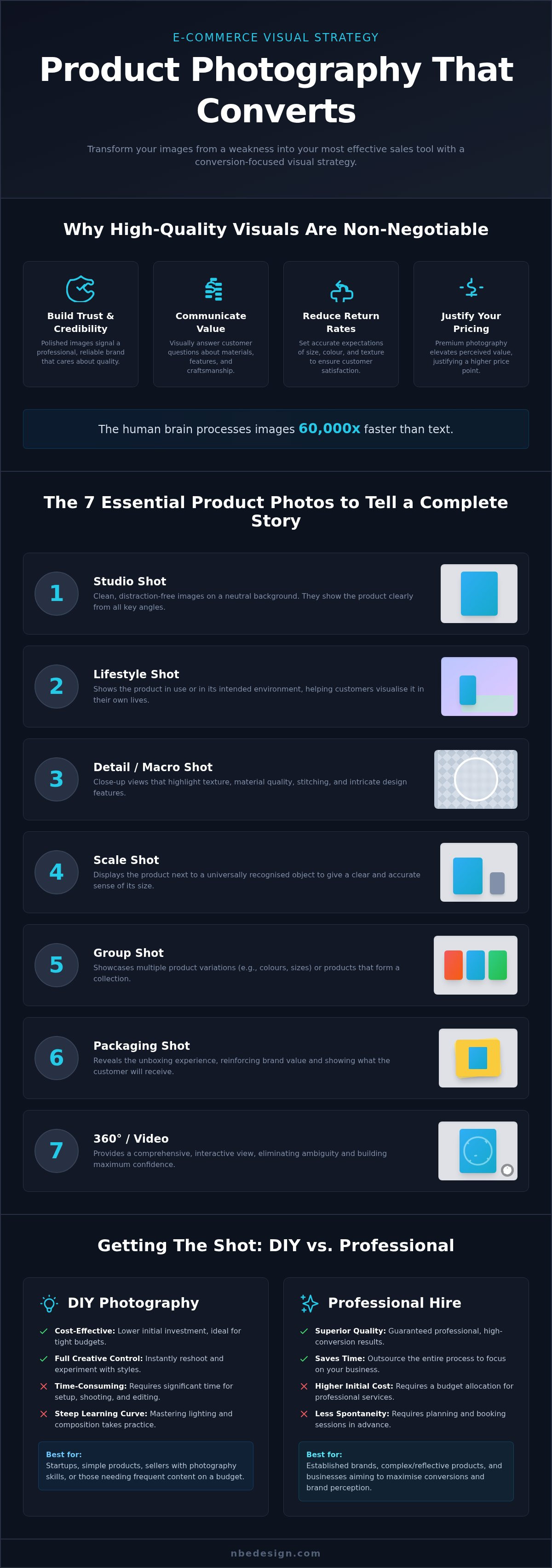
The 7 Essential Types of Product Photos Every Store Needs
To drive conversions on your Shopify store, you need to tell a complete visual story. While a simple shot on a white background is a start, effective product photography goes much further to build trust and answer customer questions before they're even asked. Think of this list as a comprehensive checklist for your next photoshoot-a brief for yourself or your photographer to ensure you capture every asset needed to turn browsers into buyers. To execute these shots effectively, it's crucial to master essential photography principles like composition and lighting.
Studio & Lifestyle Shots
These two categories form the foundation of any high-performing product page. They work together to both inform and inspire your customers, covering the most critical aspects of the decision-making process.
- Studio Shots: These are your clean, distraction-free images, typically on a white or neutral background. Their purpose is to show the product clearly from all angles. Capture the front, back, sides, and any unique features. This is your product's official portrait.
- Lifestyle Shots: This is where you bring your product to life. Show it in use, in its intended environment. A lifestyle shot helps customers visualise the item in their own lives, creating an emotional connection that a studio shot cannot. For inspiration on how to capture powerful, story-driven images, the portfolio from Boutique Weddings showcases exceptional emotional storytelling that can be adapted for lifestyle product shots.
Detailed & Scale Shots
Once a customer is interested, they'll look for details to confirm quality and suitability. These next images are designed to answer specific questions about materials, craftsmanship, and dimensions, helping to manage expectations and reduce returns.
- Detailed/Macro Shots: Get close up. Highlight the texture of the fabric, the quality of the stitching, the finish on the material, or intricate design elements. These shots build confidence and justify your price point.
- Scale Shots: Show your product next to a universally recognised object to give a clear sense of its size. For smaller items, a £1 coin or a smartphone works well. For larger items, show it being held or next to a person.
Group, Process & Packaging Shots
Finally, these shots add another layer to your brand story and help with upselling. They provide context beyond the individual product, showcasing your brand's range, values, and the customer experience.
- Group Shots: Display all available variations-like different colours or sizes-in a single image. This is also perfect for showing bundles or kits, simplifying the shopping process and encouraging larger orders.
- Process Shots: A 'behind-the-scenes' look at how your product is made can be incredibly powerful. It highlights craftsmanship, ethical production, and the care that goes into each item.
- Packaging Shots: Showcase the unboxing experience. High-quality, branded packaging is a significant selling point, especially for gifts or luxury goods. An attractive packaging shot can seal the deal.
Getting the Shot: A Practical Guide for Store Owners
Once you understand the fundamentals, it's time to capture your images. When it comes to your store's product photography, you have two primary paths: a Do-It-Yourself (DIY) approach or hiring a professional. The right choice is a strategic business decision, hinging on your budget, the complexity of your products, and your technical confidence. There is no single correct answer, but making an informed choice is essential for your brand's growth.
We'll outline the basics for both routes to help you decide. Even if you plan to hire an expert, understanding the core components will empower you to write a more effective brief and get better results, ensuring your investment pays off.
The DIY Photography Starter Kit
Starting out doesn't require a studio full of expensive gear. With a few key items, you can achieve clean, conversion-focused images that build a rock-solid foundation for your Shopify store.
- Camera: A modern smartphone is more than capable. The latest models have excellent cameras that can produce sharp, high-resolution images perfect for web use.
- Lighting: Natural light is your best friend. Position your setup near a large window to get soft, diffused light that minimises harsh shadows. Avoid direct, midday sun.
- Background: Keep it simple. A large sheet of white paper or poster board curved up a wall (a 'sweep') creates a seamless, professional-looking background that removes distractions.
- Stability: A tripod is non-negotiable. Even the slightest handshake can cause blur. A basic smartphone tripod is an affordable investment that dramatically improves image sharpness and consistency.
How to Hire the Right Professional Photographer
If your products are complex (like jewellery or reflective items) or you're ready to scale, investing in a professional can elevate your brand. How do you find the right creative partner?
- Where to Find Them: Start with creative directories, search for local photographers on Instagram using hashtags like #UKproductphotographer, or ask for recommendations in local business networks.
- Check Their Portfolio: Look for consistency in lighting and style. Most importantly, seek out experience relevant to your products. If you sell clothing, find a photographer with a strong fashion portfolio.
- Create a Detailed Brief: A professional is not a mind reader. Provide a clear shot list (detailing every angle you need), a style guide (mood, colours, tone), and visual examples of what you want to achieve.
- Understand Pricing: Costs vary, but common models in the UK include per-image (from £5 - £50+ depending on complexity), per-hour, or a day rate (often starting from £350-£500). Always get a clear quote upfront.
Best Practices for Product Images That Actually Convert
Capturing high-quality images is a crucial first step, but it's only half the battle. To turn browsers into buyers, your photos must be presented consistently and optimised for performance. Following a clear set of best practices ensures your entire storefront looks professional, builds trust, and provides a seamless user experience. These rules are fundamental whether you handle your product photography in-house or collaborate with a professional.
Consistency across your product pages, collections, and marketing materials doesn't just look good-it builds a strong, recognisable brand that customers remember.
Create a Visual Style Guide
A visual style guide is your rulebook for every photoshoot. It removes guesswork and ensures every image contributes to a cohesive and professional brand identity. By defining these elements upfront, you streamline future photoshoots and make it easier to maintain standards, even as your product line grows. Your guide should clearly define:
- Lighting: Will you use bright, natural light or a more dramatic, studio-lit look?
- Backgrounds: Stick to a specific colour palette or type of background (e.g., plain white, textured wood, lifestyle setting).
- Composition: Establish rules for product placement, angles, and zoom levels.
- Editing Style: Define post-production adjustments for colour, contrast, and tone.
A consistent visual style is a key part of your overall business graphic design and is essential for building a premium brand feel.
Optimise Images for Web Performance
Even the most stunning product photo can hurt your sales if it's not optimised for the web. Large image files are a primary cause of slow-loading websites, and a delay of even a few seconds can cause potential customers to leave. To maximise performance and improve your SEO, you must focus on optimisation.
Start by compressing your images using tools like TinyPNG or Shopify’s built-in features, which reduce file size without a noticeable loss in quality. Furthermore, pay attention to your file names. Instead of a generic name like ‘IMG_1234.jpg’, use a descriptive, keyword-rich name such as ‘mens-navy-cashmere-scarf.jpg’. This simple step helps search engines understand what your image is about, improving your visibility in image search results and supporting your overall product photography strategy.
Showcasing Your Photos: Optimising Your Shopify Product Page
You’ve invested time and effort into creating stunning images. The final, critical step is presenting them effectively. Your investment in high-quality product photography deserves a platform that does it justice, and this is where your Shopify store's design becomes paramount. A clean, intuitive, and visually-led product page can transform great photos into an incredible, conversion-focused experience for your customers.
Think of your product page as the gallery for your work. The layout, features, and user experience all contribute to how customers perceive your products. A clunky or slow-loading page can undermine even the most professional images. By optimising this space, you empower customers to explore your visuals with ease, building the confidence they need to make a purchase.
Key Shopify Theme Features for Photography
When selecting or customising a Shopify theme, prioritising features that enhance visual storytelling is essential. A great theme should act as a seamless frame for your images, not a distraction. Look for these core functionalities:
- High-Resolution Image Support: Your theme must display crisp, clear images without compromising on speed. A built-in zoom function allows customers to inspect details, which is crucial for building trust and reducing returns.
- Flexible Image Galleries: Customers expect to see a product from multiple angles. Your theme should support a gallery format that is easy to navigate, allowing for a mix of lifestyle shots, white background images, and detail close-ups.
- Integrated Video Support: Product videos are a powerful tool for demonstrating usage, scale, and features. A modern theme should allow you to embed videos directly into the product gallery for a seamless viewing experience.
- Mobile-First Design: With the majority of traffic coming from mobile devices, your product photography must look flawless on smaller screens. A responsive, mobile-first design ensures your images are impactful, no matter the device.
Advanced Tactics and Expert Help
Ready to take your product pages to the next level? Advanced features can create a truly immersive shopping experience. Consider using Shopify apps to integrate 360-degree product views or even augmented reality (AR) that lets customers visualise products in their own space.
Another powerful tactic is incorporating user-generated content. Displaying photos from happy customers on your product pages acts as powerful social proof, building an authentic connection with new shoppers. Implementing these advanced features to work flawlessly often requires technical expertise. A certified Shopify expert can help you integrate these solutions seamlessly, ensuring your store is both beautiful and functional. For inspiration on how powerful design can elevate a brand, explore our portfolio of stunning Shopify stores we have built for retailers across the UK and beyond.
Transform Clicks into Customers with Flawless Product Photography
As we've explored, compelling visuals are the cornerstone of a successful e-commerce business. They are no longer a 'nice-to-have'; they are a non-negotiable tool for building customer trust and driving conversions. By implementing a diverse range of high-quality images and optimising them effectively on your product pages, you create an online shopping experience that truly sells.
Getting the images right is a huge step, but displaying them on a platform built for growth is just as critical. A powerful image on a poorly designed page loses all its impact. As Certified Shopify Experts based in the North East UK, we specialise in crafting conversion-focused online stores that make your products the hero of the story.
Ready to ensure your product photography translates into tangible sales? Let's build a Shopify store that makes your products shine. Get in touch today. We're here to help you build a rock-solid foundation for your online growth.
Frequently Asked Questions
How much does professional product photography cost in the UK?
In the UK, costs for professional product photography can vary. You can expect to pay between £15 to £50 per image for simple studio shots on a white background. Many photographers offer half-day rates starting around £350 or full-day rates from £600 to £1,200+. This investment typically includes shooting, basic editing, and image rights for your Shopify store. Always clarify what’s included in a quote to ensure it aligns with your budget and business goals.
How many product photos should I have for each item?
For most Shopify products, we recommend a minimum of 3-5 high-quality photos. This should include a clear hero shot, images from different angles (front, back, and side), and a close-up to show texture or specific details. If relevant, an in-context or lifestyle photo can significantly boost conversions. The goal is to replicate the in-person shopping experience, giving customers the confidence to make a purchase by answering all their visual questions.
Can I really use my smartphone for my e-commerce photos?
Absolutely. Modern smartphone cameras are incredibly powerful and can produce excellent results for your Shopify store, especially when you're starting out. The key to success, however, isn't the camera but the technique. Ensure you have excellent, consistent lighting (natural daylight is best), use a tripod to avoid blur, and use editing apps to crop, brighten, and colour-correct your images. With the right setup, smartphone photos can look surprisingly professional and drive sales effectively.
What are the best background colours for product photography?
The industry standard for e-commerce is a pure white or light grey background. This approach ensures your product is the hero, eliminates distractions, and creates a consistent, professional look across your entire Shopify catalogue. This is a rock-solid foundation for any product photography strategy. For lifestyle shots or to convey a specific brand mood, you can experiment with muted colours, textures like wood or marble, or colours that complement your brand's palette for a more dynamic feel.
What's the difference between a lifestyle photo and a studio photo?
The key difference is context. A studio photo (or packshot) is typically shot on a plain, neutral background, like white or grey. Its sole purpose is to show the product clearly and accurately from multiple angles. In contrast, a lifestyle photo shows the product in use or in a styled environment. It tells a story, helps customers envision the item in their own lives, and builds an emotional connection, which is crucial for increasing conversions on your Shopify store.
How do I optimise my product photos for SEO?
Optimising your images for SEO is vital for visibility and site speed. First, compress your images to ensure fast page load times without sacrificing quality. Second, use descriptive file names before uploading (e.g., `brand-blue-cotton-shirt.jpg` instead of `IMG_1234.jpg`). Finally, write descriptive alt text for each image on Shopify. This not only helps search engines understand your product but also improves accessibility for visually impaired users, boosting your overall SEO performance.

- Posted in:
- conversion optimization
- DIY photography
- e-commerce
- photography tips
- product photography
- Shopify
- visual merchandising