Skip to content
WooCommerce to Shopify: The Complete Migration Guide for UK Retailers
-
2314 words · 11 min read

Are you feeling the growing pains of your WooCommerce store? If slow performance, constant maintenance, and security worries are holding your business back, you're not alone. For ambitious UK retailers, migrating to a more robust platform is a critical step towards scaling. This guide provides the business case, a step-by-step plan, and expert tips for a seamless and successful migration from WooCommerce to Shopify.
Why Migrate from WooCommerce to Shopify? The Business Case for Growth
Making the leap from WooCommerce to Shopify is a strategic decision that empowers you to focus on selling, not on technical upkeep. While WooCommerce's open-source nature offers flexibility, it often comes at the cost of performance, security, and time-the most valuable resources for a growing business. Shopify, a fully hosted platform, is engineered for commerce, providing the stability and integrated tools you need to scale with confidence.
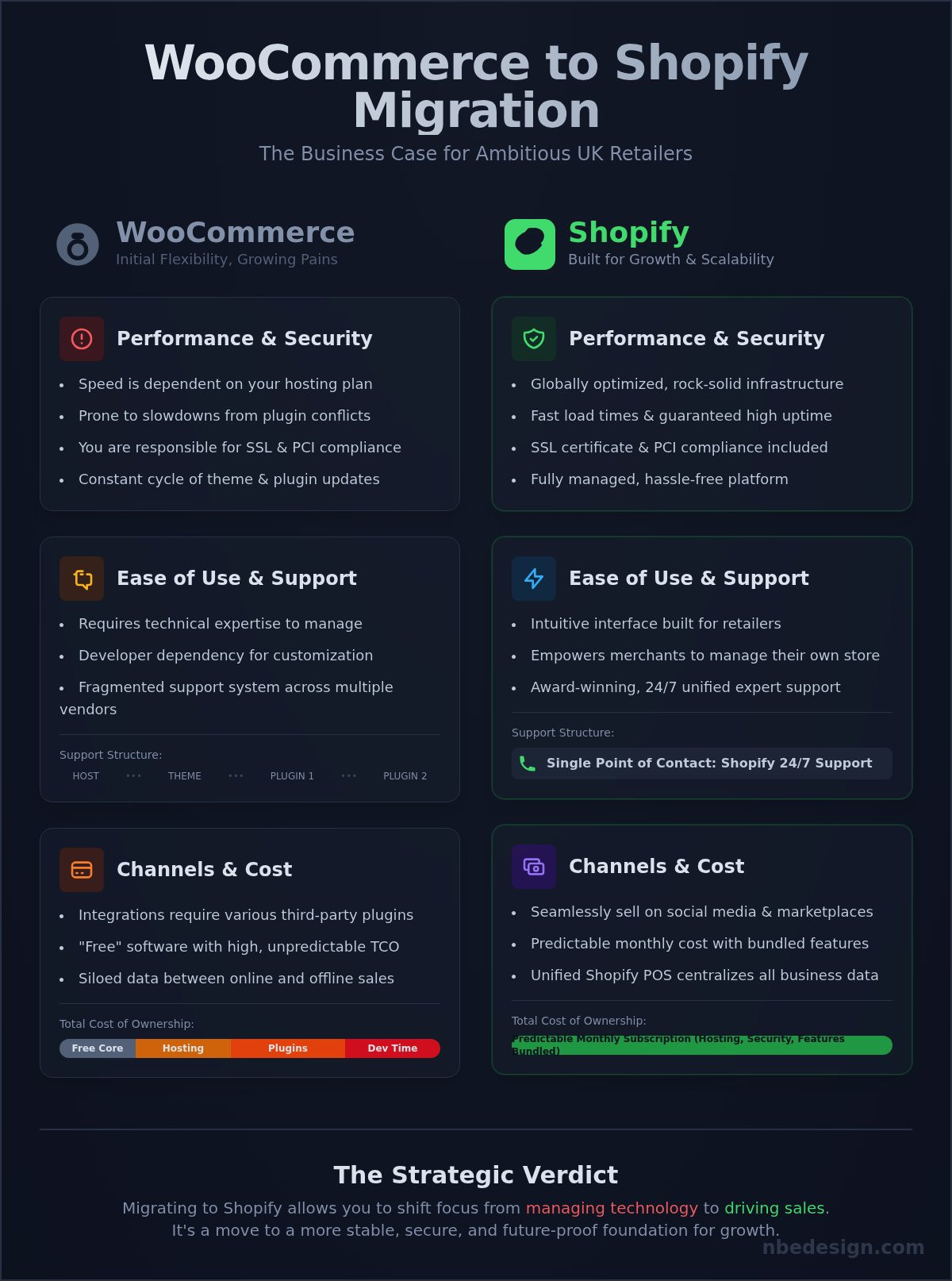
Let's break down the core differences:
| Feature | WooCommerce | Shopify |
|---|---|---|
| Hosting | Self-hosted. Performance depends entirely on your hosting provider and plan. | Fully hosted. Includes a global CDN for fast, reliable performance. |
| Security | Your responsibility. Requires security plugins, manual updates, and vigilance. | Built-in. Includes SSL certificate and full PCI DSS compliance. |
| Ease of Use | Requires technical knowledge for setup, updates, and troubleshooting. | Intuitive, user-friendly interface designed for retailers. |
| Support | Fragmented. Relies on hosting providers, theme/plugin developers, and forums. | Centralised 24/7 support via chat, email, and phone. |
| Total Cost | "Free" software, but requires paid hosting, themes, premium plugins, and developer time. | A predictable monthly subscription fee that covers hosting, security, and support. |
Performance and Security
With WooCommerce, your store's speed is tied to your hosting plan, and performance can suffer from plugin conflicts or traffic spikes. You are also responsible for the constant cycle of updating plugins, themes, and WordPress core to patch security vulnerabilities. For businesses committed to the platform, addressing these issues often involves partnering with a specialized agency; you can learn more about WordPress Hjemmeside og WebShop Webbureau WooCommerce to see how experts optimize these systems.
Shopify eliminates these headaches. Its globally hosted infrastructure is built for high-volume traffic, ensuring your store is fast and available 24/7. With built-in SSL and automatic PCI compliance for secure payments, you can give your customers peace of mind without having to manage the technical details yourself.
Ease of Use and Support
Shopify's interface is designed for business owners, not developers. From adding products to running marketing campaigns, the entire experience is streamlined and intuitive. When you do need help, you have access to dedicated, 24/7 support from Shopify experts who understand eCommerce inside and out. This is a world away from the WooCommerce model, where you might find yourself juggling support tickets with your hosting provider, theme developer, and multiple plugin creators.
Integrated Sales Channels and POS
For modern UK retailers, selling extends beyond a simple website. Shopify is built for multi-channel commerce. You can seamlessly sell across social media platforms like Instagram and TikTok, list products on marketplaces like eBay, and unify it all with a physical store.
Shopify POS is a game-changer for businesses with a brick-and-mortar presence. It fully integrates your online and in-store operations, creating a single view of your customers, inventory, and sales data. This allows you to offer a seamless customer experience with features like click-and-collect, in-store returns, and unified loyalty programs.
Pre-Migration Planning: Your Essential 8-Point Checklist
A successful migration is 90% planning and 10% execution. This pre-migration phase is the most critical part of the entire process. A thorough audit of your existing store prevents data loss, minimises downtime, and ensures you hit the ground running on your new platform.
1. Data and App Audit
- Clean Your Data: Before moving anything, review your product, customer, and order data in WooCommerce. Remove old, irrelevant, or duplicate entries. A clean slate is a good start.
- List Your Plugins: Create a comprehensive list of every WooCommerce plugin and extension you currently use.
- Find Shopify Equivalents: For each essential plugin, identify its function (e.g., loyalty, subscriptions, reviews) and research the best equivalent app in the Shopify App Store.
- Define Data Scope: Decide what historical data is absolutely critical to migrate. While moving all past orders is possible, it can add complexity. Prioritise what you truly need for daily operations.
2. SEO and Content Strategy
- Map Your URLs: Use a crawling tool like Screaming Frog to create a complete list of all your current WooCommerce URLs (products, categories, pages, blog posts). This is vital for preserving your search rankings.
- Plan Your 301 Redirects: Shopify has a slightly different URL structure than WooCommerce. You must map every old URL to its new Shopify equivalent and implement 301 redirects. This tells search engines that your pages have moved permanently, transferring their SEO authority.
- Audit Your Content: Review all your pages and blog posts. Is the content still relevant? Is this a good opportunity to update or consolidate articles?
-
Review URL Structure: Familiarise yourself with Shopify's URL format (e.g.,
/products/product-name) and plan accordingly.
3. Design and Branding
- Replicate or Redesign? Decide whether you want to closely replicate your existing store's design or take this opportunity for a complete rebrand and a fresh look.
- Gather Your Assets: Collect all your branding materials in one place: high-resolution logos, brand fonts, and a list of your brand's specific hex colour codes.
- Explore Shopify Themes: Browse the Shopify Theme Store to find a theme that matches your brand's aesthetic and has the features you need. Many themes offer extensive customisation without needing to write any code.
The Migration Process: How to Move Your Data Safely
Once your planning is complete, it's time to transfer your store's data. There are three primary methods for migrating from WooCommerce to Shopify, each with its own set of pros and cons. Often, the best approach involves a combination of these methods.
What Data Gets Migrated?
It's important to understand what can and can't be moved automatically.
- Typically Migrates: Products (including images, descriptions, variants), product categories, customer data (name, email, address), basic order history, blog posts, and pages.
- Typically Does Not Migrate: Customer passwords (for security reasons), plugin-specific data, theme settings, and some complex order information.
Migration Method 1: Manual CSV Import
This is the do-it-yourself approach. You export your product and customer data from WooCommerce into CSV files, reformat them to match Shopify's template, and then import them into your new store.
- Pros: It's free, and you have complete control over every piece of data.
- Cons: It's incredibly time-consuming, requires technical skill, and carries a high risk of formatting errors that can lead to corrupted or incomplete data.
Migration Method 2: Using Automated Apps
There are many third-party apps available on the Shopify App Store (like Matrixify or Cart2Cart) that automate the data transfer process. These apps connect to both platforms via API and move the data for you.
- Pros: Much faster than a manual import and requires less technical expertise.
- Cons: Can become costly depending on the volume of data. You have less control over data mapping, and custom fields or plugin data can sometimes cause issues.
Migration Method 3: Hiring a Shopify Expert Agency
For a completely hands-off and secure migration, working with a certified Shopify Expert agency is the gold standard. A dedicated team manages the entire process, from planning and data transfer to SEO preservation and post-launch testing.
- Pros: Zero stress for you. Guarantees SEO preservation with a comprehensive redirect strategy. Experts can handle complex data and custom requirements.
- Cons: Requires a higher initial investment than DIY or app-based methods.
- As UK-based Shopify migration experts, we ensure a seamless switch so you can focus on your business. Talk to our Shopify migration experts to get started.
Top 4 Migration Pitfalls and How to Avoid Them
A successful migration is about more than just moving data from A to B. Many businesses stumble into common but avoidable traps that can cost them sales and search engine visibility.
Pitfall 1: Losing SEO Rankings
This is the biggest fear for most businesses, and for good reason. Failing to implement a thorough 301 redirect strategy means all the authority your old WooCommerce URLs have built up with Google will be lost. Customers and search engines will find "404 Page Not Found" errors, tanking your rankings.
-
How to Avoid It: Meticulously map every old URL to its new Shopify URL. After the migration, submit your new
sitemap.xmlfile to Google Search Console to encourage faster indexing. An expert-led migration ensures this critical step is handled flawlessly.
Pitfall 2: Data Loss or Corruption
Automated tools can sometimes misinterpret data fields. For example, WooCommerce "attributes" might not map cleanly to Shopify "tags" or "metafields," leading to lost product information.
- How to Avoid It: Perform a test migration with a small subset of your data first. Before going live, implement a "data freeze" on your WooCommerce store (stop taking orders for a short period) to prevent data from changing during the final transfer. Always verify all products, images, and customer data post-migration.
Pitfall 3: Extended Store Downtime
Poor planning can lead to your store being offline for hours or even days, resulting in lost sales and frustrated customers.
- How to Avoid It: The entire new store should be built and tested on a Shopify development store, which is not visible to the public. The final step is a simple "DNS switch," where you point your domain name from your old host to Shopify. This process results in near-instantaneous go-live with virtually zero downtime.
Pitfall 4: Post-Launch Functionality Issues
The migration isn't over when the data is moved. Many forget to configure the essential settings on the new platform, leading to a poor customer experience.
- How to Avoid It: Before you go live, thoroughly test every aspect of your new Shopify store. Configure your payment gateways and shipping settings. Ensure all your essential apps are installed and working correctly. Place several test orders to check the entire checkout process, from adding to cart to the confirmation email.
Life After Migration: Growing Your Business on Shopify
The migration is just the beginning. With the technical headaches of WooCommerce behind you, you can now leverage Shopify's powerful ecosystem to grow your business. This is where you turn your stable new platform into a high-performance sales engine.
Leverage the Shopify App Store
Replace your collection of clunky WooCommerce plugins with a curated selection of streamlined, vetted apps from the Shopify App Store. Focus on apps that directly improve the customer experience and drive conversions, such as tools for customer reviews, loyalty programs, advanced search, and email marketing.
Unify Sales with Shopify POS
If you have a physical retail location, now is the time to connect it seamlessly with your online store. With Shopify POS, you can manage your entire business-inventory, sales, and customer data-from one central hub. Offer modern retail experiences like click-and-collect, buy online return in-store, and browse in-store buy online.
Optimise and Scale for Success
Use Shopify's built-in analytics to gain deep insights into your customers' behaviour and your store's performance. The platform makes it easy to A/B test changes to your theme, product pages, and promotions to constantly improve your conversion rate. As your business grows, you have a clear upgrade path to Shopify Plus, an enterprise-level solution for high-volume merchants.
Ready to Make the Switch?
Migrating from WooCommerce to Shopify is a powerful move for any UK retailer ready to scale. By leaving behind the complexities of a self-hosted platform, you free yourself up to focus on what you do best: growing your brand and delighting your customers.
- Certified Shopify Experts based in the UK
- Proven track record with hundreds of successful migrations
- We handle the tech, so you can focus on your business
Ready for a seamless switch? Get your free Shopify migration quote today.
Frequently Asked Questions
How long does a WooCommerce to Shopify migration typically take? A typical migration can take anywhere from 2 to 6 weeks. The exact timeline depends on the complexity of your store, the amount of data being moved, and the extent of any design or custom functionality requirements.
How much does it cost to migrate from WooCommerce to Shopify? The cost varies widely. Using an automated app might cost a few hundred pounds. A fully managed migration by an expert agency is an investment that typically starts in the low thousands, depending on the scope of the project. This expert-led approach provides peace of mind and protects your SEO value.
Will I be able to keep my domain name after migrating to Shopify? Yes, absolutely. You will continue to own your domain name. During the go-live process, you will simply update your DNS settings to point your domain from your old hosting provider to Shopify.
Will my customer passwords be migrated from WooCommerce? No, customer passwords cannot be migrated. This is a security measure to protect your customers' data. After migration, you will need to invite your existing customers to create a new password for their account on your new Shopify store.
What happens to my WooCommerce subscriptions when I move to Shopify? Migrating active subscriptions is a complex process. It typically requires a specialised app on Shopify (like Recharge) and a careful plan to move billing information without interrupting service. This is an area where working with a migration expert is highly recommended.
Can I migrate my product reviews and ratings to Shopify? Yes. Most product review data can be exported from your WooCommerce plugin and then imported into a Shopify reviews app like Shopify Product Reviews, Loox, or Judge.me.
Is it possible to migrate my order history from WooCommerce? Yes, your order history can be migrated. This allows you to maintain a complete record of customer purchases for support and marketing purposes. The level of detail that can be migrated may vary depending on the migration method used.

- Posted in:
- woocommerce to shopify