Skip to content
Mastering Shopify POS Inventory Management: A 2026 Retailer’s Guide
-
3424 words · 17 min read

Have you ever had to call a customer to apologise because the "in-stock" item they bought online was actually sold ten minutes earlier at your physical till? It's a frustrating scenario that many retailers face when their systems don't talk to each other. Mastering Shopify POS inventory management is the only way to stop these errors and reclaim your time.
We understand that spending hours on manual stocktakes or wrestling with inaccurate data across different locations is exhausting. You didn't start a business to become a spreadsheet administrator. Our goal is to help you move beyond the stress of disconnected systems and build a retail operation that runs with precision and calm expertise.
In this 2026 guide, you'll learn how to unify your in-store and online stock to eliminate overselling for good. With online sales now making up a huge portion of the UK market, having a robust system is essential for any modern brand. We'll walk through setting up automated purchase orders and creating a single source of truth that allows you to focus on growth. Whether you're based in the North East or serving a global audience, these strategies will streamline your workflow.
Key Takeaways
- Establish a single source of truth for your stock to stop overselling and ensure your online and in-store levels match perfectly at all times.
- Discover how tools like Stocky and automated purchase orders can save you hours of manual work and reduce the risk of human error.
- Understand the critical differences between Lite and Pro versions to determine which level of Shopify POS inventory management is right for your business growth.
- Follow a structured five-step setup process, from auditing your current stock to configuring multiple locations for maximum accuracy.
- Learn why partnering with a certified specialist can simplify your transition and ensure your retail systems are professionally unified from day one.
What is Shopify POS Inventory Management?
A modern Point of Sale (POS) system does far more than just process payments at the till. In the Shopify ecosystem, it acts as a unified bridge between your physical shop floor and your digital storefront. Essentially, Shopify POS inventory management ensures that every time a customer buys a product in your Darlington boutique, your website instantly knows there's one fewer available for your customer in London. This real-time synchronisation is vital to prevent the dreaded scenario of overselling, which often leads to cancelled orders and frustrated shoppers.
Shopify POS inventory is the central nervous system for modern omnichannel retail. It connects three core pillars: the Shopify admin, where your master product data lives; the POS app, which handles the face-to-face transactions; and the Stocky integration, which provides the advanced forecasting and stock control needed to scale. By pulling from the same stock pool, you eliminate the need to reserve specific items for online orders, allowing your entire inventory to work harder for your business.
The Problem with Disconnected Systems
Many retailers still struggle with "ghost stock" where items appear in their system but aren't actually on the shelf. This usually happens when you're managing sales on a separate till and an e-commerce platform that don't talk to each other. Relying on manual spreadsheet updates or monthly stocktakes is a recipe for human error. It isn't just an admin headache; it directly impacts your bottom line and brand reputation. If a customer sees an item is out of stock online when it's actually sitting in your stockroom, you've lost a sale. Worse, if they buy something that isn't there, you damage the trust you've worked hard to build.
How the Shopify Ecosystem Unifies Your Data
The Shopify Admin serves as your command centre. It's where you create products, set prices, and manage stock levels across all your sales channels. When a sale happens via the POS app, the data travels back to this central hub instantly. This seamless flow of information is what makes Shopify POS inventory management so powerful for growing brands. You don't have to manually adjust figures at the end of the day because the system does it for you.
For retailers with multiple locations, this system is a game-changer. You can track stock levels at each individual shop or warehouse while maintaining a birds-eye view of your entire business. This visibility allows you to move stock between locations based on demand, ensuring you always have the right products in the right place. If you're looking to see this in action, we offer Shopify POS demos to help you visualise how these systems integrate into your daily workflow.
Key Features of Inventory Management in Shopify POS
Effective Shopify POS inventory management relies on more than just counting boxes; it requires intelligent tools that interpret your sales patterns. While the basic Shopify setup handles simple stock levels, the true power for retailers lies in advanced features that automate the heavy lifting. These tools move your business away from reactive replenishment and towards a proactive strategy that protects your margins.
Advanced Stock Tracking with Stocky
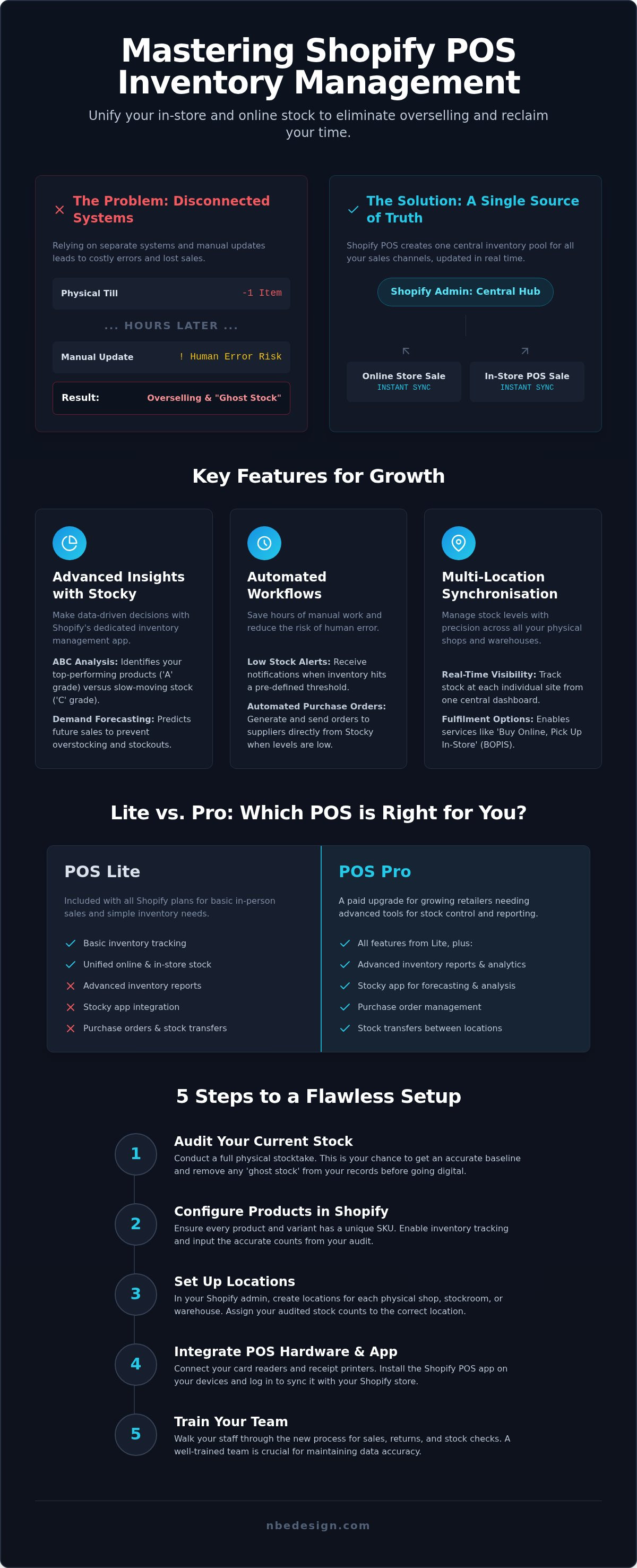
Stocky is Shopify's dedicated inventory management app, and it's an essential tool for any growing retailer. One of its most valuable features is ABC analysis. This categorises your stock into three grades: 'A' for your top 20% of products that drive the most revenue, through to 'C' for stale stock that is simply taking up space. By identifying these patterns, you can make informed decisions about what to reorder and what to discount.
The app also excels at demand forecasting. By analysing your historical sales data, it predicts how much stock you'll need for upcoming periods. This aligns with retail inventory management fundamentals by ensuring you aren't tying up too much capital in surplus stock while avoiding costly out-of-stock scenarios. When levels run low, Stocky can automatically generate purchase orders, saving you hours of manual data entry and reducing the risk of human error.
Multi-Location Synchronisation
Managing a single shop is one thing, but coordinating stock across multiple sites requires precision. Shopify POS allows you to assign stock to specific locations, such as a boutique in Darlington and a distribution warehouse in Newcastle. This visibility is crucial for modern retail trends like "Buy Online, Pick Up In-Store" (BOPIS). When a customer chooses to collect an item, the system decrements the stock from the specific shop's shelf, ensuring your online and physical counts remain perfectly aligned.
Stock transfers are equally streamlined. If your Newcastle warehouse has a surplus of a trending item that is sold out in Darlington, you can initiate a transfer within the system. This tracks the journey of the goods from "sent" to "received," maintaining a clear audit trail. You can also perform stock adjustments for damages or returns, ensuring your "single source of truth" is never compromised by undocumented changes. To ensure your multi-location setup is configured correctly, you can speak with our Shopify experts for a tailored implementation plan.
Finally, the integration of barcode scanning hardware turns the once-dreaded stocktake into a swift, digital process. Instead of ticking off items on a clipboard, staff can scan products directly into the POS app. This updates your Shopify admin instantly, providing an accurate, real-time reflection of your physical assets without the typical errors associated with manual counting.
Shopify POS Lite vs. POS Pro: Inventory Differences
Choosing between the two versions of the app is often the most critical step in refining your shopify pos inventory management strategy. While POS Lite is included with all standard Shopify plans, it's designed for simple, single-location setups where stock management is relatively straightforward. For retailers looking to scale or those managing high volumes of stock, POS Pro offers the professional tools required to maintain a single source of truth across every branch.
The fundamental difference lies in how much of the "heavy lifting" the software does for you. POS Lite relies heavily on the central Shopify admin for changes, whereas POS Pro empowers your staff on the shop floor to handle complex inventory tasks directly through the tablet interface. This decentralisation is what allows larger retail teams to operate with the speed and accuracy required in a modern retail environment.
Inventory Features Exclusive to POS Pro
The Pro version unlocks several features that are essential for serious stock control. Without these, your team will likely find themselves performing manual workarounds that lead to data discrepancies. The primary advantages include:
- Stock Transfers: Move inventory between shops or warehouses with full tracking from dispatch to receipt.
- Purchase Orders: Create and manage orders with suppliers directly within Shopify, ensuring your stock levels are updated as soon as goods arrive.
- Inventory Receiving: Use barcode scanners to check in new deliveries quickly and accurately, reducing "ghost stock" caused by manual entry errors.
- Advanced Reporting: Access deep-dive analytics such as sell-through rates and stock-on-hand reports to make data-driven buying decisions.
- Staff Permissions: Assign specific roles to your team, ensuring only authorised staff can perform stock adjustments or access sensitive sales data.
When Should You Upgrade to POS Pro?
If you're operating from more than one location, the upgrade is effectively mandatory. POS Lite doesn't support the stock transfer workflows needed to balance inventory between sites. You should also consider the move if you're spending more than a few hours a week on manual stocktakes or spreadsheet reconciliation. Constant errors in your stock levels are a clear sign that your business has outgrown the Lite version's capabilities. For a deeper look at how this fits into your wider digital strategy, read our Shopify POS: The Ultimate Guide to Unifying Your Retail and Online Store.
From a financial perspective, the POS Pro subscription costs £69 per month for each retail location. While this is an additional overhead, the return on investment comes from the administrative time saved. If the Pro features save your manager just four hours of admin work per month, the system has already paid for itself. For retailers on the Shopify Plus plan, this functionality is included for up to 20 locations at no extra cost, making it an easy choice for high-volume businesses looking to unify their operations.
5 Steps to Setting Up Your POS Inventory for Success
Implementing a robust system for shopify pos inventory management requires a methodical approach. It isn't just about turning on a piece of software; it's about building a reliable framework that supports your daily operations. A rushed setup often leads to data discrepancies that can take months to unpick. By following these five steps, you'll establish a "single source of truth" that scales with your business.
- Step 1: Audit and Clean: Start by auditing your current stock levels and cleaning your product data. This is the time to delete old SKUs and ensure every product has a unique barcode.
- Step 2: Configure Locations: Define your retail locations and warehouses in the Shopify Admin. Assign your initial stock counts to the specific site where they physically sit.
- Step 3: Integrate Stocky: Connect the Stocky app to manage your supplier profiles. Set your reorder points so the system can alert you when stock is running low.
- Step 4: Staff Training: Show your team how to use the POS interface for receiving stock. Accurate data depends on every delivery being scanned in correctly from day one.
- Step 5: The Baseline Stocktake: Perform a full, physical stocktake to establish your final baseline. This ensures your digital records perfectly match your physical assets.
Preparing Your Data for Migration
Clean data is the foundation of any successful retail system. You should use standardised SKUs that follow a logical pattern, making it easier for staff to identify products at a glance. Organising your products by type, vendor, and collection doesn't just help with navigation; it powers the advanced reporting you'll need for growth. When handling variants like size or colour, ensure each individual combination has its own barcode. This prevents "ghost stock" where one variant is sold but another is decremented from your records.
Hardware Considerations for Inventory
The right hardware turns a digital system into a practical tool. Choosing reliable barcode scanners for the shop floor is essential for fast, accurate receiving and stocktakes. You'll also need a high-quality label printer to create professional, scannable tags for products that arrive without them. The Shopify POS app is designed to run seamlessly on iPad or iPhone, allowing your staff to move around the stockroom freely while performing mobile stock counting. This mobility reduces the time spent on admin and keeps your team on the shop floor where they are needed most.
A professional setup ensures your business remains compliant with the 2026 HMRC regulations regarding data handling and sales suppression. If you're feeling overwhelmed by the technical transition, we can provide expert setup support to ensure your unified retail operation is configured for long-term stability.
Why Work with a UK Shopify Expert for Your POS Setup?
Setting up a unified retail system isn't just a technical task; it's a strategic move that dictates how your business will scale. While the platform is designed for ease of use, configuring a complex shopify pos inventory management system for multiple locations requires a level of precision that goes beyond standard documentation. A DIY approach often leads to data discrepancies, broken stock flows, or issues with product variants that can take months to resolve. By working with a certified expert, you eliminate these risks and ensure your transition is seamless and stress-free.
Our team at NB eCommerce & Design specialises in these technical transitions. We don't just provide a service; we act as a trusted guide through the entire process. This professional oversight is particularly important during migrations, where the risk of data loss or SEO disruptions is highest. We ensure your product data, customer records, and historical sales information move safely to the new system, creating a stable foundation for your growth. Our air of calm expertise aims to reduce the anxiety often associated with complex digital shifts.
Expert POS Demos and On-Site Support
We take great pride in our Darlington and Newcastle roots. While we serve a global client base, we find that many North East retailers value the opportunity to see the technology in person before committing. We offer Shopify POS demos and on-site visits in the North East to help you understand how the hardware and software will function on your specific shop floor. This local expert, global reach identity allows us to provide grounded, approachable support regardless of your business size.
This hands-on support is invaluable for businesses transitioning from legacy systems like Epos Now or Lightspeed. These platforms often have different data structures, and a direct migration requires careful mapping to ensure your Shopify admin remains clean. We handle this technical heavy lifting, allowing you to focus on your customers while we build your single source of truth. We've evolved alongside this technology since its inception, giving us a deep-rooted knowledge that serves as a unique competitive advantage for our clients.
Tailored Solutions for UK Retailers
The UK retail market has unique requirements that generic guides often overlook. From managing VAT settings to configuring regional shipping rates for online orders, your system needs to be tailored to the local landscape. Our managed experience promise means we take care of these intricate details for you. We ensure your inventory system grows with you, providing ongoing consulting to help you interpret the data and refine your buying strategy.
Choosing a professional implementation means you aren't just buying software; you're investing in long-term stability. If you're ready to unify your retail operations and stop wrestling with manual admin, contact our Shopify Experts today for a tailored POS strategy.
Future-Proof Your Retail Operations
Retail is evolving rapidly. By 2026, the lines between physical and digital storefronts have blurred almost entirely. Implementing professional shopify pos inventory management is no longer just a technical upgrade; it's the foundation of a resilient, modern business. You've seen how establishing a single source of truth prevents the frustration of overselling and how tools like Stocky can automate your most tedious administrative tasks. Whether you're starting with POS Lite or scaling with POS Pro, the focus remains on clarity, accuracy, and sustainable growth.
As Certified Shopify Experts based in North East England, we specialise in unifying online and in-store operations for retailers across the globe. We understand that technical transitions can feel intimidating, but you don't have to navigate them alone. Our grounded, supportive approach ensures your system is built for long-term stability so you can spend less time on spreadsheets and more time with your customers.
Ready to streamline your shop floor? Book a Shopify POS Consultation with Our UK Experts to start your managed transition today. Your more efficient, stress-free retail future is just one conversation away.
Frequently Asked Questions
Does Shopify POS automatically update my online store inventory?
Yes, Shopify POS is designed to synchronise your inventory in real-time across all sales channels. When a customer makes a purchase in your physical shop, the system immediately decrements that item from your total stock count. This ensures your online storefront reflects the correct availability instantly. By maintaining this single source of truth, you eliminate the risk of overselling products that have already been bought by walk-in customers.
Can I manage inventory for multiple shop locations with Shopify POS?
You can certainly manage multiple retail locations and warehouses through the Shopify admin. The system allows you to assign specific stock levels to each site, giving you a clear overview of your assets across your entire estate. If you use the POS Pro version, you also gain the ability to perform stock transfers between locations. This visibility is essential for balancing your inventory based on regional demand and maintaining operational efficiency.
What is the Stocky app and do I need it for my retail store?
Stocky is Shopify’s official inventory management app, included with a Shopify POS Pro subscription. It provides advanced tools like demand forecasting, ABC analysis, and automated purchase orders. While a basic setup might suffice for very small retailers, any business looking to scale will find Stocky invaluable. It helps you identify top-performing products and stale stock, ensuring your capital isn't tied up in items that aren't selling.
Is Shopify POS Pro worth it for inventory management?
For most growing retailers, the investment in POS Pro is highly beneficial for professional shopify pos inventory management. The Pro version unlocks critical features like purchase orders, stock transfers, and advanced reporting that aren't available in the Lite version. These tools significantly reduce the time spent on manual admin and minimise human error. If your business manages high stock turnover or operates from multiple sites, the efficiency gains usually outweigh the monthly subscription cost.
Can I use a barcode scanner with Shopify POS for stocktakes?
Yes, integrating a barcode scanner with your POS system is one of the most effective ways to streamline your stocktakes. Instead of manually counting items and recording them on paper, your staff can scan products directly into the Shopify POS app. This updates your records instantly and provides much higher accuracy. It’s a vital tool for receiving new deliveries and performing regular audits without disrupting your daily shop floor operations.
What happens to my inventory if I sell a product in-store and online at the same time?
Shopify's cloud-based architecture handles simultaneous transactions by processing them in the order they are received. Because the system updates in real-time, the stock level is adjusted immediately after the first sale is finalised. If you only have one item left and it sells at the till, the online listing will update to out of stock within seconds. This rapid synchronisation is the primary defence against overselling and maintaining customer trust.
How do I handle returns and exchanges in Shopify POS without messing up my stock levels?
Handling returns is straightforward within the POS app, which prompts you to restock the item or mark it as damaged. If the item is fit for resale, selecting the restock option automatically adds it back into your available inventory for both in-store and online customers. This ensures your stock counts remain accurate without manual adjustments. The system also tracks these changes, providing a clear audit trail for your end-of-year reporting.
Can NB eCommerce & Design help me migrate my inventory from another POS system?
Our team specialises in migrating retailers from legacy systems like Epos Now or Lightspeed to the Shopify ecosystem. As Certified Shopify Experts based in Darlington and Newcastle, we manage the entire data transfer process to ensure your product variants, SKUs, and stock levels remain intact. We focus on creating a unified retail operation that reduces your admin burden. You can contact us directly to discuss a managed, stress-free migration for your business.

- Posted in:
- E-commerce Tips
- Inventory Management
- Overselling
- Retail Guide
- Shopify POS
- shopify pos inventory management
- Shopify UK
- Stock Control
- Stocky App