Skip to content
Shopify Design Tips to Increase Sales: The 2026 Conversion Guide
-
3172 words · 15 min read
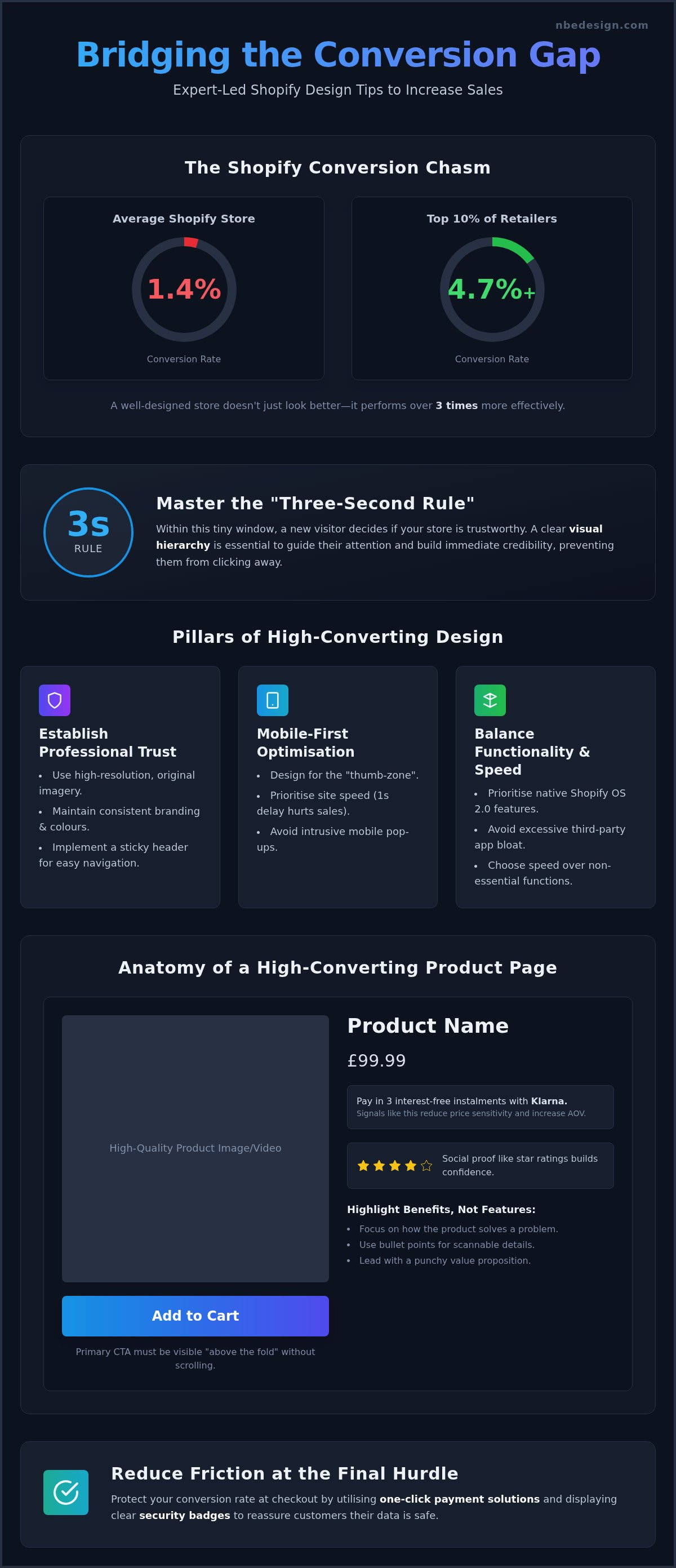
Did you know that while the average Shopify store converts at just 1.4%, the top 10% of retailers are achieving rates of 4.7% or higher? It's incredibly frustrating to watch your ad spend climb while sales remain stagnant, especially when you suspect your store looks a bit unprofessional compared to your biggest competitors. You might feel overwhelmed by the endless list of "must-have" apps, wondering which ones actually move the needle and which ones are simply slowing your site down.
We understand that building a profitable online presence should feel like a partnership, not a technical headache. This guide will show you how to bridge the gap by implementing expert-led Shopify design tips to increase sales and transform your store into a high-converting engine. We will explore everything from mobile-first UX optimisations to building immediate trust with UK shoppers, providing you with a clear checklist to boost your average order value and create a managed, low-stress retail experience.
Key Takeaways
- Master the "three-second rule" by implementing a clear visual hierarchy that builds immediate credibility with new visitors.
- Discover expert-led Shopify design tips to increase sales by refining your product page layouts and strategic button placement.
- Learn to balance functionality with site speed by prioritising native Shopify OS 2.0 features over excessive third-party app installations.
- Reduce friction at the final hurdle by utilising one-click checkout solutions and security optimisations to protect your conversion rate.
- Explore how unifying your online and in-store operations with Shopify POS can significantly increase long-term customer loyalty.
The Psychology of Shopify Design: Why First Impressions Drive Sales
In 2026, conversion-centric design is no longer a luxury; it's the foundation of every successful online retailer. It involves a systematic approach to Conversion rate optimization (CRO), where every element on your page serves a specific purpose. You aren't just making a site look "nice". You're building a path that leads a visitor to a purchase with as little friction as possible. By applying strategic shopify design tips to increase sales, you can turn casual browsers into loyal customers who feel confident in their choice.
The "Three-Second Rule" is a psychological benchmark. Within this tiny window, a visitor decides if your store is trustworthy. Visual hierarchy is your best tool here. Your headline, hero image, and primary call-to-action must be the first things they see. If your layout is cluttered, you increase the cognitive load on the user. They get overwhelmed and click away. A clean layout outperforms a busy one. It lets the brain process information without stress. This simplicity ensures that your message isn't lost in a sea of unnecessary graphics or competing banners.
Establishing Professional Trust in Seconds
Trust is built through professional craftsmanship. Generic stock photos are a red flag to modern shoppers; they suggest a lack of original effort. Instead, use high-resolution, original imagery that showcases your products in real-world settings. Your typography and colour palettes must remain consistent across your Shopify store and social channels. This creates a "halo effect" where your brand feels established and reliable. To keep the experience low-stress, ensure you use a sticky header. It allows for effortless navigation on longer pages, keeping the "Cart" or "Search" functions within reach at all times. You can see how we apply these principles in our expert Shopify portfolio.
Mobile-First Design for the Modern UK Shopper
Most UK shoppers now browse on their phones, making mobile-first design essential. You must optimise the "thumb-zone" by placing critical buttons where they are easiest to reach. Research shows that even a one-second delay in load speed can decimate your conversion rate. Speed is a design choice. Avoid heavy scripts or massive unoptimised images that slow down the mobile experience. Implementing these shopify design tips to increase sales ensures your mobile visitors stay engaged rather than bouncing due to technical lag. Finally, be cautious with pop-ups. If a banner obstructs the entire screen on a mobile device, it creates immediate frustration. Your design should feel fluid and supportive, guiding the user toward the checkout without interruptions.
Optimising the Product Journey: Layouts That Close the Deal
The product page is the moment of truth where a visitor decides whether to commit or click away. In 2026, a high-converting layout follows a strict conversion audit framework that prioritises clarity over clutter. The "Add to Cart" button must be immediately visible upon loading, ideally positioned above the fold on both desktop and mobile devices. If a customer has to scroll to find the primary action, you've already introduced unnecessary friction. Applying specific shopify design tips to increase sales involves looking at your page structure as a logical argument where every element answers a potential objection.
To reduce price sensitivity, display "Buy Now, Pay Later" signals like Klarna or Clearpay directly beneath the product price. This reassures customers by breaking down the total cost into manageable instalments, making higher-ticket items feel more accessible. Integrating social proof, such as star ratings and "recent purchase" alerts, creates a narrative of popularity and trust. These elements work together to build a sense of security, ensuring the shopper feels confident in their choice before they even reach the basket.
Writing Product Descriptions That Sell
Stop listing features and start highlighting benefits. Your customer doesn't care about technical specifications as much as how the product solves their specific problem. Use bullet points and clear headings to make technical details scannable for those in a hurry. A single, punchy sentence at the top of the description should define the product's unique value proposition. This clarity reduces hesitation and aligns with checkout usability best practices by ensuring the user feels fully informed. When descriptions are benefit-led, they act as a silent salesperson, guiding the customer toward the checkout.
Visual Proof and Interactive Elements
Static images are no longer enough to win over modern shoppers who expect a rich, interactive experience. Incorporating user-generated content (UGC), such as customer photo reviews, provides authentic proof that generic studio shots simply cannot match. Short product videos or 360-degree views are now vital for reducing return rates; they give a realistic sense of scale, colour, and texture. To increase your average order value, use dynamic "Complete the Look" sections. These suggest complementary items, turning a single purchase into a larger, more valuable basket. If you're unsure if your current layout meets these standards, we can help you implement these shopify design tips to increase sales through a professional store review.
Native Features vs. App Bloat: Choosing Functionality Wisely
Many retailers fall into the trap of thinking that more apps will automatically lead to more revenue. In reality, this often results in "app bloat," which can severely degrade your site performance and frustrate your visitors. Since the launch of Shopify Online Store 2.0, many functionalities that previously required third-party plugins are now built directly into the platform core. By prioritising native features, you can implement effective shopify design tips to increase sales without sacrificing the lightning-fast load speeds that modern shoppers expect.
Every app you install adds a new layer of script to your storefront. This "App Tax" manifests as slower load times and potential code conflicts that can break your layout. If your store takes too long to respond, your conversion rate will drop, regardless of how many flashy widgets you have active. We recommend a quarterly audit to identify redundant apps that offer overlapping features. Custom Shopify development often provides a cleaner, more stable solution for unique business requirements. This ensures your site remains agile and professional as your business grows.
Maximising Shopify Sections and Blocks
The Shopify Theme Editor has evolved into a sophisticated tool for building unique landing pages without touching a single line of code. By using native sections and blocks, you maintain a consistent visual hierarchy while keeping your site lightweight and easy to manage. You can also leverage native metafields to display complex product data or custom specifications without relying on external plugins. While "Standard" themes provide a solid foundation, they often require expert customisation to truly reflect your brand’s craftsmanship and handle high-volume traffic efficiently. Using these native tools correctly is one of the most sustainable shopify design tips to increase sales.
Strategic App Integration for Growth
Growth doesn't come from the quantity of apps you use; it comes from their individual impact. Instead of cluttering your store with multiple small tools, choose one comprehensive loyalty programme that handles rewards, referrals, and reviews in one unified interface. Similarly, implementing a single, high-quality smart search and filtering system helps customers find products faster, which is a cornerstone of conversion-centric design. Understanding how to build a lean, efficient tech stack is vital for long-term stability. You can learn how Shopify Web Design Agency services can help you choose the right stack for your specific needs. This strategic approach ensures your design is supported by a robust and high-performing technical foundation.
Advanced CRO Tactics: Frictionless Checkout and Upselling
The checkout experience is the final, most critical stage of the product journey. While previous sections focused on attracting and engaging visitors, this stage is about securing the commitment. Implementing advanced shopify design tips to increase sales means removing every possible excuse for a customer to abandon their cart. You should avoid the generic "urgency" hacks like flashing countdown timers; these often feel spammy and can quickly erode the trust you've worked so hard to build. Instead, focus on technical speed and perceived security to reassure your shoppers.
One-click checkout solutions, such as Shop Pay and Apple Pay, are no longer optional for modern retailers. They allow returning customers to bypass lengthy form-filling, which is a major cause of cart abandonment on mobile devices. Helpful upsells should be integrated at the cart stage as gentle suggestions rather than aggressive pop-ups. For example, suggesting a protective case for a high-end electronic item adds genuine value to the user experience. After the sale, use post-purchase surveys to ask simple questions like "What almost stopped you from buying today?" This data is vital for future optimisation and long-term growth.
Building Trust at the Final Hurdle
UK shoppers are particularly sensitive to hidden costs and delivery delays. You must display clear shipping rates and estimated delivery times as early as possible in the shopping journey. Unexpected costs at the final step are the leading cause of abandoned baskets; transparency here is non-negotiable. Highlighting your return policy and satisfaction guarantees near the checkout button provides the final reassurance needed to close the deal. Many successful retailers recognise that displaying local contact details and verified trust badges helps build immediate rapport with a domestic audience.
Increasing Average Order Value (AOV)
You can grow your revenue without necessarily increasing your traffic by focusing on AOV. Applying these shopify design tips to increase sales involves using native Shopify logic to set up "Frequently Bought Together" bundles that encourage customers to add complementary items to their order. Another effective strategy is the free shipping threshold. By clearly stating "Spend £10 more for free delivery," you give the customer a logical reason to increase their basket size. Explore our Conversion Rate Optimisation guide for more advanced tips on refining these mechanics. If you want to refine your checkout process and boost your store's performance, get in touch with our expert team today.
Beyond the Browser: Unifying Sales with Shopify POS
While the previous sections focused on the digital experience, true retail growth in 2026 relies on a seamless connection between your website and your physical storefront. Retailers who unify their online and in-store operations often see a significant increase in customer lifetime value. This omnichannel approach ensures that a shopper’s interaction with your brand is consistent, whether they are browsing on a smartphone or walking through your front door. Applying shopify design tips to increase sales shouldn't stop at the browser; it should extend to how your online presence supports your physical retail space.
Shopify POS allows you to offer modern conveniences like "Buy Online, Pick Up In-Store" (BOPIS). This feature is a major driver of conversion, as it caters to customers who want the ease of online shopping without the wait for delivery. By creating unified customer profiles, you can track every purchase a customer makes across all channels. This data is invaluable for personalised marketing. If a customer views a product online but buys it in your shop, your automated emails can adapt to suggest relevant accessories rather than showing them the item they already own. This level of sophistication builds deep trust and long-term loyalty.
The Retailer’s Advantage: Seamless Stock Management
Managing inventory across multiple UK locations can be a source of significant anxiety for growing businesses. Shopify POS solves this by syncing your stock levels in real-time, which prevents the frustration of overselling an item that was just purchased in-store. This unified data helps you identify your best-performing products with absolute precision, allowing you to make informed decisions about restocks and promotions. You can manage your entire retail empire from a single Shopify dashboard, reducing the technical complexity of your daily operations. To see this in action, you can view our Shopify POS demos tailored for North East businesses.
Expert Guidance for Your Shopify Journey
Technical transitions and system migrations can feel intimidating, but you don't have to navigate them alone. Working with a certified Shopify Expert reduces this anxiety by providing a managed, low-stress experience. At NB eCommerce & Design, we pride ourselves on being a trusted guide for retailers, offering grounded and professional support that helps you scale with confidence. We combine our deep-rooted regional knowledge with a global reach to ensure your store is built on a foundation of proven results. If you are ready to grow your sales and transform your retail operations, contact our Shopify Experts today. We are here to help you implement the right shopify design tips to increase sales and build a store that truly performs.
Building a High-Performing Future for Your Retail Brand
Transforming your store into a high-converting sales engine is a continuous process of refinement. By focusing on psychological trust markers and streamlining the product journey, you remove the friction that often stops a shopper in their tracks. We've explored how prioritising native features and unifying your operations with a robust POS system creates a stable, professional environment for your customers. Implementing these shopify design tips to increase sales ensures your business is prepared for the competitive landscape of 2026 and beyond.
Technical transitions don't have to be intimidating when you have a seasoned partner by your side. As a Certified Shopify Partner and Expert based in the North East of England, we offer a unique blend of local expertise and global reach. We specialise in managed migrations and POS integrations that unify your data and reduce your daily stress. Let's work together to build a store that builds immediate trust and delivers tangible results for your business.
Ready to take the next step? Get in touch with our Shopify Experts to boost your sales. We look forward to helping you grow your retail brand with confidence.
Frequently Asked Questions
How can I increase my Shopify sales without increasing traffic?
You should focus on Conversion Rate Optimisation (CRO) and increasing your Average Order Value (AOV). This involves refining your product descriptions to be benefit-led and implementing strategic cross-sell bundles. Reducing friction at the checkout with one-click payment options like Shop Pay also helps significantly. By improving the experience for your existing visitors, you convert a higher percentage of the traffic you already have into paying customers.
Does my Shopify theme really affect my conversion rate?
Yes, your theme is the technical foundation that dictates site speed, mobile responsiveness, and user experience. A poorly coded theme can lead to slow load times, which directly correlates with higher bounce rates. Modern Shopify themes built on Online Store 2.0 architecture offer better performance and more native features. Choosing the right theme ensures your layout is intuitive and supports the psychological trust markers needed to close sales.
Which Shopify apps are essential for increasing sales in 2026?
Focus on high-impact apps that don't cause "app bloat" or slow down your site performance. Essential categories include a robust loyalty programme, a smart search and filtering tool, and a post-purchase survey app. Instead of dozens of small plugins, choose comprehensive tools that handle multiple tasks. This strategic approach to shopify design tips to increase sales keeps your code clean while providing the functionality needed to grow your customer lifetime value.
Is it better to use a free Shopify theme or a premium one?
Free themes like Dawn are excellent for new stores, but premium themes often offer advanced features that reduce the need for external apps. Premium options typically include built-in upsell blocks, better mega-menus, and more customisation settings. However, even a premium theme often requires expert customisation to align perfectly with your brand's unique requirements. The best choice depends on your specific functionality needs and your budget for professional design support.
How do I make my Shopify store look more professional to UK customers?
Building trust with UK shoppers requires local signals and high-quality craftsmanship. You should display clear shipping costs in GBP, provide a local contact number, and use trust badges from recognised UK payment providers. Original photography is also vital; generic stock images can make a store feel impersonal. Ensure your return policy is easy to find and written in clear, reassuring language to reduce the perceived risk of buying online.
What is the most important design element on a product page?
The primary call-to-action (CTA), usually the "Add to Cart" button, is the most critical element. It must be visually distinct and positioned above the fold so users don't have to scroll to find it. High-resolution imagery and clear pricing also play major roles in the decision-making process. When these elements work together with benefit-led descriptions, they guide the user toward a purchase with minimal cognitive load or hesitation.
Can Shopify POS actually help increase my online sales?
Absolutely, as it creates a unified shopping experience that increases customer loyalty. Features like "Buy Online, Pick Up In-Store" (BOPIS) encourage local customers to visit your site and your physical shop. Unified customer profiles also allow you to send personalised marketing based on both online and in-store purchases. By implementing these shopify design tips to increase sales across all channels, you build a stronger, more recognisable brand identity.
How often should I redesign my Shopify store for better results?
You don't always need a full redesign; instead, focus on incremental improvements based on your store data. We recommend a comprehensive design audit every 12 to 18 months to ensure your store still meets modern UX standards and performance benchmarks. Minor tweaks to your layout or navigation should happen more frequently as you gather feedback from post-purchase surveys. This proactive approach ensures your store evolves alongside changing consumer habits.

- Posted in:
- Conversion Rate Optimisation
- e-commerce
- Increase Sales
- Shopify
- Shopify Design
- shopify design tips to increase sales
- Shopify Theme
- Shopify Tips
- UX Design